CRM Integration Services Explained for Small Businesses

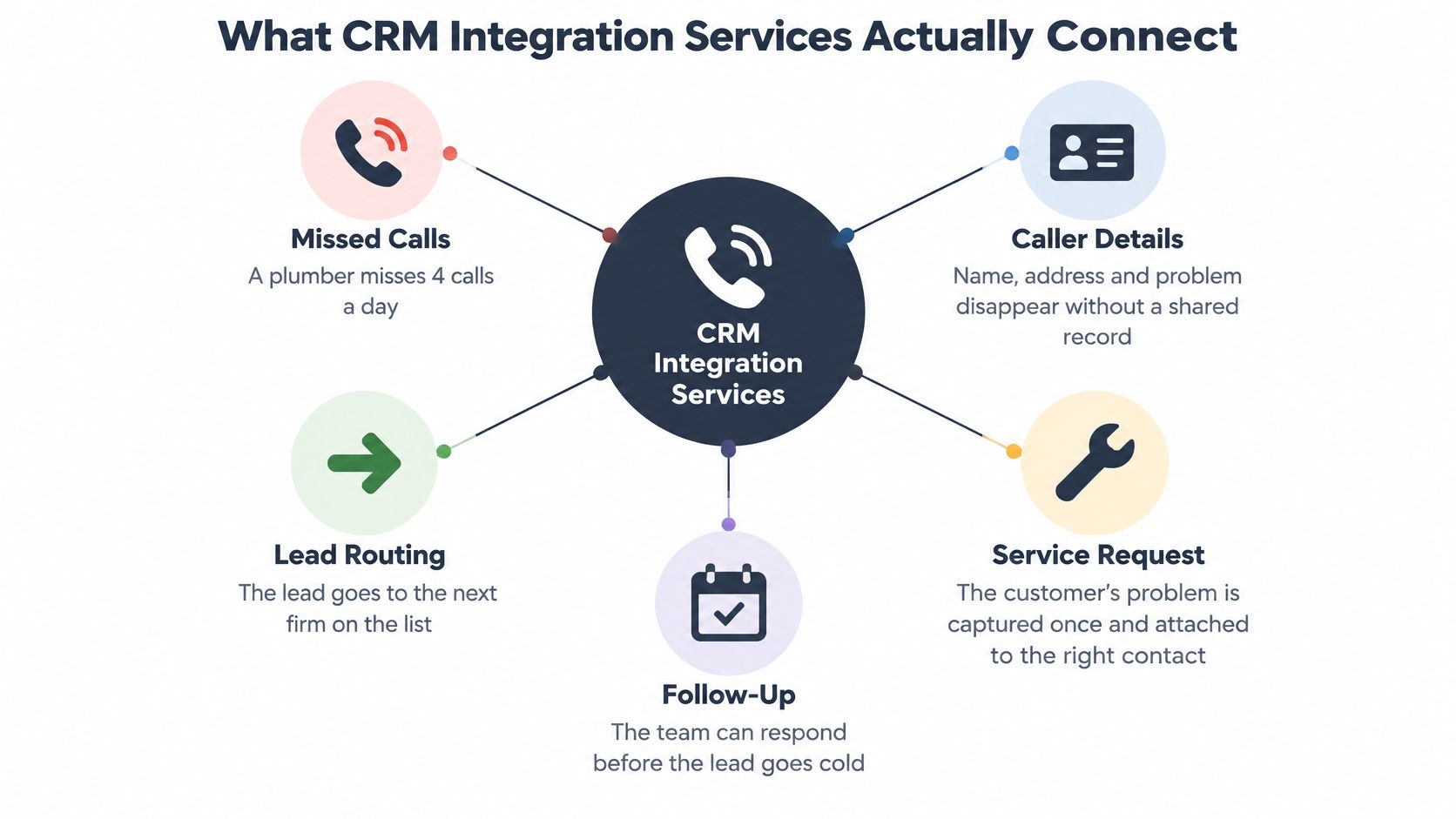
A plumber is on his knees under a kitchen sink at two in the afternoon when the phone goes. Then again ten minutes later, and twice more before five. Four homeowners, four problems, four sets of details that end up as voicemail files nobody plays until the evening. Two of them have already rung the next name on their list.
That isn't a marketing failure or a pricing problem. It's a filing problem. The calls arrived, the information existed, and nothing put it where someone could act on it. CRM integration services exist to fix exactly that: they connect the customer record to the phone, the calendar, the inbox and the invoicing tool, so a call becomes a record instead of a memory.
This is about doing that work in a business with no IT department, and about the part most vendors skip. The build is the easy half. What happens in month four, when nobody is watching the connection, is where the money goes.
What CRM Integration Services Actually Connect
A CRM integration is a set of rules for moving selected customer data between systems. A phone call can create a customer record, a calendar can return a confirmed appointment, and an accounting tool can update an invoice status. The practical question is not how many systems you can connect, but which fields need to move and in which direction.
A secondary industry summary of Gartner market data reports global CRM software revenue of approximately $48.2 billion in 2018, up from about $14 billion in 2010, an increase of roughly 244% over eight years, with 15.6% growth during 2018 alone. That investment creates ongoing work beyond installing a CRM: businesses must decide how records, appointments and payment information connect to the tools they already use.
For a small service firm, a useful starting map is the data each system sends and receives.
| System | Data sent to the CRM | Data sent back |
|---|---|---|
| Phone or AI receptionist | Caller name, number, reason for call, call summary | Callback tasks, call outcome |
| Calendar (Google Calendar, Microsoft 365) | Booked appointment time, service type | Availability, reschedules |
| Industry scheduling tool | Appointment type, assigned staff member | Confirmed slot |
| Customer correspondence, quotes sent | Templates, follow-up reminders | |
| Accounting | Invoice status, payment received | Customer balance, overdue flags |
| Marketing platform | Lead source, consent status | Campaign segment, opt-outs |
The phone connection is often the most visible. Caller details, the reason for the call and a summary can be added to the CRM, while a callback task or call outcome can return to the business workflow. A narrow sync is usually easier to maintain than copying every available field. Send only what staff need to follow up, and avoid creating duplicate or incomplete records when caller details are missing.
Accounting data needs clear ownership. Invoice status and payment received can update the customer record, while balances and overdue flags can inform staff. If two systems can edit the same field, decide which one is authoritative before connecting them. Otherwise, a later update may overwrite the value staff rely on.
Not every enquiry starts with a phone call. Businesses that quote for home visits also need a route from first contact to a scheduled appointment. This guide to turning blinds enquiries into booked jobs follows that process.
Treat the connection as ongoing operating work, not a one-time setup. A changed field name, a new booking step or a staff member updating information in the wrong system can interrupt the flow. Without IT staff, keeping the sync narrow makes it easier to check what moved and spot what stopped.
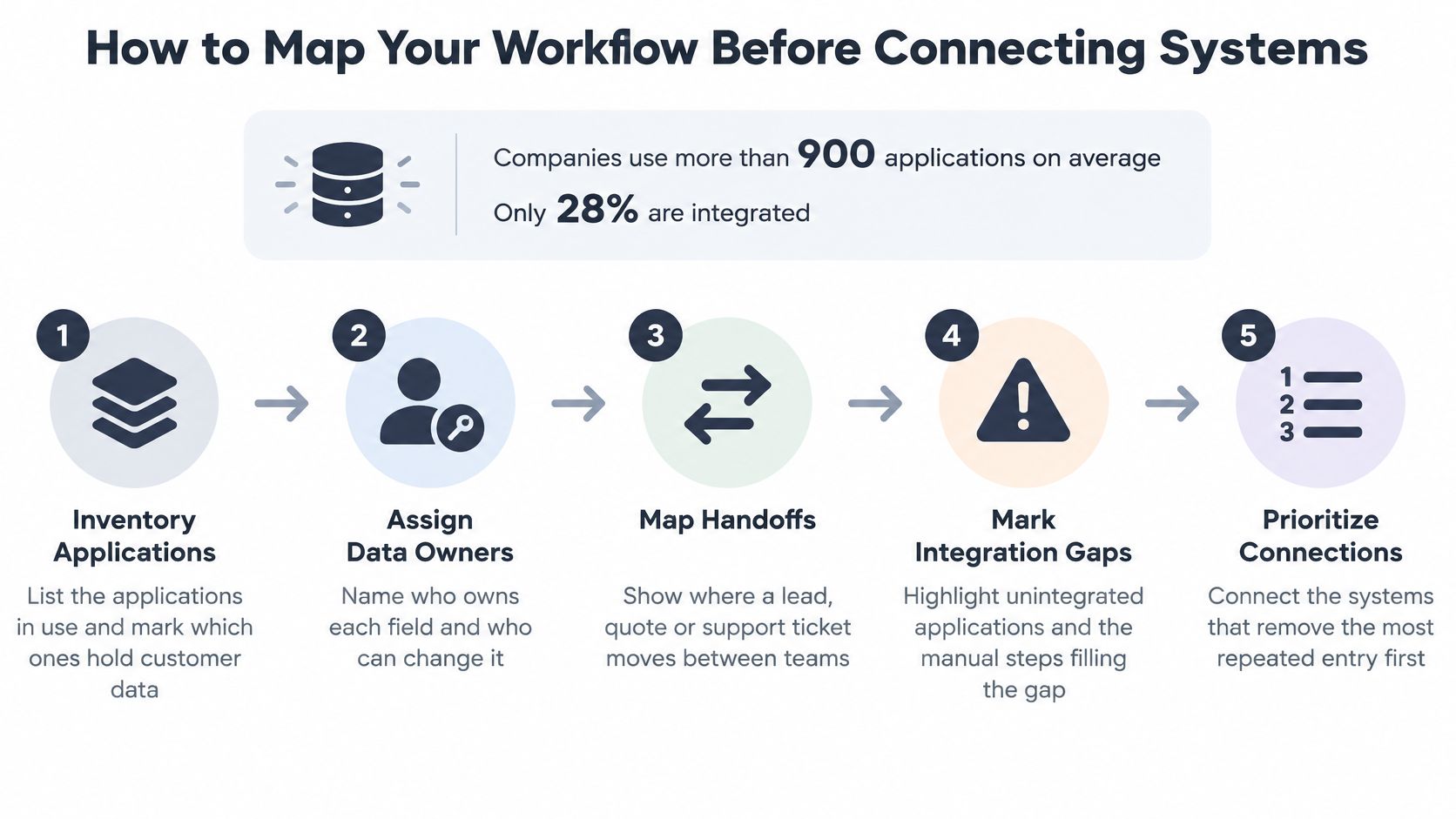
Start by listing the tools used in a normal working day, then mark which ones hold customer details. For each connection, specify the fields required, the direction they should move and the system that owns each value. Leave out data that has no clear use.
Who Needs Integration and How Much Work It Takes
Scope follows size and call volume, not ambition. A sole electrician needs a booking and a call summary to land on one record. A four-branch dental group needs field mapping, permissions and somebody watching the sync log every week. Too little scope and staff still retype everything. Too much and you pay for governance nobody uses.
Adoption numbers support the sizing argument. Eurostat-based CRM adoption figures report that in 2025, 28.5% of European Union enterprises with at least 10 employees used CRM software. The split by headcount is the useful part: 24.7% of firms with 10 to 49 employees, 43.8% of firms with 50 to 249, and 65.4% of enterprises with 250 or more. That's a 40.7 percentage point gap between smallest and largest, and large enterprises were about 2.6 times as likely as small firms to run a CRM at all.
Read that as permission to start where you are, because nearly one in four small EU firms was already running one. Complexity climbs with departments, data volume and the number of systems that must agree on the same customer.
Match your profile to a starting scope
| Business profile | Systems to connect first | Integration depth | Typical example |
|---|---|---|---|
| Sole tradesperson or freelancer | Phone, calendar, invoicing tool | Light: bookings and call summaries sync one way | Electrician booking call-out visits from a missed call |
| Small team of 10-49 staff | Phone, calendar, CRM, email | Standard: contact and booking fields sync both ways | Dental practice with two receptionists |
| Medium firm of 50-249 staff | Telephony, CRM, helpdesk, accounting | Full: custom field mapping, permissions and monitoring | Multi-location law firm sharing matter records |
| Large organization of 250+ staff | Full stack including data warehouse | Complex: dedicated team and formal governance | Regional insurer syncing claims, policies and a data warehouse |
Five questions set your score. How many calls and bookings arrive in a week. Which system is the source of truth for contact details. Who reads the data every day. Which privacy rules apply to the content of a call. How many hours a month one person can spend keeping the connection healthy.
Low answers across the board point at the first row. A mix points at the second. High call volume spread across departments points at the third, and only a business with a dedicated IT lead should aim at the fourth. Where a calendar or scheduling tool falls outside the standard connectors, custom calendar and tool integrations are available as an add-on for an extra fee on the Professional and Scale plans.
Practical rule: choose the row that matches your busiest month, not your plan for next year. Adding a field later takes an afternoon. Unpicking a sync that has spent six months writing junk into the record takes a fortnight of cleanup.
Choosing a Connection Method and Its Cost
Three routes connect systems, and they differ mainly in who owns the upkeep.
- Native connectors ship inside the CRM or the phone assistant. No code, maintained by the vendor, usually included in the plan. This is the right default for a sole trader or a team of up to 49 staff. The first check is boring: confirm your calendar, Google Calendar or Microsoft 365, and your CRM both appear on the supported list before you assume the connection can be switched on.
- Middleware links apps through prebuilt templates. It suits a business running three or more tools the vendor doesn't connect directly, and it costs a monthly fee per connection plus one more login, one more set of credentials and one more place where a token expires without telling anyone.
- A custom build earns its place when the field logic is unusual or the firm must route regulated data under its own controls. Budget for maintenance after every CRM update, not just for the build. Teams that need something bespoke, which is often the case with integration work for NGOs and startups, usually need it because the data model is unusual rather than because a connector is missing.
Security applies to all three routes. NIST's guidance on securing APIs recommends risk-based controls across pre-runtime and runtime stages: inventory the APIs, classify sensitive fields such as personally identifiable information, encrypt runtime communication, and use cryptographically verifiable credentials with regular rotation. Keep service authorization separate from end-user authorization, so an integration account can create a lead without holding the keys to the whole CRM.
Four questions before you sign with anyone:
- Which fields sync by default, and can that list be cut down?
- Are the credentials narrowly scoped, or does the connection arrive with admin rights?
- How are rate limits and retries handled during a busy Monday morning?
- What does a deletion request trigger across every connected system?
The setup fee is the visible number. The monthly upkeep hours are the actual cost, so price them in from day one rather than discovering them in month three.
How to Map Your Workflow Before Connecting Systems
Connecting first and mapping later is how businesses end up with a CRM full of half-filled records. In 2024, companies were reported to use more than 900 applications on average, while only 28% of those applications were integrated, according to Workato data cited by Contentmation. That gap isn't laziness. It's the absence of a decision about what should move and what should stay where it is.
- Log every touchpoint for one week. Write down each inbound and outbound contact, including missed calls, after-hours messages and website enquiries. The common slip is logging only the contacts that get answered, which hides the leak you're trying to fix.
- Name the system of record for each data type. The calendar owns time slots. The CRM owns contact details and status. The slip is letting two systems own the same field and then guessing which one is right.
- Define the trigger event for each sync. A new call, a confirmed booking, a paid invoice. Triggers are where most integration design goes wrong, and it's the same discipline as workflow optimization, which strips out unnecessary steps before automating whatever remains.
- Choose the fields that must move. Name, number, reason for calling, urgency, appointment time. Drop the rest. The slip is "sync everything", which fills the record with noise and slows every write.
- Set direction and frequency. One way for call summaries, two ways for bookings that staff change by hand. The slip is turning on two-way sync for a field nobody maintains.
- Decide the failure rule. What happens when a write fails, who gets alerted, and whether the call data waits in a queue or gets dropped. The slip is assuming a green screen means a successful write.
- Test with 20 real records. Run actual calls and bookings through the connection and check for duplicates and blanks before going live. The slip is testing with the one example record the vendor supplied.
Finish with a one-page map the whole team can read in five minutes: systems, owners, fields, direction, triggers, failure rules. Tape it inside a cupboard door if that's what it takes to keep it findable.
Booking and Intake Workflows in Practice
A booking workflow is useful only when the caller's request reaches the right calendar and the business has enough context to act. The assistant can read real availability and book an estimate or service call during the conversation. The CRM can then hold the contact details and follow-up status, while the calendar remains the record of the appointment. For the setup steps and supported calendar connection, see this guide to calendar integration for appointment booking.
For example, a caller reporting a leak gives their name, address and a description of the problem. The assistant books an available estimate in the business's calendar, and the team receives a structured summary of what was requested and promised. A narrower connection that passes only the details needed for follow-up is often easier to maintain than syncing every field across systems.
A practice can use the same pattern for rescheduling. The assistant books into the practice's calendar, and the business receives the call outcome and summary in the language it configured. Staff can see the change and decide whether any further action is needed.
For a law firm, intake can collect a name, matter type and contact details, then flag the enquiry for a solicitor to review. The assistant records information; the solicitor provides advice and handles decisions that require professional judgement.
Where the line sits: the assistant handles repetitive intake. People handle complaints, distress, money disputes and anything needing judgement or a professional opinion.
Connected records help staff act without re-entering call details. Salesforce's 2025 State of Service research found organizations with unified service-channel data were 1.4 times more likely to describe their AI implementation as "very successful" than organizations with siloed data. It also found that 44% of service leaders with AI said technology silos had delayed or limited their initiatives.
For a small team, the practical goal is to let AI carry routine execution while people keep judgement. Microsoft's reporting on AI adoption in small and medium businesses found 58% of AI users said they were already producing work they couldn't have done a year earlier, and 66% said AI let them spend more time on higher-value work as it took on execution tasks.
What to track in the first month
- Completed bookings. Check that the calendar connection reads availability and records appointments.
- Qualified leads. Count calls that produce enough detail for staff to act.
- Escalation rate. Track calls passed to a person and whether the handoff was appropriate.
- Response time. Measure the time from the call ending to a record or callback task appearing.
rednea books directly into the business's calendar, including Google Calendar, Microsoft 365 and industry-specific software. After each call, the business receives a structured email summary covering who called, what they wanted and what was booked or promised. That gives the person handling follow-up a clear starting record.
Human Handoff and Data Limits Your Integration Needs
Most integration advice assumes more data in the CRM is better. In practice the stronger design is often narrower: sync the fields needed for follow-up and leave the rest where it sits.

Handoff comes first, because an assistant with no exit route damages trust faster than a missed call. A European Parliament briefing on the proposed EU AI Act004090_EN.pdf) states that people interacting with chatbots should be told they're interacting with an AI system unless that's obvious, and that if a chatbot can't solve a problem, consumers should be able to contact the trader by mail, telephone or email. It also says chatbots should be offered only as auxiliary services, useful when they let consumers reach the trader quickly and communicate efficiently.
Three rules follow. Identify the assistant at the start of the call. Give a clear route to a person. Pass the conversation and its captured context across so the caller doesn't repeat themselves.
Then write the triggers down, because a policy nobody wrote is a policy nobody follows:
- The caller asks for a person. Hand over without a debate.
- Distress or urgency. A suspected gas leak, a flooded kitchen, someone who sounds frightened.
- A disputed charge. Money conversations belong to the person who can adjust the invoice.
- A request for regulated advice. Legal, clinical, financial.
- An answer the system can't interpret with confidence. Uncertainty is a handoff signal, not a reason to guess.
A tight lead qualification process sets those boundaries in advance, so the assistant isn't deciding mid-call whether a question counts as legal advice.
The design test: if you can't name who reads a field and what they do with it, that field doesn't belong in the sync.
On data, the discipline is subtraction. A 2025 academic framework for AI-CRM integration emphasises determining which customer data is necessary and accessible, establishing data governance across the integration lifecycle, and centralising only structured, usable information. In practice: sync the summary rather than the raw recording where you can, set a retention period, and confirm a deletion request can be carried out in every connected system rather than just the CRM.
We process call data on your instructions and offer configurable retention, so a business can honour a deletion request without rebuilding the integration.
Three questions to settle before go-live. Which data should never sync. How long call summaries are kept. Who signs off a deletion request. Write the answers down, because they're the first thing an auditor or a new office manager will ask for.
Keeping Integrations Reliable After Launch
A CRM connection can fail without an obvious alert. Leads stop arriving, while enquiries collect in a queue that nobody checks. For businesses without IT staff, reliability depends on simple routines: assign an owner, watch a few useful signals, and know how to fall back to manual intake.
A 2025 State of Martech Implementation report found 31% of marketing-technology implementations failed or produced neutral results. The report identified post-implementation monitoring as a prominent factor for 72% of respondents and training for 66%. These findings make the work after launch part of the integration, not an optional cleanup task.
Name one owner who can check whether records are arriving and match the source. For a small business, that person does not need to manage every technical detail. They do need to know where to find the sync status and whom to contact when something stops working.
The numbers to watch
Track sync success, retry delay, duplicate records, and the time between a call ending and its CRM record appearing. Microsoft's guidance on API throttling explains how clients should handle HTTP 429 responses: honour the Retry-After header, apply bounded retries, and avoid bursts of requests. Limits may apply per user or service principal, so a connection that works during a quiet period can still fail under heavier use.
A reliable setup queues events such as a new caller, qualified lead, or appointment booking, then retries failed requests with exponential backoff and jitter. An idempotency key based on the call or appointment ID helps ensure that a retry updates the same event rather than creating a duplicate.
| Signal | Likely cause | Fix |
|---|---|---|
| Missing leads from the last few days | Connection token expired or revoked | Re-authorize with a narrowly scoped account and set an expiry alert |
| Duplicate contacts appearing | A retry wrote the same record twice | Attach an idempotency key based on the call or booking ID and set a matching rule |
| Bookings in the calendar but not the CRM | Write failed or was rate limited | Check the retry queue for rate-limit errors and reconcile daily |
| Call summaries arriving late | Sync lag or a growing retry backlog | Set a maximum lag alert and check the queue each week |
| Fields blank or misaligned | Field mapping changed after a CRM update | Audit the mapping after every CRM update and keep a mapping document |
| Staff stop trusting the record | Too many fields or stale data | Remove fields staff do not use and assign an owner to each synced field |
For a business without dedicated technical support, a narrower sync is often easier to maintain. Move only the fields staff need for their next action, and review those mappings after CRM changes. More data can create more places for a mismatch to go unnoticed.
Review escalated calls as well. This analysis of AI disclosure rules discusses keeping records of what an automated system did and concluded, what the human agent saw, and what the agent changed. Sample a few escalated calls regularly and adjust routing if the same failure keeps recurring.
Include access control in the review. Apply customer data protection practices to integration logs, not just the CRM, and limit access to the people who need it.
Finally, rehearse the rollback. Know how to switch off the connection and return to manual intake within the hour, before a busy period makes a failure harder to manage.
Confirm Your Integration Scope Before You Commit
Before committing to an integration, decide what it must do on a busy day. Keep the first version narrow: one workflow, a named owner and only the fields staff need to act. A smaller sync is easier to check and less likely to create duplicate or stale records.
Set the handoff rules in writing, including which calls need a person to make a judgement. Then pilot one workflow, such as missed-call recovery or appointment booking. If your calendar and CRM already have standard connectors, start there; treat custom integration work as a separate cost decision.
During the pilot, use the four measures already defined for the workflow to judge whether it is working. Check whether records arrive in the right place, staff can follow up, and exceptions reach the right person. When something fails, adjust the fields or handoff rules before expanding the connection. Integration needs ongoing ownership, not just a successful launch.
rednea can be one option for the call-intake part of that workflow. Its AI phone assistant answers calls around the clock, books appointments into connected calendars such as Google Calendar or Microsoft 365, and sends a structured summary by email. The business configures the assistant through a no-code dashboard, while custom calendar and tool integrations are available as an add-on on the Professional and Scale plans.
Choose one workflow to map, and write down the fields, owner and handoff rules on a single page. Keep the pilot focused; expand only when the connection supports staff without adding records or work they do not need. Visit rednea to see whether its phone assistant fits your intake workflow.
Try rednea, no strings attached
AI phone assistant for business. Hear a live demo in your browser, book a call with our team, or get started — from £90/month, cancel monthly, no minimum term.
GDPR-compliant · EU & UK GDPR · Multilingual