Workflow Optimization for SMBs: A Practical Guide

The phone rings while you're under a sink, driving between jobs, or helping the customer already standing in front of you. You let it go to voicemail, plan to call back later, then discover that the caller has already contacted someone else. Meanwhile, the details you did capture sit in a notebook, the calendar lives elsewhere, and follow-up depends on memory.
That isn't a motivation problem. It's a workflow problem. For a small or medium-sized business, workflow optimization means removing the points where customer requests stall, information gets retyped, and human attention is wasted on work that a reliable system can handle. You don't need an enterprise software program to start. You need a clear view of where work breaks and a practical way to protect the next customer interaction.
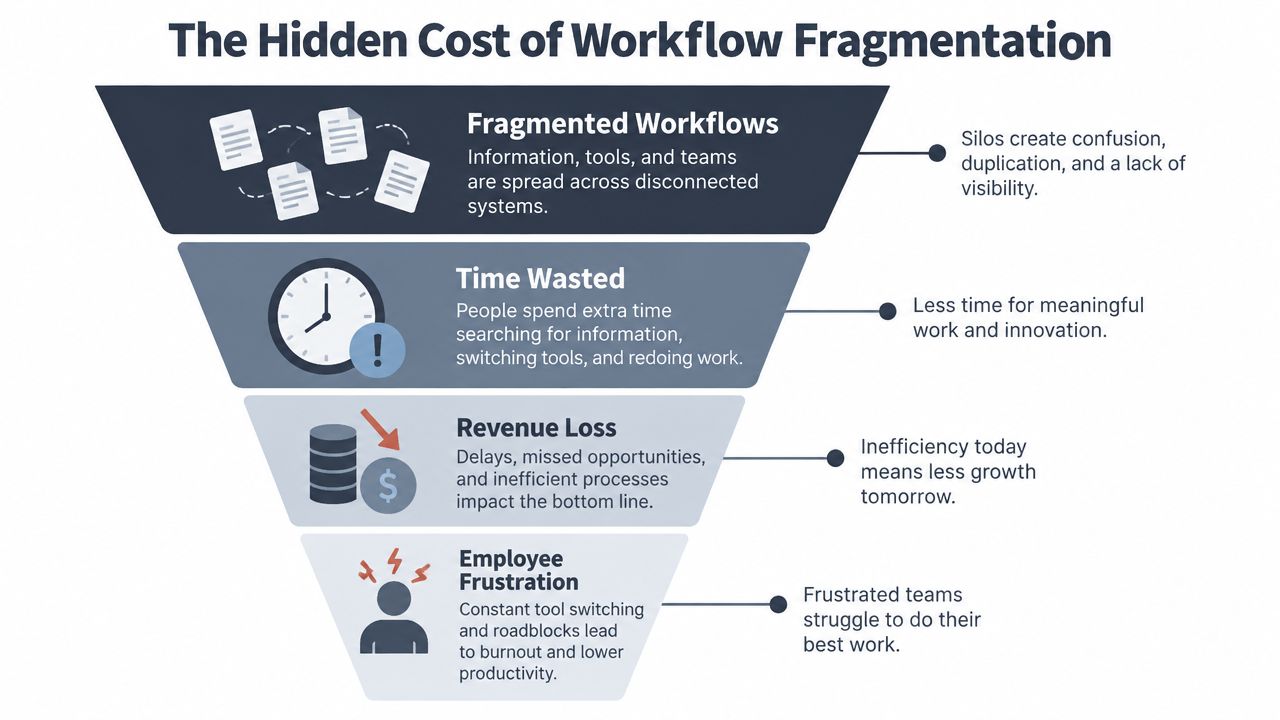
The Hidden Cost of Workflow Fragmentation
Many owners assume workflow optimization belongs to large companies with dedicated operations teams. In practice, a fragmented workflow hurts a small business faster because fewer people share the workload. When one person is answering calls, scheduling jobs, quoting work, and delivering the service, every interruption carries an operational and commercial cost.
A lead might arrive by phone, remain in voicemail, get copied into a notebook, and eventually appear on a calendar. Each transfer creates another opportunity for missing information, delayed response, or double booking. The customer only sees the outcome, not the internal effort. If nobody responds promptly, the customer experiences silence.
Start with the leak, not the software
Workflow optimization doesn't require a complex technology project. It can begin with one manual handoff, such as moving a caller's request from voicemail into a shared calendar. Remove that handoff, or make it structured and visible, and you've already improved the process.
The scale of adoption shows why this matters. At least one business function is automated in 31% of organizations, while 66% of businesses automate across multiple functions and 76% use automation to standardize daily workflows, according to Formstack's summary of workflow automation statistics. The same summary reports McKinsey's estimate that roughly 50% of work activities can be automated, and that 60% of employees could save about 30% of their time through workflow automation.
Those figures don't mean you should automate everything. They show that standardizing routine work is now a broad management practice, not an enterprise-only luxury. A smaller company can apply the same principle at a narrower scale, starting with the customer-facing activity that loses the most opportunities.
Practical rule: Don't automate a messy process just because you can. First remove unnecessary handoffs, then automate the parts that remain predictable.
The commercial question is simple: where does a customer get stuck? If the answer is “between the missed call and the callback,” that's where your first improvement belongs. A cost-effective approach to business automation should buy back attention without forcing the owner to redesign the entire company.
Auditing Your Current Operations for Bottlenecks
Before choosing an AI assistant or changing your software, observe the workflow you run. Documented procedures often describe the ideal process. The customer encounters the actual process, including interruptions, forgotten callbacks, unclear ownership, and incomplete information.
Start with a short audit over several working days. Don't aim for a perfect operational map. Capture enough evidence to identify where requests wait or disappear.
Trace one customer request from start to finish
Pick a common enquiry, such as a request for an electrical repair, a dental appointment, a property valuation, or a legal consultation. Write down every step from the first contact to the confirmed next action:
1. Record the entry point. Note whether the enquiry arrives by phone, web form, email, or another channel. 2. Identify the first owner. Who sees it first, and what happens if that person is busy? 3. List every handoff. Include voicemail, notes, internal messages, calendar entries, and CRM updates. 4. Mark waiting points. Record where the customer waits for a reply, quote, appointment, or decision. 5. Define the outcome. Decide what counts as resolved, booked, qualified, escalated, or closed.
Phone calls deserve special attention in field-service businesses. Someone on a job site can't safely stop to collect every detail, and a receptionist may not know which enquiries are urgent. A voicemail system records a message, but it doesn't necessarily qualify the lead, check availability, or route the request to the right person.
Find the leak points
Look for signs rather than opinions. Repeated callbacks, incomplete names, missing addresses, duplicate calendar entries, and customers asking whether anyone received their message all point to process friction. Ask staff which tasks interrupt them most often and which details they have to enter more than once.
Measurement discipline matters here. Process-improvement guidance on common failure points warns that initiatives often begin with remembered or documented workflows instead of day-to-day reality. The same guidance identifies weak frontline engagement, unclear objectives, poor change management, and insufficient training as recurring problems, with one cited estimate putting failure to consistently meet objectives at nearly 60%.
Set a baseline before making changes. Track missed calls, time to first response, abandoned enquiries, booking errors, and the proportion of calls that require staff intervention. A real-time analytics approach to operational visibility can help, but the principle is more important than the tool. If you can't describe the current bottleneck, you won't know whether the new workflow fixed it.
Why AI Phone Assistants Are the Missing Link
Manual intake and AI-supported intake solve different parts of the same problem. Voicemail gives you a message to process later. An AI phone assistant can answer immediately, collect structured information, handle routine questions, and pass exceptions to a person.
That distinction matters for interruption-heavy businesses. A plumber on a callout, a dentist with a patient, or a solo lawyer in a consultation can't provide constant availability. The business still needs a front desk that can capture intent without pretending every enquiry is simple.

Routine work belongs in the triage layer
A useful AI phone workflow handles the first layer of conversation:
- Capture the basics. It can ask for the caller's name, contact details, location, reason for calling, and preferred timing.
- Answer predictable questions. Opening hours, service areas, appointment requirements, and general process questions don't always need a staff member.
- Check availability. If connected to the right calendar, the assistant can offer suitable times rather than creating another callback.
- Escalate exceptions. Urgent, sensitive, complex, or high-value calls should reach a person or follow a defined escalation path.
This is complementarity, not replacement. A Harvard Business School study found that AI helped human customer-service agents respond to chats about 20% faster, with the largest gains for less experienced agents. The study also found improvements in empathy and thoroughness, supporting the view that AI can help people perform better rather than merely removing them from the process. You can read the findings in Harvard Business School's analysis of AI and human customer service.
The human still owns judgment. A customer describing a safety issue, a distressed patient, or a complicated legal matter needs careful handling. The assistant's job is to recognize the situation, collect useful context, and make the handoff cleaner.
A hybrid model protects the customer experience
Pure automation is attractive because it appears simple. It also creates a hard boundary when the system reaches a question it can't handle. A hybrid workflow is more flexible. AI manages routine contact and triage, while people take over when empathy, discretion, negotiation, or professional judgment matters.
Industry coverage citing a multilingual customer-service analysis reports 74% customer satisfaction for pure AI chatbot interactions versus 89% for hybrid models. The same source says the hybrid approach can reduce cost per interaction by 55% to 65% and reduce routine handling time from 12 minutes to under 2 minutes. These figures appear in coverage of AI answering services and hybrid customer support, but the operational lesson is broader: customers don't need a human for every first step, yet they want access to one when the situation requires it.
For multilingual businesses, language detection makes the first exchange more natural. A phone assistant that can converse in English, Spanish, French, German, or Italian can reduce the need for staff to identify the language, find a suitable colleague, and restart the conversation. That's especially valuable when the alternative is a missed call.
Designing and Integrating Your Optimized Workflow
The strongest implementation is usually narrow. Don't begin by asking an AI assistant to run your entire customer operation. Give it a defined responsibility, clear boundaries, and a reliable destination for every captured request.
A practical setup path looks like this.
1. Define the call types
Separate routine enquiries from exceptions. For an electrician, routine calls might involve service areas, appointment requests, and basic job descriptions. An urgent outage, safety concern, or complaint belongs in an escalation path.
Write the rules in plain language:
- Bookable: The caller wants an appointment and provides the information needed to schedule it.
- Informational: The caller needs a standard answer that doesn't require professional judgment.
- Qualified lead: The caller has a relevant project, location, budget context, or timing that staff should review.
- Urgent or sensitive: The call needs immediate human attention or special handling.
This classification prevents a common mistake, which is treating every call as equally automatable.
2. Connect the systems you already use
The assistant should write information into the workflow your team already understands. Connect it to a shared calendar, an existing CRM, an industry scheduling system, or another central record. The point isn't to create another inbox. It's to ensure that the next person can see what happened without asking the customer to repeat it.
For calendar bookings, require live availability checks and confirmation messages. The workflow should avoid double bookings, record the caller's details, and send an email or optional SMS summary when appropriate. If your team needs to review a lead before scheduling, route the structured enquiry to the correct person instead.
3. Test language and exception handling
Multilingual support isn't just a list of available languages. Test whether the assistant detects the caller's language, keeps the conversation understandable, and switches to a person when vocabulary or intent becomes uncertain. Run test calls for accents, background noise, interruptions, and incomplete answers.
The same principle applies to escalation. Specify who receives an urgent call, what happens outside working hours, and how staff see the summary. A neutral research summary on frontline service interaction supports switching control between AI and humans according to the situation, with people taking over when judgment, empathy, or exception handling is needed. The research summary on complementary AI and human intelligence reflects that operating model.
4. Choose operational fit over feature volume
Check privacy, data retention, language support, calendar and CRM integrations, call routing, summaries, reporting, and the ability to delete data when required. For businesses serving customers in Europe or the United Kingdom, GDPR obligations should be part of the selection criteria, not an afterthought.
An option such as rednea can answer calls, detect the caller's language, book appointments, qualify enquiries, answer routine questions, and escalate important calls. It connects with calendars, scheduling tools, and CRMs, then sends concise summaries for follow-up. The right choice is the one that fits your actual call flow and reduces work rather than adding another screen to monitor.
Tracking KPIs and Measuring Real ROI
Workflow optimization becomes credible when you can show what changed. Small businesses don't need a large analytics department. They need a short list of measures tied to customer access, staff time, and completed commercial outcomes.
Start with two operational indicators.
Missed call rate
Count calls that arrive when nobody answers and compare them with calls that receive an immediate response or a defined follow-up. Don't treat every missed call as a lost sale, but do look for patterns by time of day, day of week, staff availability, and campaign activity.
A lower missed call rate is useful only if the replacement experience works. An answered call that produces no usable customer information moves the leak. Review whether the caller's intent, contact details, urgency, and next action reach the right person.
Response time
Measure the time from the initial enquiry to a meaningful next step. That might be an appointment confirmation, a qualified lead summary, a human callback, or an escalation. “We replied eventually” isn't a useful operational standard if the customer needed an answer while choosing between providers.
Track response time separately for routine questions, bookings, urgent calls, and leads requiring human review. This tells you whether AI is clearing routine work or merely creating a new queue.
Customer experience and commercial outcomes
Satisfaction should be measured by workflow type, not averaged into one flattering number. Industry coverage citing multilingual customer-service analysis reports 74% satisfaction for pure AI interactions and 89% for hybrid interactions, with the hybrid model also associated with a 55% to 65% reduction in cost per interaction and routine handling time falling from 12 minutes to under 2 minutes. Use those figures as context from the cited customer-service analysis, not as a promise about your own business.
Your internal dashboard can remain simple:
| KPI | What it reveals | Action |
|---|---|---|
| Missed call rate | Where access breaks | Add coverage or automated answering |
| Response time | How quickly work moves | Improve routing and escalation |
| Booking completion | Whether enquiries become appointments | Fix calendar or qualification rules |
| Escalation rate | Whether the assistant's boundaries fit | Refine call categories |
| Customer feedback | Whether the experience feels natural | Review transcripts and handoffs |
For a focused reporting setup, call reporting software guidance can help you decide which call outcomes to track. Compare the cost of the system with recovered staff capacity, completed bookings, and opportunities that no longer disappear into voicemail. ROI isn't only a software saving. It can also be the value of making the next customer reachable.
Building a Sustainable Culture of Continuous Improvement
A workflow isn't finished when the assistant goes live. It's finished when the team can see where it fails, correct the rules, and keep the process stable while the business changes.
Review a small sample of calls regularly. Look for unanswered questions, unnecessary escalations, poor summaries, incorrect routing, and moments where callers repeat information. Ask staff whether the handoff gives them enough context to act, then ask customers whether they understood what would happen next.
Stabilize before expanding: A narrow workflow that works reliably is more valuable than a broad workflow that creates uncertainty.
Give one person ownership of improvements, even if that person only reviews the process periodically. Record changes to scripts, escalation rules, appointment types, and frequently asked questions. When a new failure appears, decide whether it needs a rule change, better training, a clearer human handoff, or no action because it's an acceptable exception.
Don't chase full automation as a measure of success. Only 4% of organizations report being fully automated, according to coverage of workflow optimization statistics, so most businesses operate in partial adoption. That's not a weakness. It's where good workflow design matters most, because people still decide which cases need attention.
The best small-business workflow often looks like a dependable front desk: AI answers quickly, captures the facts, handles routine requests, books what it can, and sends the right exceptions to a human. The team gets fewer interruptions, customers get clearer next steps, and the owner can grow without relying on memory to hold the operation together.
You don't need to become a technology specialist. Start with the calls you miss, make the handoff visible, and improve the process from real customer interactions.
---
rednea provides an AI phone assistant for answering calls, detecting languages, handling routine questions, qualifying enquiries, booking appointments, and escalating important conversations to your team. Visit rednea to see how a practical AI front desk can support your customer-service workflow without replacing the human judgment your business depends on.
Try rednea, no strings attached
AI phone assistant for business. Hear a live demo in your browser, book a call with our team, or get started — from £90/month, cancel monthly, no minimum term.
GDPR-compliant · EU & UK GDPR · Multilingual