8 Lead Qualification Tools Compared for SMBs in 2026

You're packing away your tools after an evening job when your phone rings. You can't safely answer, so the caller gets voicemail. By the time you listen, you still don't know whether they need a routine repair, an urgent visit, or work outside your service area. You call back, but they don't answer.
That's a lead qualification problem before it's a sales problem. You need to establish what the customer needs, whether you can help, and what should happen next, without stopping every job to conduct an intake interview.
Speed matters. The historical Lead Response Management study, summarized by Callingly, reported approximately 21 times higher odds of qualifying a lead when contact happened within five minutes rather than thirty minutes. That isn't a promised return from buying software, but it's a strong reason to connect intake with immediate action.
Lead qualification tools can answer routine questions, collect useful details, check basic fit, and arrange the next step. AI is useful for that repetitive work. People still need to handle uncertainty, sensitive conversations, exceptions, and commitments the business hasn't authorized.
Choose by the channel your customers already use, not by the longest feature list. These options cover website chat, customer service, social messaging, CRM workflows, and phone intake.
1. CRM-Connected Website Chat for Lead Qualification
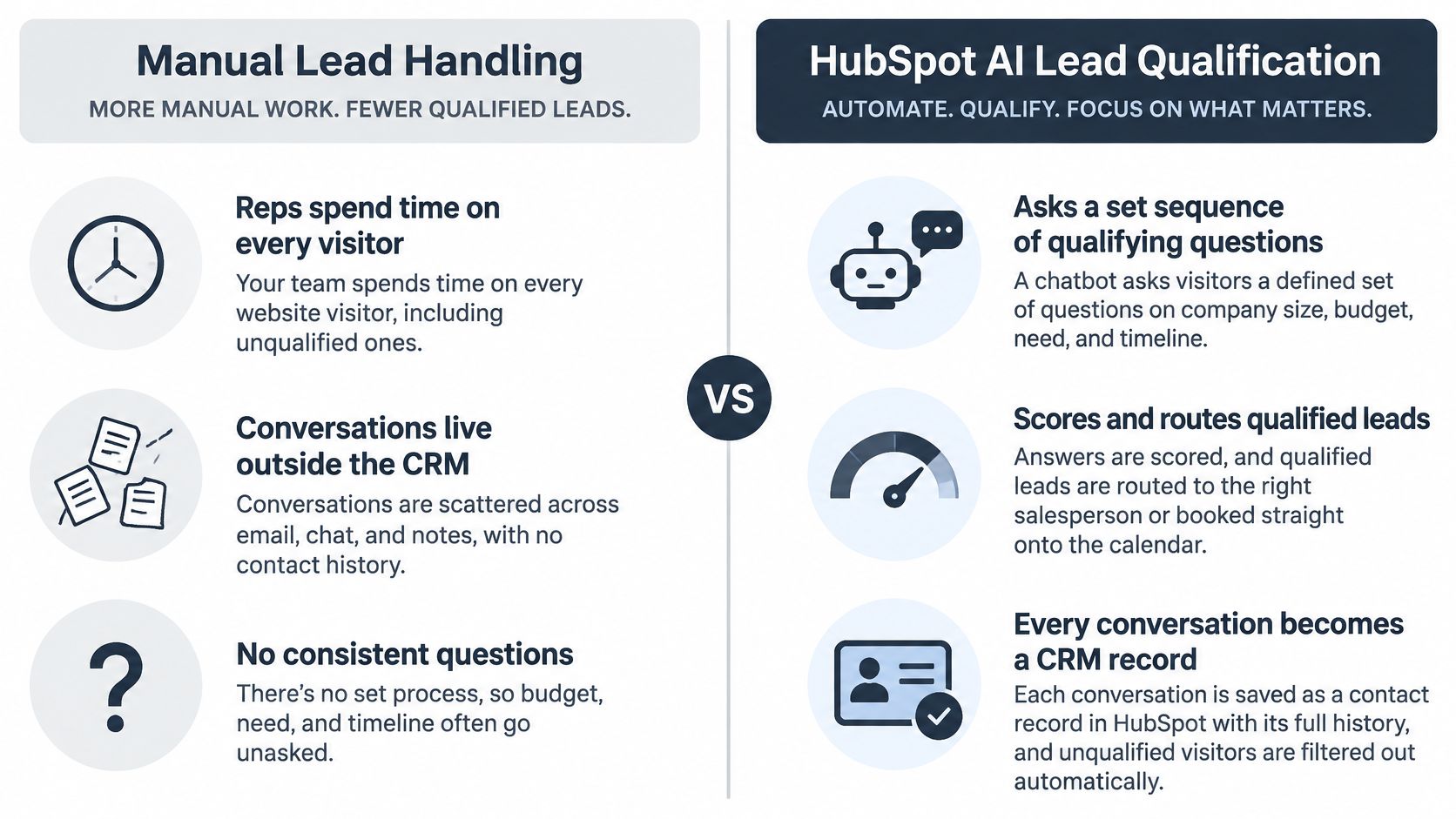
Best fit for website enquiries that need organized sales follow-up. A CRM-connected chatbot asks visitors about their needs, records the answers against a contact, and routes suitable enquiries to a salesperson or booking workflow.
The practical advantage isn't the chat bubble. It's keeping the conversation, qualification fields, appointment, and follow-up task together. A small consultancy doesn't need someone copying chat answers into a separate contact database before deciding whom to call.
Make the answers trigger an action
Say a home-services company receives website enquiries for installations and repairs. The chat asks for the job type and postcode, checks the service area, then offers an appropriate site-visit request. An unusual commercial project goes to the owner instead of receiving an automatic appointment.
Start with a short sequence:
- Need: Ask what the visitor wants done, using customer language rather than internal service codes.
- Timing: Establish whether they're researching, ready to book, or asking about an urgent problem.
- Budget range: Use this when it affects suitability, not as an automatic rejection rule.
Our guide to how to qualify sales leads can help translate those answers into a usable handoff.
The trade-off is configuration discipline. A chatbot that captures answers without creating an assigned task adds another inbox for your team to monitor. Scoring and routing also require explicit rules; don't assume an AI conversation automatically produces a reliable sales decision.
Include a human option, review early transcripts weekly, and test what happens when a visitor gives an incomplete address or refuses to discuss budget.
2. Knowledge-Based AI Chat with Human Handoff
A prospective customer asks whether your service supports their workflow. An existing customer asks a similar question because something isn't working. A knowledge-based AI agent can answer the shared factual question, but the next action should differ.
This category combines approved help content, conversational answers, and a shared inbox. Use structured questions to identify buying intent, while the AI handles routine explanations about services, availability, or standard processes.

Separate answering from qualifying
For an online service business, the assistant might explain onboarding, ask what the customer wants to achieve, and capture their implementation timeframe. A suitable prospect reaches sales with those answers attached. An account-specific billing dispute reaches support instead.
Write plain-language help articles before enabling automated answers. Include exclusions, booking conditions, and the boundary between an indicative price and a confirmed quote.
Practical rule: Let AI explain an approved policy. Let a person decide whether to make an exception.
The main weakness is dependence on your content. If your cancellation rules contradict your booking page, the assistant doesn't have a trustworthy foundation. Assign someone to maintain the material rather than treating deployment as a finished project.
For multilingual enquiries, test complete conversations in the languages customers use. Check whether dates, service names, and handoff summaries remain understandable, not merely whether the greeting sounds fluent.
Measure qualified conversations reaching the right person, alongside automated resolution and customer satisfaction. A bot that closes chats quickly but leaves buying questions unresolved isn't doing useful qualification.
3. Lightweight Live Chat and Visual Qualification Flows
Start here when your website needs basic intake, not a full sales platform. Lightweight live chat tools combine a human inbox with visual conversation flows and, where available, an AI agent grounded in your website content.
They suit small shops and service businesses that need a manageable starting point. The flow can collect contact details and buying intent while the AI answers straightforward questions about products, opening hours, or appointment arrangements.

Keep the first flow narrow
For a boutique, ask which product category interests the shopper and whether they need help choosing or are ready to order. Send a relevant next step rather than giving every visitor the same promotion.
For a clinic, collect a name, preferred appointment time, and a brief administrative reason for the visit. Don't turn appointment intake into automated diagnosis. Reception staff should review sensitive or unclear requests under the practice's procedures.
- Set expectations: Display business hours and explain when a person will reply.
- Offer a clear action: Finish with an appointment request, callback request, or product recommendation.
- Move the record: Connect captured enquiries to your working system rather than leaving them in chat history.
The limitation is usually workflow depth. A simple builder can become difficult to maintain when every service, location, and exception needs another branch. Keep complex decisions with a person instead of creating a maze of buttons.
Our explanation of AI chatbots for customer service covers the distinction between answering routine questions and managing a useful customer interaction.
Before expanding, test the offline experience. A friendly opening followed by silence after contact capture is still an unanswered enquiry.
4. Support-Desk AI Agents for Qualified Customer Conversations
An accountancy practice receives new-client enquiries, document requests, and time-sensitive questions through the same inbox. A support-desk AI agent can collect context and direct each conversation without asking reception staff to classify everything manually.
This is the strongest category when customer service already runs through tickets. Keep prospect intake in that existing workflow, with an identifiable owner and status, rather than creating a disconnected sales channel.

Route by intent without pretending to know everything
Begin with new enquiry, existing customer, and urgent issue as routing categories. Ask enough to distinguish them, then attach the reason for classification to the ticket. A pricing question from a prospect belongs with business development; a disputed invoice from a current customer doesn't.
Security deserves equal attention. In Capterra's sales and marketing software research, 60% of sales and marketing decision-makers considered security critical when evaluating software, while 52% identified effective use of AI features as a major challenge.
Configure the assistant to collect only information needed for the next action. A legal enquiry may need a broad matter type and callback details, not an unrestricted account of confidential events in an opening chat.
The trade-off is administrative overhead. Ticket queues, permissions, tags, and escalation rules need maintenance, which can be excessive for a solo operator.
Use a visible sales-intent tag, but don't mistake tagging for follow-up. Assign a person, define the next action, and review misrouted conversations regularly. Sensitive matters and uncertain urgency should reach staff rather than wait for the AI to become confident.
5. Agent-Assist AI Connected to Support and CRM
Some leads arrive inside the support inbox rather than through a sales channel, and the agents answering them already hold the judgement those conversations need. Agent-assist AI shortens the writing work around that judgement: drafting replies, summarizing threads, and suggesting the qualification question still missing.
A repair business can turn a scattered quote enquiry into a structured draft containing the equipment type, reported fault, location, and preferred visit time. The agent checks the draft, asks about missing information, and decides whether the job needs a technician's assessment.
A usable draft reads like a job card: equipment type, reported fault, location, preferred visit time, and the next step agreed with the customer.
Measure average minutes per reply before and after activation. When that figure barely moves, the tool is summarizing rather than saving time; when it drops while complaint volume stays flat, the setup is earning its cost. The category also suits businesses handling nuanced enquiries, since nothing reaches a customer until a person approves it.
Use a shared qualification standard
Give agents a consistent set of fields to complete before creating an opportunity. Include service need, location, timing, and the agreed next step. Keep a distinction between what the customer said and what the assistant inferred.
For a recruitment agency, candidate questions might stay in support while employer enquiries move into the sales CRM. The assistant can suggest the correct route, but staff should verify whether the person is seeking work or buying recruitment services.
Coverage is where this category stops. The assistant works only while an agent is at the desk: an unattended inbox still sits unanswered, an evening caller still reaches voicemail, and a caller in a language your team doesn't speak still waits for a person. Pair it with an always-on channel if after-hours leads matter to the business.
- Treat suggestions as drafts: Check pricing, dates, exclusions, and promises before sending.
- Track response time: Compare minutes per reply against your pre-activation baseline.
- Preserve context: Transfer the customer's request and agreed action into the CRM.
Choose this category when consistency and staff capacity matter more than fully automated intake.
6. Social Messaging Automation for Lead Qualification
A salon receives a comment asking about appointments. A contractor receives a messaging-app enquiry with photographs but no address. Social messaging tools qualify interest where the customer already started the conversation, instead of forcing an immediate move to a website form.
Useful flows ask a focused question, capture a contact preference, and alert a person when the customer is ready to proceed. Buttons help with clear choices such as service type or preferred day; free text remains necessary for unusual jobs.
Convert interest into a usable appointment request
For a salon, ask which service the customer wants and their preferred availability before offering the booking route. For a tradesperson, request the job location, a short description, and relevant photographs before arranging a callback.
Photos can help staff prepare, but they aren't a substitute for technical assessment. Don't let the assistant promise a fixed repair price based on an ambiguous image.
- Use channel-specific permissions: Check the messaging platform's current automation and promotional rules before launch.
- Keep a human exit: Move complaints, emotional messages, and unusual requests to staff.
- Record the source: Preserve which conversation produced the enquiry so follow-up has context.
The trade-off is dependence on platform rules and customer attention. Someone who comments on a post hasn't necessarily agreed to a sales conversation. Ask for the next step rather than treating every engagement as a qualified opportunity.
For multilingual messaging, test how the flow handles a customer switching languages midway through. If the automation can't interpret the request reliably, capture a callback preference and hand it over.
Social messaging works best as short intake followed by a clear action. Long branching interviews are a poor fit for someone sending brief replies between other tasks.
7. Hybrid AI Receptionist with Human Backup
Phone qualification needs a different standard from website chat. Callers can be distressed, distracted, or unsure how to describe the problem. A hybrid receptionist model uses AI for routine intake and human receptionists for conversations that need more judgment.
A small law firm could collect the caller's broad matter type, location, contact details, and timing before routing the enquiry. Staff or an attorney must handle legal advice, eligibility decisions, conflicts, and sensitive exceptions.
The reachability issue is substantial: LeadDuo's reporting of CallRail figures cites missed-call rates of 14% for home services and 28% for legal businesses. Those sector figures aren't a forecast for your business, but they make call handling worth examining before adding more elaborate lead scoring.
Define what human backup actually does
A useful handoff includes the caller's request, captured answers, and the reason for escalation. Without that context, the customer has to repeat the intake conversation.
Handoff standard: Tell the person receiving the call what needs a decision, not just that a lead is waiting.
Write intake questions in the words callers use. An estate agency might ask about property type, buying or renting, budget range, and viewing availability. A caller challenging a previous promise should reach a person rather than restart a qualification script.
The trade-off is operational coordination. You need clear responsibilities for AI, reception staff, and your own team, particularly when nobody authorized to decide is available.
Our guide to a small-business phone answering service explains the intake and routing decisions to settle before forwarding calls. Review summaries weekly and distinguish routine callbacks from urgent transfers.
8. rednea AI Phone Assistant for Lead Qualification
For a tradesperson working on-site, the phone is often the qualification channel that matters most. Our assistant answers calls around the clock, collects the request, books appointments, and routes important enquiries according to your rules.
It detects the caller's language and converses in English, Spanish, French, German, or Italian. That provides practical multilingual coverage, but it shouldn't be confused with support for every language or permission to automate every kind of decision.
Start with the calls you currently miss
Say an electrician receives an evening enquiry about a planned installation. The assistant captures the job type and service address, checks the configured service area, and books an appropriate visit into Google Calendar or Microsoft 365. The owner receives a structured summary with the outcome and next steps.
For a dental practice, keep the routine workflow administrative. Appointment requests can be handled automatically; urgent symptoms should reach staff under the practice's escalation procedures, not receive an AI diagnosis.
- Prepare the intake: Configure services, job durations, service area, approved pricing information, and everyday questions.
- Set the escalation boundary: Specify which urgent or important calls reach the right person immediately.
- Keep your existing number: Set up call forwarding rather than making customers learn a new number.
Our summaries and transcripts are available in the dashboard, with outcomes also sent by email. We process call data on the business's instructions and offer configurable retention so deletion requests can be carried out.
The limitation is the same as any structured intake system: unclear business rules create unclear outcomes. Begin with after-hours coverage, review the summaries, and expand once routing is dependable. Use lead scoring automation to prioritize captured enquiries without letting a score override an urgent human concern.
Lead qualification tools compared by channel, best fit and handoff
The useful comparison starts with the channel where a lead first arrives, not the feature list. Read the handoff column to see what a person still owns once the automation finishes.
| Channel | Where leads arrive | Best for | Human handoff | Main limitation |
|---|---|---|---|---|
| CRM-connected website chat | Website chat | Teams already running a CRM that want qualification and meeting booking written to one record | Visitors can request a person; qualified chats create CRM entries | Deeper automation and AI features sit on higher-priced plans |
| Knowledge-based AI chat with human handoff | Website and in-app chat, email | Teams combining lead qualification with customer support from one knowledge base | Built-in handoff passes the conversation across with context | Answers depend on an up-to-date knowledge base, and pricing can rise with resolved conversations |
| Lightweight live chat and visual qualification flows | Website chat and messaging | Small businesses wanting quick setup and basic lead capture | Live chat handoff to agents | Limited CRM-style lead management |
| Support-desk AI agents | Email, chat, messaging and voice | Service teams routing sales and support enquiries through one desk | Queue-based routing to specific teams | Setup can be complex and costly for very small teams |
| Agent-assist AI connected to support and CRM | Chat, email and social | Teams combining support, agent assistance and lead tracking | Agents handle the conversation with AI assistance alongside | Advanced AI features may require higher plans |
| Social messaging automation | Instagram, Facebook Messenger and WhatsApp | Businesses qualifying leads from social interactions | Live chat handoff to a team member | Platform policies can restrict automations |
| Hybrid AI receptionist with human backup | Phone and website chat | Service businesses needing reliable call answering and intake | Human receptionists step in when needed | Typically costs more than fully automated tools |
| rednea AI phone assistant | Phone | Small businesses needing multilingual call answering, qualification and booking | Escalates calls that need the owner's attention | Phone-focused; complex calls still need human follow-up |
Building a Lead Qualification Stack That Your Team Can Run
Start with the channel where your best enquiries already arrive. If customers call while you're working, improve phone coverage before adding website chat. If most prospects ask questions through messaging, fix that conversation and its handoff before purchasing a broader CRM workflow.
Don't buy separate tools to solve the same intake problem. Choose a primary capture point, a working record your team checks, and a clear route to the person responsible for the next step.
Define qualification before adding automation
Begin with three qualifying questions. For a local service business, they can cover what needs doing, where the job is, and when help is needed. A consultancy might replace location with budget range or decision-making responsibility. Everything the tool collects should map to one of these questions or to the booking itself; anything else is noise your team has to read.
Keep the automated response separate from meaningful follow-up. A Harvard Business Review audit of lead response times found that contacting a lead within an hour made qualification nearly seven times more likely than waiting an additional hour, according to Lead-Spot's benchmark document. An instant acknowledgement followed by an unattended queue doesn't provide the same interaction.
Review outcomes, not just activity
Review summaries weekly and inspect the path from enquiry to appointment. For the first 30 days, run a fixed checklist so problems surface while the setup is still easy to change:
- Captured details: Confirm the tool recorded what needs doing, where the job is, and when help is needed, plus a way to reach the prospect.
- Missed opportunities: Find suitable prospects who abandoned the conversation or never received follow-up.
- False positives: Identify bookings outside your service area or requests your team can't fulfil.
- Language handling: Check names, addresses, dates, and whether the customer understood the next step.
- Response time: Confirm the assigned person made contact while the enquiry was still fresh.
- Escalation: Confirm sensitive or ambiguous conversations reached a person with enough context.
After the first month, keep the same checklist on a weekly cadence. Patterns in false positives and missed follow-ups tell you whether the qualifying questions or the routing need adjusting.
Add another tool only when a specific gap appears. That might be unattended phone calls, disconnected social enquiries, or staff repeatedly rewriting routine answers.
---
rednea answers calls, captures qualifying details, books appointments, and routes important enquiries so your team can focus on conversations that need judgment. Visit rednea to try the live demo before paying and assess how an after-hours intake workflow could work with your existing number.
Try rednea, no strings attached
AI phone assistant for business. Hear a live demo in your browser, book a call with our team, or get started — from £90/month, cancel monthly, no minimum term.
GDPR-compliant · EU & UK GDPR · Multilingual