AI for Lead Qualification: How It Works and What to Set Up

You're up a ladder finishing a plumbing repair when your phone rings. By the time you climb down and check voicemail, the caller may already have booked someone else. Meanwhile, the next message could be a routine opening-hours question that never needed your attention.
AI for lead qualification helps separate those calls while giving each caller a useful response. The practical aim isn't to replace your judgement. It's to capture the enquiry, identify the next sensible action, and keep uncertain callers from disappearing into a low-priority queue.
What AI Scores on Every Inbound Call
Think of AI qualification as a triage desk, not a yes-or-no gate. The assistant gathers facts during a conversation and ranks the enquiry for booking, follow-up, or human attention. A caller doesn't have to sound confident or know the technical name for a problem to deserve help.
For a service business, useful signals describe the work and the next step. They shouldn't reward callers merely for speaking fluently, providing lots of detail, or agreeing with the assistant.
Caller signals AI scores and their effect on the score
| Signal | What the AI extracts | Effect on score | Example |
|---|---|---|---|
| Service type | Which of your services the caller needs | Raises fit when it matches your menu | Boiler repair versus a general question |
| Urgency | Words such as today, leak, or out of order | Raises priority | Water leaking through a ceiling |
| Location | Postcode, town or site address | Raises fit inside the service area, lowers it outside | Postcode inside a hypothetical 15-mile radius |
| Budget | Price range or budget the caller states | Raises when stated, neutral when absent | Asks for a quote under a set limit |
| Appointment intent | Request for a specific slot | Raises likelihood of booking | Wants Thursday morning |
| Availability | Overlap with open calendar windows | Decides the booking path more than the raw score | A hypothetical Thursday slot from 9 to 11 is free |
| Consent | Agreement to SMS or email follow-up | Required before any message in this workflow; not a score input | Says yes to text updates |
Service type might arrive as a description rather than a label. A caller saying the radiators won't warm up may need heating support, but the assistant shouldn't invent a diagnosis. It should record the symptoms and ask whether the business handles that kind of work.
A stated budget is evidence, not proof of affordability. Likewise, a postcode helps establish coverage but doesn't prove that a job is profitable or that the caller owns the property. Give a stated, usable budget positive weight without subtracting points when someone reasonably needs an assessment before discussing money.
Keep missing information separate
An empty location field means the service area hasn't been confirmed. It doesn't mean the caller lives outside it. Missing availability means the booking path needs another question, not that the enquiry lacks intent.
Practical rule: Store the answer, the uncertainty, and the reason for the next action separately.
Consent belongs outside the commercial ranking. A caller who declines text updates can still be an excellent customer and should be offered another appropriate way to continue.
I would start by reviewing the last ten won jobs and listing the five signals that helped staff recognise them. That's a configuration exercise, not a statistical model, but it gives you a more useful starting point than generic scoring weights.
Setting Score Bands and Thresholds That Fit Your Capacity
Score leads as probabilities, not labels. Even then, a score becomes a probability only when you've checked that predicted outcomes match actual outcomes. A high number on a dashboard isn't automatically a reliable likelihood of booking.
In a machine-learning study published by Springer, prioritising scores of at least 85 could capture roughly 80% of conversions while targeting about half the lead population. That's one study's result, not a transferable cut-off for your phone line.
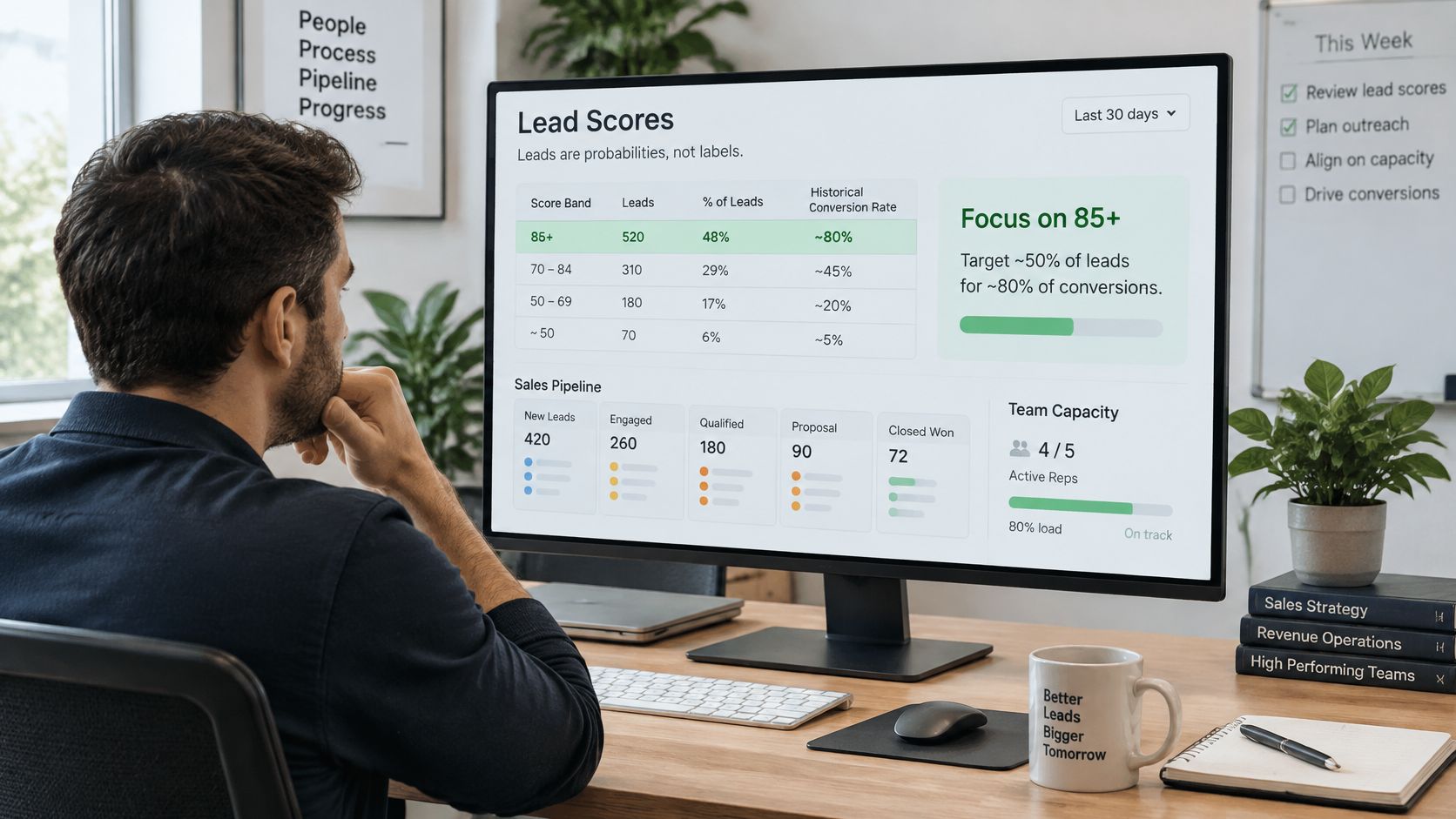
Score bands and the action each one triggers
The following is a pilot configuration, not a validated scoring policy. The lower boundary is a starting assumption to tune against your own bookings and staff capacity.
| Score band | Action | Use it when | Example call |
|---|---|---|---|
| 85 and above | Escalate to a person immediately | Daily slots are scarce | Burst pipe with a request for a same-day visit |
| 60 to below 85 | Offer an eligible slot or staff callback | Fit is established and capacity is available | Routine repair with a clear booking request |
| Below 60 | Answer, capture details and send a follow-up email with consent | Fit or intent is unclear | Price-only enquiry from outside the service area |
| Unscored | Mark unknown fields and ask one clarifying question | Service, location or consent is missing | Caller who cannot describe the job |
Say you have only two free appointments each day. You might reserve immediate interruptions for urgent, serviceable enquiries while letting routine callers request a later appointment. With an open calendar, you can offer more callers a booking without involving the owner.
Safety and vulnerability need an override, not a higher commercial score. A potentially dangerous situation should reach the designated person even when budget, location, or appointment intent remains unclear.
Separate conversation from ranking
A practical hybrid design uses a language model to extract standardised facts, then an interpretable classifier to rank them. This makes it easier to inspect whether a postcode, service request, or appointment preference caused the routing decision.
A comparative supervised-learning study reported about 92% accuracy for a stacking ensemble and about 90% for logistic regression under 10-fold cross-validation. Those results don't establish performance on your calls, especially if duplicate callers or future information leak into training and inflate validation results.
Monitor precision when human hours are scarce, recall when missed emergencies or cancellation bookings are costly, and calibration to check whether scores mean what they claim. Review conversion by segment, use a time-based holdout, and schedule seasonal retraining and threshold adjustment rather than leaving the original settings untouched.
How the Qualification Workflow Runs From Call to Handoff
Between the first ring and a human callback, the system needs to complete a short chain of dependable actions. Each action should leave a record that staff can inspect, correct, and use.
The workflow below separates conversation, extraction, routing, and logging. Keeping those responsibilities distinct makes failures easier to diagnose.
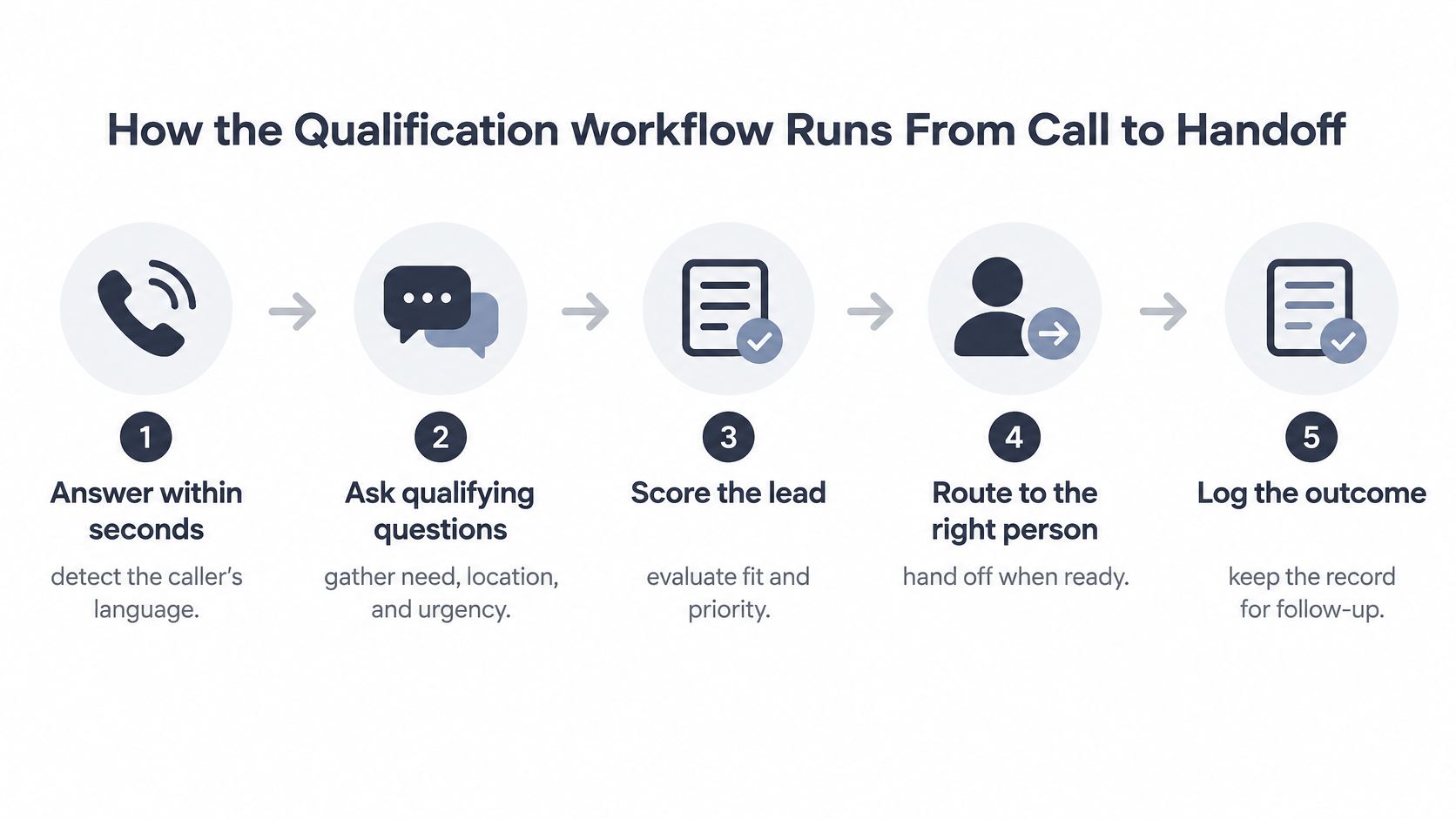
- Answer within seconds and establish language. Configure a short greeting that identifies the assistant, then detect and confirm the caller's preferred language when necessary. Log the detected language as a structured field on every call, and provide a human fallback when understanding is uncertain rather than pretending the conversation is going well.
- Ask qualifying questions in a consistent order. Work through service, location, urgency, budget range, and preferred time, skipping questions the caller has already answered. The usual mistake is turning intake into an interrogation, so answer relevant customer questions along the way and interrupt the sequence for urgent concerns.
- Write answers into structured fields. Save the caller's stated information, keep useful wording from the conversation, and mark anything unstated as unknown. Don't let the assistant convert a vague request for help into a specific diagnosis, confirmed budget, or promised appointment.
- Assign a score band with a reason. Apply the approved ranking logic only after checking whether essential facts are available. Keep extraction confidence separate from commercial priority, because uncertainty about what was said isn't evidence that the customer is unlikely to buy.
- Execute the permitted action. Book an eligible slot, transfer to the designated person, or arrange an agreed follow-up, with a fallback when the calendar or transfer fails. Define escalation call-handling rules in advance so the assistant doesn't repeatedly attempt an unavailable destination or promise a callback nobody owns.
- Log the outcome and deliver the summary. Create or update the CRM record, notify the responsible staff member, and send the caller an email or SMS confirmation only through the agreed channel. Distinguish a requested appointment from a confirmed booking, and record failed notifications instead of treating them as delivered.
Make the handoff usable
A useful handoff contains the requested service, location, urgency, agreed next action, outstanding questions, and the caller's preferred language. Include a link to the transcript only for authorised staff who need it, rather than distributing the full conversation everywhere.
The recipient should also see who owns the next action. An urgent summary in a shared inbox isn't an escalation unless someone is expected to acknowledge it.
A healthy callback begins with the job already named: the staff member confirms they're calling about the leaking radiator and checks the missing detail. The caller shouldn't have to restart the enquiry because the assistant collected information that nobody could find.
Speed to Lead and What It Does to Conversion
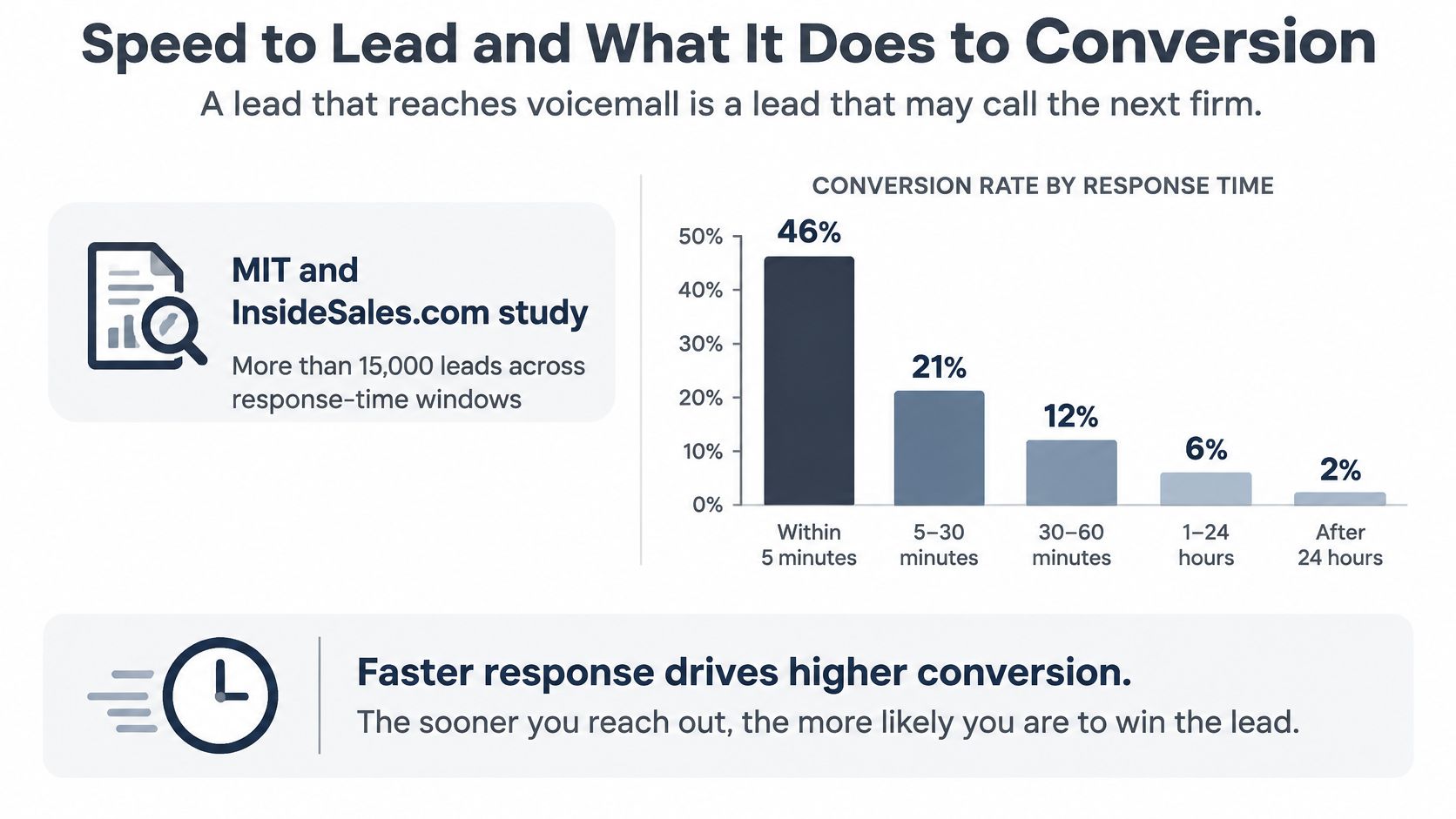
A lead that reaches voicemail is a lead that may call the next firm. Your eventual callback can be helpful and professional, but it can't recover an appointment the caller has already booked elsewhere.
The cost of slow replies starts before any advanced scoring. If nobody engages with the caller, you never collect the information needed to decide whether the enquiry deserves attention.
Response-time benchmarks for inbound leads
| Response comparison | Reported effect | Source and scope |
|---|---|---|
| Contact within 5 minutes versus after 30 minutes | About 21 times more likely to qualify | The 2007 MIT-associated and InsideSales.com study summarised by Plura, covering over 15,000 leads across six companies |
| Contact within 5 minutes versus after 30 minutes | About 100 times higher odds of making contact | MIT-associated and InsideSales.com study, same sample |
| First contact within 5 minutes versus 5 minutes to 24 hours | 8 times higher conversion | Martal Group's 2025 account of InsideSales research, covering more than 5.7 million inbound leads at over 400 companies |
These findings measure different outcomes. Contact, qualification, and conversion aren't interchangeable, and neither study guarantees a sales uplift for a local service business.
Measure a useful reply
AI can provide first-line coverage while the owner is on a job, in a meeting, or asleep. The useful interaction is more than an answered line: the caller needs to explain the problem, receive an appropriate response, and understand what happens next.
A fast greeting followed by a dead-end conversation is still a poor response.
Track both time to first reply and whether the caller reached a usable next step. A system that answers promptly but can't recognise a service request, access availability, or reach staff may just move the delay further along the call.
Use a customer-service response-time review to distinguish the assistant's reply from the human team's response. Log first ring, first meaningful reply, transfer attempt, and callback completion separately.
Before judging scoring quality, confirm that typical first replies sit comfortably inside the fastest benchmark window above. Then inspect slower calls individually, including connection failures and language misunderstandings, rather than relying on an average that hides them.
Connecting Qualification to Your CRM and Calendar
Where does a qualified enquiry go after the call? If the answer is an unstructured email that someone must retype, you've automated the conversation but left the administrative bottleneck intact.
Write the core records in a predictable order. That lets staff search, filter, and correct enquiries without reading every transcript.
Write records staff can use
- Contact details: Save the confirmed name, phone number, and preferred contact channel. Check for an existing record before creating another.
- Service requested: Use a controlled service category alongside a short description in the caller's own words.
- Score band and reason: Record the routing decision and the facts behind it, not just a number that staff can't interpret.
- Consent flag: Store the permitted channel and the caller's agreement separately from lead status.
A shared phone number can belong to a household or business, so don't merge contacts blindly. Conversely, an old record with an outdated number can make a returning customer appear new. Define a review path for ambiguous matches rather than letting the assistant overwrite them.
Free-text fields are another common failure. If every heating enquiry receives a different label, staff won't be able to filter the queue reliably.
Confirm availability before promising time
An integration should check the live calendar, required appointment duration, travel allowance, and staff eligibility before offering a slot. Recheck availability when committing the booking, then return a clear confirmation or failure status.
One option is the publisher's AI phone assistant, which connects qualification with calendar, scheduling, and CRM workflows and sends concise email and optional SMS summaries after calls. Whatever option you choose, inspect the actual field mapping and booking behaviour rather than accepting an integration badge as proof that the whole workflow works.
Run an end-to-end test using CRM phone-integration checks: place a test call, book an appointment, inspect the calendar entry, and open the resulting customer record. Then change or cancel the appointment and confirm that staff don't retain a misleading original confirmation.
Examples From Trades, Clinics and Law Firms
The following illustrative scenarios show where automation helps and where staff should take over. They're workflow examples, not claims about deployed customer results.
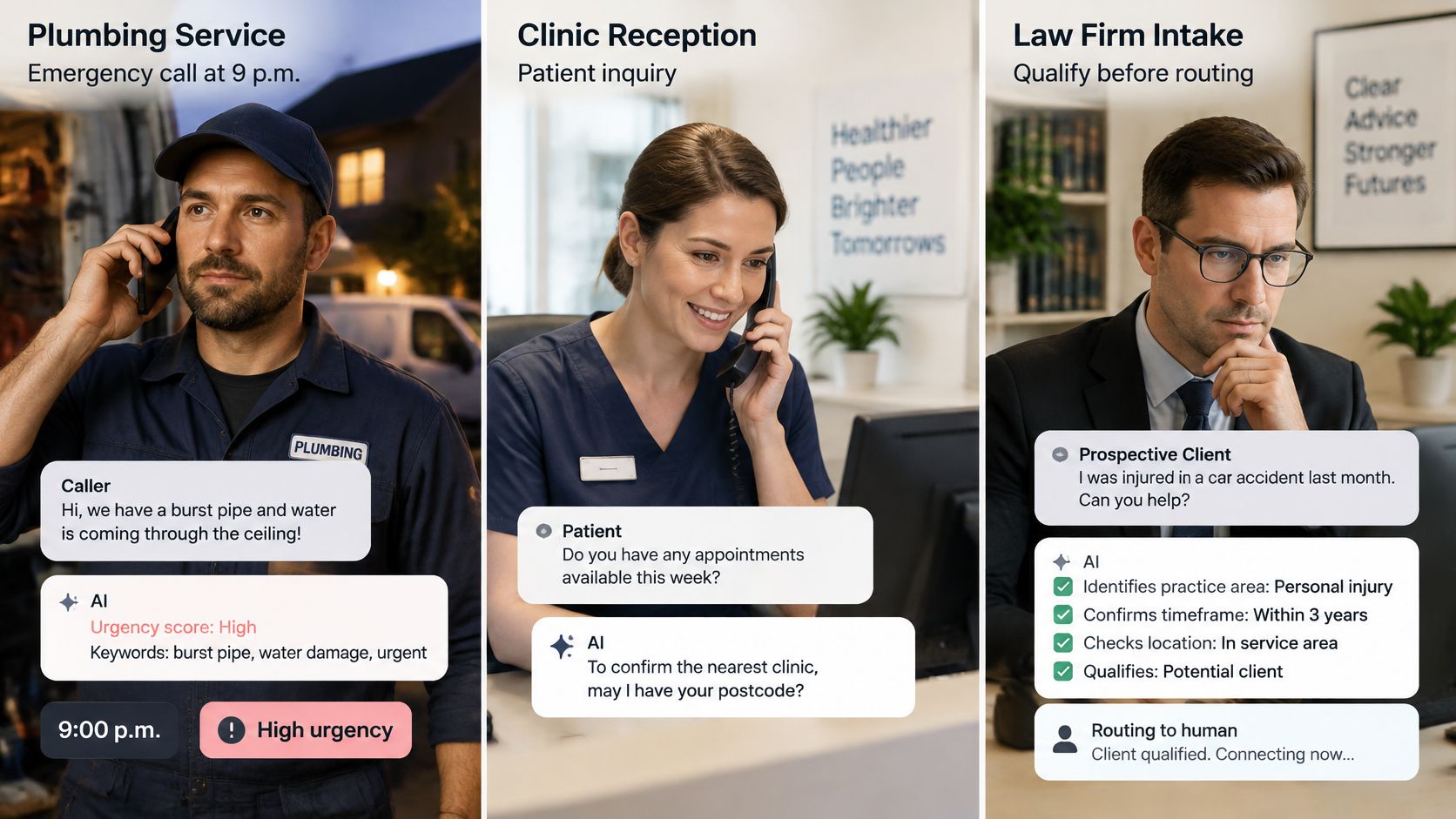
A plumber's after-hours emergency
Say a caller phones at 9 p.m. describing a burst pipe. The assistant identifies urgent language, asks for the postcode and address, and checks whether the on-call service covers that location.
It sends the designated technician an SMS containing the address, callback details, and the caller's description. The technician decides whether and how to attend; the assistant doesn't promise an arrival time that hasn't been approved.
If the technician doesn't acknowledge the alert, the workflow follows a defined backup route. That matters more than giving the enquiry an impressive score.
A dental practice's routine booking
A new patient asks about a cleaning. The assistant answers approved administrative questions, checks eligible appointments, and books an available time after confirming the patient's details.
The patient also requests a particular dentist. If the schedule doesn't establish whether that request can be met, the assistant flags it for reception rather than turning a preference into a guarantee.
Clinical symptoms take a different route. The assistant captures the concern and follows the practice's escalation policy without diagnosing or deciding clinical suitability.
A law firm's sensitive intake
A caller describes a dispute and sounds distressed. The assistant collects the matter type, any stated deadline, and contact details, but gives no legal advice and makes no promise that the firm will accept the case.
It passes the emotionally charged call to a person with a concise summary and controlled access to the transcript. Staff can then handle conflict checks, urgency, suitability, and the caller's immediate concerns.
The division of labour is deliberate. A customer-service paper on generative AI supports automating routine, information-intensive interactions while assigning complex, sensitive, exceptional, and high-value cases to people, with privacy controls, monitoring, and clear accountability.
Context makes escalation worthwhile
A multilingual conversational-AI study reported that handing over intent, sentiment, and dialogue history reduced human resolution time by 32% in its evaluated system. Treat that as evidence for contextual handoffs, not a forecast for your reception team.
For small and medium businesses serving callers in different languages, the same operating principle applies: collect useful context in a supported language and involve a capable person when understanding or judgement is uncertain. AI is good enough to complement staff on bounded tasks, but routine automation shouldn't become a barrier to reaching them.
Safeguards and Metrics Before You Switch It On
A caller's low score can hide a real opportunity. If an inaccurate score excludes someone, no person may get the chance to correct it. Engagement, job title, language, caller confidence, and CRM completeness are clues, not proof of buying intent. A caller who struggles to describe a fault may still need an expensive repair; someone calling after hours may be ready to book.
Put uncertainty into the operating rules
- Keep unknown fields unknown. Ask a clarifying question or route the call for review instead of treating missing information as a negative signal.
- Set limits on automated questions. Collect the service requested, coverage location, preferred time, contact details, and permission for follow-up. Leave diagnosis, legal interpretation, and sensitive eligibility decisions to authorised staff.
- Make borderline calls reviewable. Give staff the uncertain detail and relevant wording, not an unsupported conclusion about the caller.
- Check for uneven outcomes. Compare results by language, postcode, and customer type. Review accent-related recognition failures where appropriate and lawful, without inferring ethnicity or creating unnecessary sensitive profiles.
- Restrict access and retention. Decide who needs recordings, transcripts, and summaries. Use this GDPR compliance checklist to organise the review.
A reviewer should be able to explain why a call was routed and what evidence would justify changing that decision. Apply the same rubric to human reviewers so their preferences do not replace the assistant's.
Measure outcomes and missed opportunities
Set a baseline before launch, with consistent definitions and denominators. Track:
- Booking outcomes: Qualified-call rate, booked-appointment rate, and show rate.
- Commercial return: Revenue per answered call, calculated as booked revenue divided by answered calls.
- Staff workload: Escalation rate and the follow-up staff must complete.
- Missed opportunities: False negatives found in human review and qualified leads recovered after review.
- Conversation gaps: Unanswered questions, failed bookings, and unresolved language misunderstandings.
Revenue per answered call is not profit or a complete return calculation. Compare it with the baseline, then account for service costs, staff review time, cancellations, and the assistant's cost.
Run a narrow pilot
Start with one call type, such as after-hours appointment requests or caller-detail capture. Review unsuccessful and low-scoring calls alongside bookings. Expand to more lines or languages only when staff can confirm that the workflow is useful and fair.
rednea's AI phone assistant answers routine questions, captures qualification details, books appointments, and escalates important calls with context for your team. Visit rednea to discuss a narrow pilot. Bring your service-area rules, booking requirements, and human-escalation criteria so the setup reflects how your business works.
Try rednea, no strings attached
AI phone assistant for business. Hear a live demo in your browser, book a call with our team, or get started — from £90/month, cancel monthly, no minimum term.
GDPR-compliant · EU & UK GDPR · Multilingual