Customer Service Response Time Playbook for SMBs

You're finishing a repair when your phone vibrates again. By the time you can safely answer, there's another voicemail, an appointment request, and a caller who hasn't left any details. You don't need another inbox to check. You need a way to give customers a useful next step while you're doing the work they hired you to do.
Why Response Time Feels Different for Small Businesses
For a plumber working under a sink, answering the phone means stopping the job. For a clinic manager checking in a patient, it means interrupting someone who's already waiting. Neither choice feels right, and sending the caller to voicemail doesn't solve the underlying problem.
The caller doesn't see the competing demands. They want to know whether you cover their area, have an appointment available, or can deal with something urgent. If they can't establish that, calling another business is a reasonable next move.
Small teams have less room to absorb interruptions
A small business may have no overflow desk, dedicated receptionist, or colleague available to take over. The person answering inquiries may also prepare quotes, deliver services, and collect payment. Hiring more coverage can help, but it adds a commitment that may not fit uneven demand.
That makes customer service response time a capacity and revenue decision, not just a courtesy metric. An unanswered inquiry can mean an unbooked job, but answering every call personally can also reduce the work you complete.
Customer expectations make that trade-off harder. A 2022 international survey of 7,078 consumers found that 92% expected quick customer-service responses, with long waiting times the leading service annoyance and the finding consistent across age groups and markets.
Practical rule: Protect the customer's first opportunity to explain what they need, without requiring the owner to interrupt every job.
Start by identifying what requires your attention:
- Routine inquiries: Opening hours, service areas, and appointment requests can follow approved rules.
- Time-sensitive requests: Capture urgency and route them to a named person.
- Professional decisions: Keep diagnosis, legal advice, exceptions, and sensitive complaints with qualified staff.
You're not trying to make yourself permanently available. You're building a front door that remains useful when you aren't.
What Customer Service Response Time Actually Measures
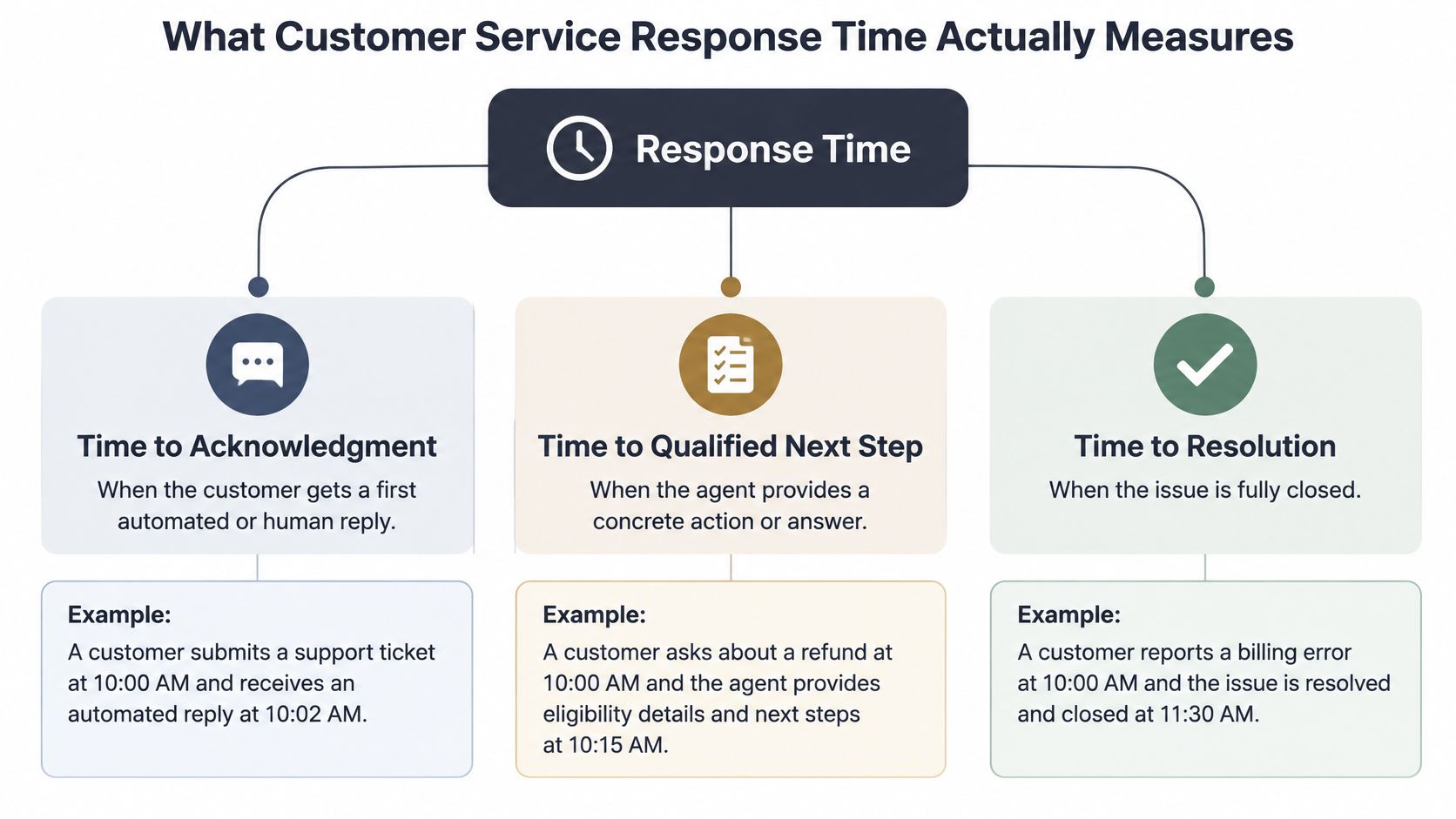
Customer service response time usually describes the delay between an inquiry and the first reply. That definition is too broad for operational decisions. A recorded greeting, a confirmed appointment, and a completed repair represent very different outcomes.
Separate the customer journey into distinct intervals:
- Time to acknowledgment: The customer knows you've received the inquiry. A French-speaking caller reaches an assistant that greets them in French and asks what they need.
- Time to a qualified next step: The business has enough information to act. For a leaking boiler, that might mean capturing the address and urgency, then reaching the appropriate on-call person.
- Time to resolution: The underlying need is fulfilled. A quote request isn't resolved merely because someone collected an email address.
Keep channel and outcome separate
The distinction matters when interpreting benchmarks. A support benchmarking report gives an average first-response time of approximately 6 hours 47 minutes, alongside conversational expectations around 15 seconds. Those figures describe different service contexts, not interchangeable targets.
A phone caller won't regard an email sent later as an answered call. An email customer may accept a considered reply, provided you've set a credible expectation.
Record a separate timestamp for each milestone. If your helpdesk defines first response as a human reply, retain that definition and report automated acknowledgment separately. Otherwise, switching on automation can make the dashboard look better without improving service.
Treat time to resolution as its own measure rather than allowing an intake event to close the case. An AI assistant can handle acknowledgment and structured intake, and sometimes complete a routine transaction. It shouldn't mark a professional judgment or unresolved complaint as finished.
The planning question is specific: Which milestone can this workflow complete correctly, using the information and authority available?
The Cost of Every Extra Hour You Wait
Response delays matter for existing customers and prospective buyers, but the evidence needs careful interpretation. Support satisfaction and lead qualification aren't the same outcome, and email findings shouldn't be presented as phone-abandonment statistics.
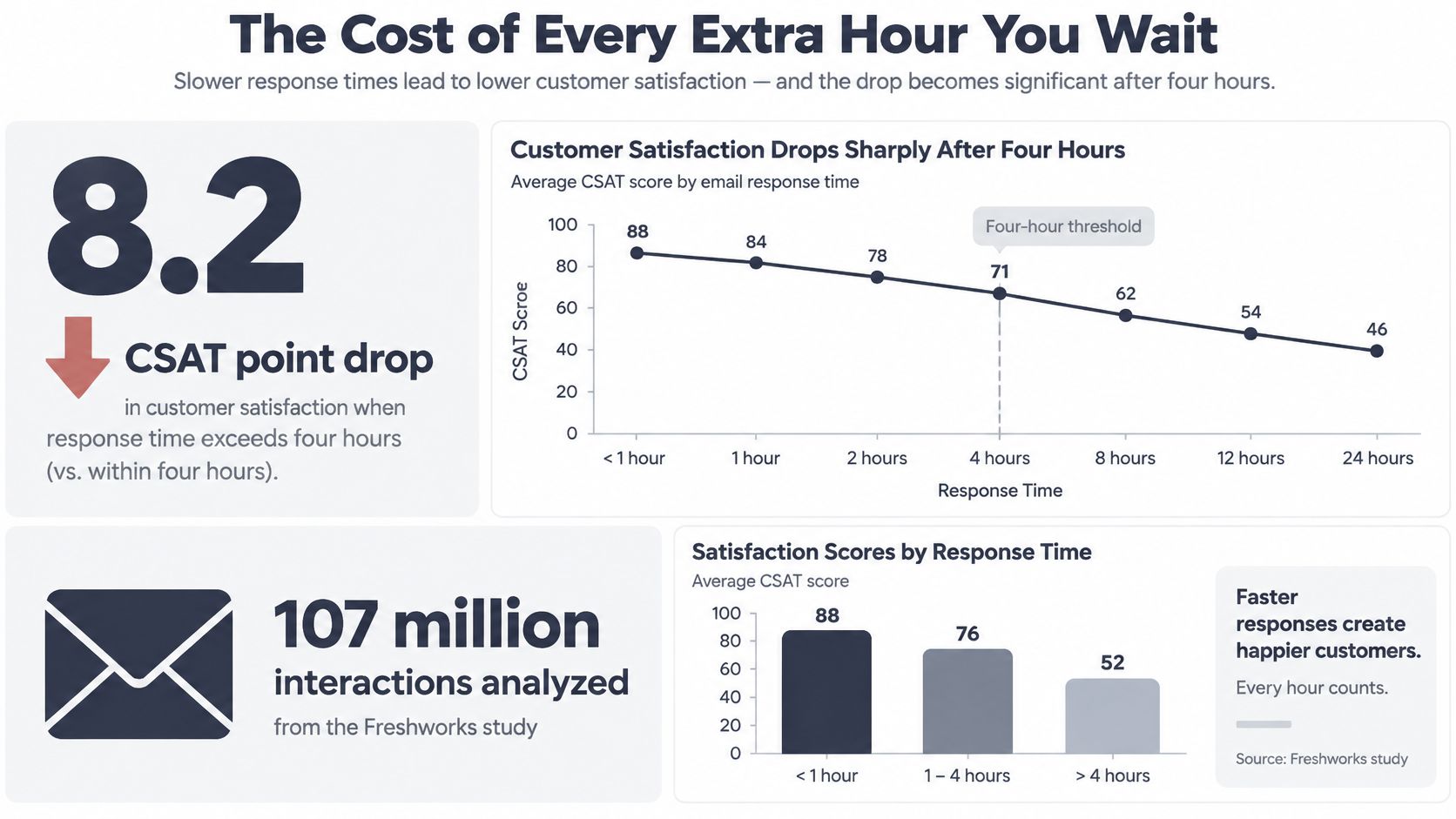
An analysis of 107 million support interactions across 4,466 accounts and 15 industries found average CSAT of 86.7% for responses within four hours versus 78.5% after four hours, an 8.2-percentage-point difference; each additional 12-hour delay was associated with a 9.6% decline in CSAT. These are associations in a large operational dataset, not a guaranteed loss for every delayed message.
Qualification is not a completed sale
The lead-response evidence points in the same operational direction. Harvard Business Review's audit of 2,241 U.S. companies found that contacting a web lead within one hour was associated with nearly seven times the likelihood of qualification compared with waiting another hour, and more than 60 times compared with waiting at least 24 hours.
That doesn't mean every fast reply produces a booking. It means you shouldn't leave a ready-to-discuss inquiry untouched while staff work through a general inbox.
For a small business, assess the exposure through actual outcomes:
- Unanswered inquiries: Did the customer reconnect, book elsewhere, or remain unreachable?
- Delayed quotes: Did you provide the information while the customer was still considering suppliers?
- Captured but stalled requests: Did someone collect details without assigning follow-up?
Use your records to estimate the cost of missed calls, rather than treating every missed call as a lost sale. Exclude spam, duplicates, and inquiries outside your service scope.
A fast intake process is commercially useful only when someone, or an authorized system, can complete the next action.
Prioritize inquiries with clear intent, then validate the change against completed appointments and accepted work. Speed alone isn't revenue.
Benchmarks and SLAs by Channel
A service-level agreement, or SLA, should tell staff what action is due, when it's due, and who takes responsibility if it's late. “Reply promptly” doesn't meet that standard.
The targets below are recommended starting policies, not additional industry benchmarks. Adjust them to your opening hours, urgency mix, and observed workload before making public promises.
Channel-by-channel SMB response time targets
| Channel | Target first response | What counts as a response | Most common failure |
|---|---|---|---|
| Phone | Answer within seconds, with overflow enabled | A person or assistant begins useful intake | Caller abandons while every extension rings |
| Live chat | Engage within seconds while advertised as live | Answer the question or begin relevant qualification | Greeting appears, but nobody continues |
| Provide a substantive reply within hours during published coverage | Answer, request necessary details, or assign a named next action | Receipt acknowledgment is mistaken for progress | |
| Social messaging | Respond during the next staffed inbox review | Address the inquiry and move sensitive details privately | Direct message sits in an unowned inbox |
| SMS | Reply within minutes when offering active conversation | Confirm the action, ask a relevant question, or explain follow-up | Customer replies to an unattended number |
Don't advertise live service if you're offering asynchronous intake. Both can work, but customers need to know which experience they're entering.
Set promises around available coverage
Use the earlier support and lead-response findings as reference points, not universal deadlines. A routine document request and an urgent appointment inquiry shouldn't share the same priority just because both arrived by email.
- Define coverage: State whether targets run during business hours or continuously.
- Assign ownership: Give each inbox and queue a primary owner and a backup.
- Specify the breach action: Route overdue requests somewhere useful rather than generating another notification.
- Publish realistic expectations: Tell customers when a specialist will respond, especially outside opening hours.
During your busiest season, test the policy against actual queues. If staff can't keep the promise, reduce the channels you advertise as live, improve overflow, or automate a bounded task. Don't conceal the shortfall by counting empty acknowledgments as service.
Four Levers That Move Response Time
Start with changes that use your existing capacity better. Add automation where a defined workflow justifies the setup and ongoing supervision.

Fix coverage and routing first
Staffing and schedule shape. Inspect call arrivals alongside missed calls, not just daily totals. If inquiries cluster while staff travel between appointments, move administrative coverage into that window where practical. Don't solve a short peak by assuming you need another full-time role.
Smarter routing. Stop sending every caller through the same sequence of unavailable people. Separate booking, existing-job questions, and urgent requests, then define a fallback when the intended recipient can't answer. Good call queue management includes an exit route, not just a longer hold experience.
- Route by intent: Send appointment-ready callers toward scheduling.
- Preserve context: Transfer the captured details with the call.
- Handle failure: Offer a specific callback arrangement when a live handoff fails.
Standardize answers before adding AI
Saved replies help staff answer repeat questions without rewriting policies. Maintain approved wording for service boundaries, preparation instructions, cancellation terms, and information needed for quotes. Assign someone to update it whenever operations change.
An AI front line becomes useful when it can use those same rules to answer questions, collect details, check availability, or route an exception. In a 2025 survey of 400 U.S. small-business owners, 51% had integrated AI into customer service; among adopters, 65% reported faster resolution and 60% gained round-the-clock support. Those are self-reported outcomes, not promises for your installation.
rednea is one option for multilingual, round-the-clock call handling when an owner can't answer mid-job. Other approaches include shared reception coverage, outsourced answering, or a tightly scoped chatbot for written inquiries.
For service in any language your customers use, test the actual workflow rather than assuming language detection guarantees accuracy. Confirm names, addresses, appointment details, and specialist vocabulary. Start with a supported language you can review confidently, then expand with competent language support.
AI is good enough to complement humans in bounded, testable tasks. Give it less authority when information is uncertain, the consequences are serious, or the caller needs professional judgment.
A 30-Day Rollout for a Small Team
Treat the rollout as a controlled operational change, not a replacement of your whole service desk. Keep the scope small enough that you can inspect failures and reverse the change if necessary.
A 2026 analysis of National Cybersecurity Alliance data reported customer-service AI use among 21% of the smallest SMBs, compared with 47.6% of businesses employing 250–500 people. That difference supports a cautious starting approach for resource-constrained teams, although it doesn't prove which implementation method works best.
Establish the baseline and remove obvious friction
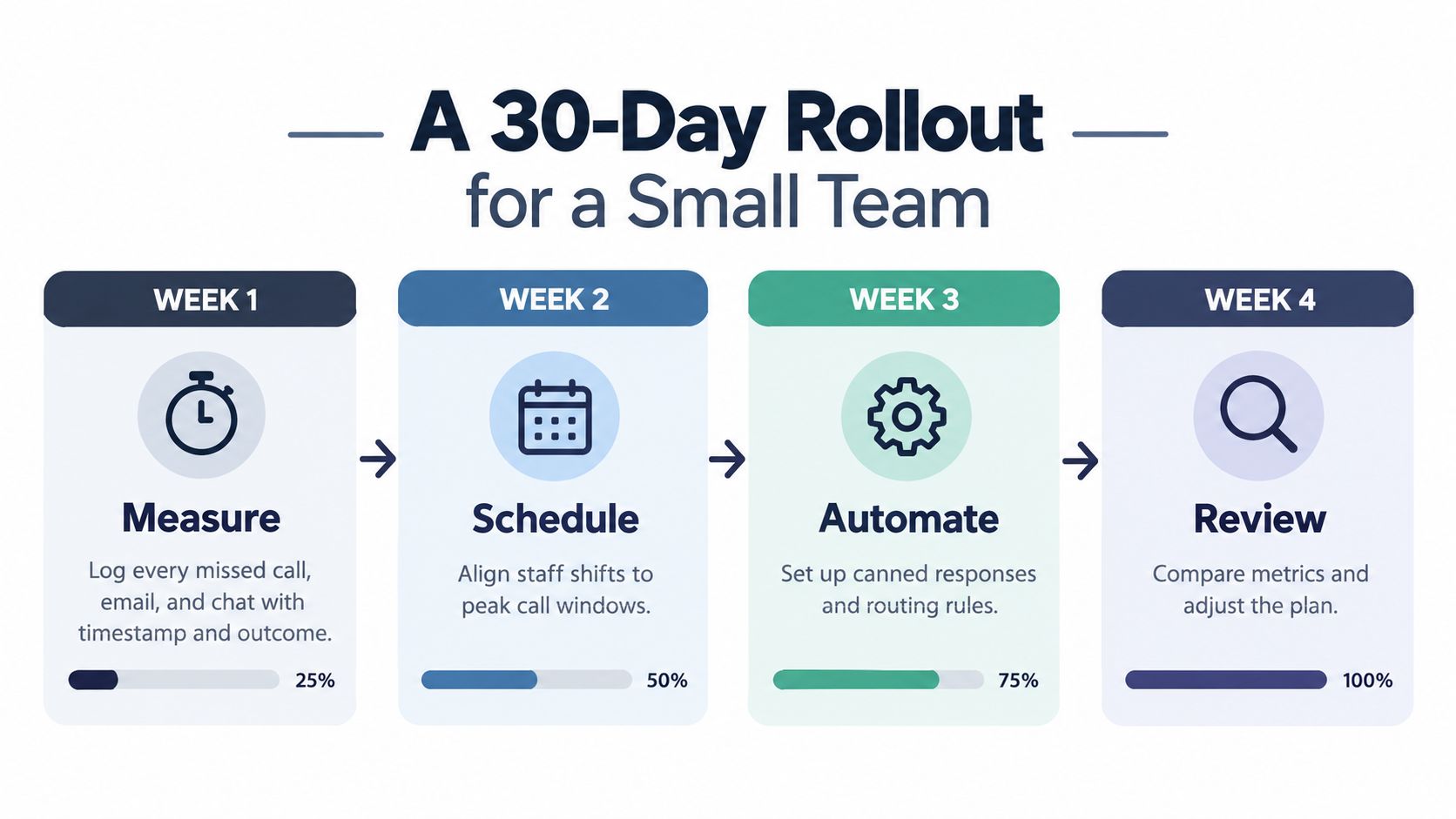
- Week one, measure: Log incoming inquiries, missed contacts, channel, timestamps, and outcome. Include inquiries that never receive a reply, or your baseline will exclude the worst failures.
- Week two, repair: Adjust coverage, clean up voicemail ownership, introduce saved answers, and test routing. Document what changed so you don't attribute every improvement to automation later.
Choose the pilot from those records. After-hours appointment intake may be a better starting point than a complex daytime complaint queue.
Introduce automation with an exit route
Week three is for a limited live pilot on the chosen channel. Supply approved answers, required intake fields, calendar permissions where relevant, and explicit escalation rules. Test unavailable appointments, unclear speech, language switching, integration failures, and requests outside your scope before widening access.
Week four is for comparing outcomes and correcting mistakes. Inspect whether captured requests reached the responsible person and whether booked appointments were valid.
Keep the rollback simple: Staff should know how to redirect calls and resume manual handling if the assistant or an integration fails.
Don't expand just because the assistant answers smoothly. Expand when it completes the assigned task correctly, preserves a usable record, and hands exceptions to someone who can act.
Monitoring Speed Without Creating a New Bureaucracy
Keep reporting on a single screen, with channel filters and clear ownership. You need enough detail to find operational problems, not a reporting project that consumes the time you've recovered.
There's a practical reason to examine service workflows specifically. A small-business report found that 62% used AI, but customer service represented only 8% of reported applications, compared with 47% for marketing. Using AI elsewhere doesn't establish that inbound inquiries are being handled well.
Use a compact operating dashboard
| Measure | What to inspect | Accountable owner |
|---|---|---|
| Response latency by channel | p50 for the typical experience and p95 for longer waits | Operations lead |
| Abandonment rate | Where callers leave before useful intake | Reception or queue owner |
| First-contact resolution | Whether customers must return for the same issue | Service lead |
| Qualified-lead rate | Whether captured inquiries meet agreed criteria | Sales or owner |
| Booking or conversion rate | Whether eligible inquiries become completed next steps | Scheduling lead |
During rollout, review weekly. Once performance is stable, move to a monthly review while retaining alerts for urgent routing failures. A solo operator can own every measure, but the definitions still need to be written down.
Use call reporting software to connect the contact record with its outcome, rather than manually copying totals across spreadsheets.
Check quality alongside speed
- Language accuracy: Sample interactions in each supported language with someone qualified to assess them.
- Escalation reliability: Check complaints, emergency indicators, failed transfers, and requests for a human.
- Data handling: Minimize collected information, restrict access, set retention rules, and verify GDPR-related obligations with appropriate advice.
Don't assume a vendor's privacy statement makes your whole workflow compliant. Likewise, don't reward fast closure if staff are reopening cases or customers are repeating themselves.
The operating question remains concrete: Are you completing more appropriate bookings and losing fewer useful inquiries without creating extra rework?
Quick-Reference Checklist and Next Move
Use the framework as a purchasing and implementation checklist, not just an internal measurement exercise. A provider should be able to demonstrate what happens after the greeting, including unavailable appointments, unsupported requests, and failed handoffs.
The earlier evidence supports prompt handling, but it doesn't justify automating every conversation. Your strongest starting point is a repetitive task with a clear success condition and a safe route to human help.
Before switching on a pilot
- Baseline recorded: Include unanswered inquiries and their eventual outcomes.
- Milestones defined: Keep acknowledgment, actionable progress, and completed resolution distinguishable.
- Channel promises written: Match each commitment to real coverage.
- Routing tested: Confirm that the fallback reaches an available person or creates an owned follow-up.
- Pilot bounded: Choose a specific inquiry type and supported language.
- Authority limited: Specify what the assistant may answer, book, change, or decline.
- Quality checks assigned: Name the person reviewing accuracy and exceptions.
- Review scheduled: Decide in advance what would justify expansion, revision, or rollback.
Ask for a demonstration using your own awkward scenarios, not only the provider's prepared examples. Check how the service is billed, what integrations it needs, and whether staff can retrieve and correct captured details.
Tomorrow, select your most common missed-call scenario and write its ideal next action. Use the rollout to implement that workflow, inspect real outcomes, and widen coverage only when the evidence from your business supports it.
---
rednea offers an AI phone assistant for round-the-clock call answering, multilingual intake, appointment booking, and escalation to your team. Visit to discuss a missed-call workflow, then test it against your service rules, scheduling needs, and human handoff requirements before expanding.
Try rednea, no strings attached
AI phone assistant for business. Hear a live demo in your browser, book a call with our team, or get started — from £90/month, cancel monthly, no minimum term.
GDPR-compliant · EU & UK GDPR · Multilingual