Escalation Call Handling: Triggers, Routing and Scripts

You're on a ladder, in a treatment room, or with a client across the desk, and the phone won't stop. One caller needs a routine slot moved. The next is standing in water, panicking, and can't find the stopcock. If both get the same treatment, the second caller waits behind the first, and you lose control of the day.
Good escalation call handling fixes that ordering problem. It doesn't mean sending more calls to a person. It means ranking calls by harm and lost revenue, letting automation close the routine ones, and protecting your people for the calls that need judgment.
Which Calls Escalate Now and Which Wait
A plumber is under a floor when two calls land in the same minute. The first caller can smell gas near the boiler. The second wants a quote for a bathroom refit next month. A rule that treats both as urgent because both callers sound keen puts the gas call behind a quote conversation.
That's the flaw in intent-only routing. Common advice says transfer whenever someone asks for a human, gets upset, or goes off script. Put every uncertain call onto one busy technician and you'll create the delay you were trying to avoid. Over-escalation is a failure mode, not a safety net.
Rank by consequence first. Safety risk, legal threat, a vulnerable caller, and an active failure route immediately, whatever the caller asks for. Lower-risk work waits for a callback or gets resolved without interrupting anyone on a job. Set this up using the same logic you'd use for emergency call routing, then apply it to every call type, not just emergencies.
The Five Tiers in Practice
| Tier | Example calls | First action | Response target |
|---|---|---|---|
| Immediate | Gas smell, electrical hazard, active leak, security alarm | Connect to the on-call person | Human on the line within 2 minutes or the next on-call person |
| Immediate | Legal threat, mention of medication, vulnerable caller | Connect to an authorised staff member | Connect now, no callback queue |
| Priority | Repeat caller, service outage, high-value commercial client | Human during working hours, summary sent otherwise | Within 15 minutes in working hours |
| Scheduled | Quote request, undisputed invoice question, rescheduling | Callback with written summary | Same working day |
| Automated | Opening hours, directions, routine booking slot | AI resolves and confirms by text or email | Instant |
| Unclear | Call still ambiguous after one clarifying question | Route to a person with the caller summary, no guessing | Connect or callback within the tier window |
The Unclear row is your fifth tier, and it's deliberate. Ambiguity isn't permission to guess. It's a signal to pass a short summary to a person who can decide.
Confidence Thresholds by Risk
Don't use one global confidence rule. Routine requests such as order status or appointment booking can proceed at a lower confidence level. Billing disputes, refunds, account closure, fraud, legal, or compliance matters need a higher threshold and earlier human review, and one documented implementation uses a **0.85** confidence threshold for billing disputes.
Configure four signals, and let any one of them trigger escalation:
- Low confidence: The assistant can't classify the request reliably.
- Explicit request: The caller asks for a person directly.
- Negative sentiment: You hear frustration, distress, or raised urgency.
- High-risk category: The topic itself sits in the Immediate tier.
Practical rule: If the cost of being wrong is high, lower your tolerance for uncertainty and escalate earlier.
Before you touch any software, write your own tier list on one page. Pull last month's calls and put one real example in every row, using your callers' actual words where you can. If you can't find an example for a tier, that tier probably doesn't match your work. Adjust it now, while it's cheap to change.
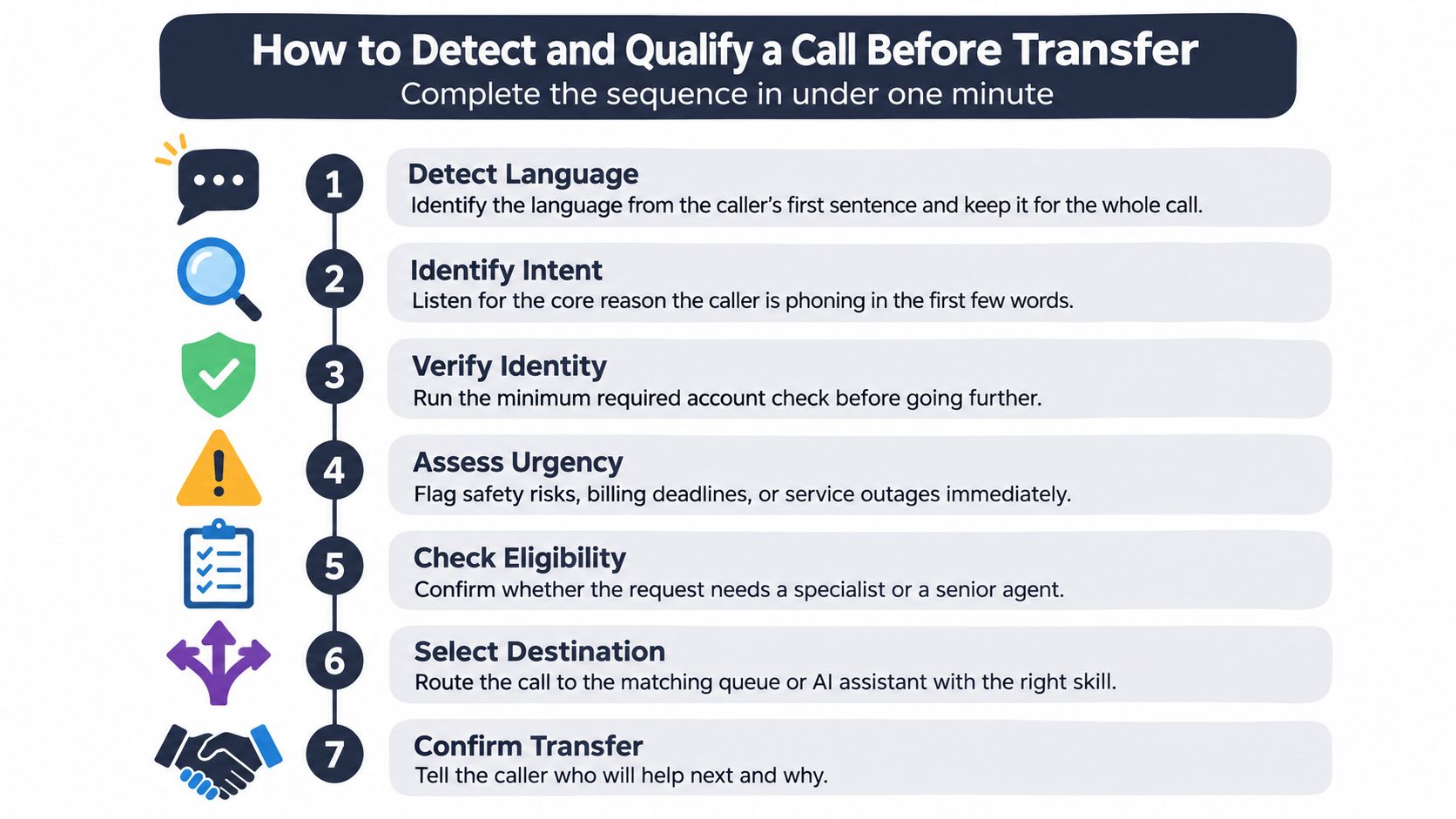
How to Detect and Qualify a Call Before Transfer
Qualification has to run in under a minute. Many callers give you only a few words before they expect a decision, and a long interrogation burns trust. Keep the sequence fixed so staff and AI assistants make the same call on the same facts.
The Seven Steps
- Detect the language: Identify it from the first sentence and keep it for the whole call. Don't move Spanish, French, German, or Italian callers into English without asking. The common slip is replying in your default language because it's faster for you.
- Identify the caller: Get a name and number, then match them to an existing record or appointment. This prevents duplicate files and tells you if you're dealing with a repeat issue. Skipping it means the next person starts blind.
- Classify into one tier: Assign the intent to a tier from your table, not to a vague category like general enquiry. If it doesn't fit a tier, that's useful information in itself. Treat it as Unclear rather than forcing a fit.
- Scan for red flags: Listen for explicit danger words, a condition that's getting worse, or a caller who can't give an address or postcode. Any one of these overrides the initial classification. The slip to avoid is treating the first thing the caller says as the underlying problem, when callers often lead with the symptom they noticed last.
- Check authority: Ask whether this assistant or person has the power to make the decision. Refunds, clinical advice, and safety instructions need an engineer, manager, or clinician with the right authority. Agreeing to something you can't approve creates a second, angrier call later.
- Handle ambiguity: Ask one clarifying question, and only one. If the call's still ambiguous after it, mark it ambiguous and route it with a summary instead of guessing. Asking three questions when one would decide the route wastes the caller's patience and your specialist's time. This is the core discipline behind how to screen a call without turning it into an interview.
- Confirm aloud: Say who takes over and why. "I'm putting you through to Sam, who handles gas issues," tells the caller the transfer is a step forward, not a brush-off.
One good clarifying question beats three vague ones. If it won't change the route, don't ask it.
A Quick Self-Check
After ten live calls, sit down with the recordings or summaries and score them against the steps. Did anyone skip identity? Did a red flag get noted but not acted on? Did an ambiguous call get guessed at?
Fix the step that failed most often before you add new rules. Many teams find one step causes most of the mess, usually authority or ambiguity. Tightening that single step improves routing more than rewriting the whole sequence.
When Escalation Fails and Voicemail Rules
Every escalation fails sometimes. The specialist is busy, nobody answers, or the assistant can't understand the caller. Design for those three moments in advance, because a caller left in an unexplained queue assumes you've forgotten them.
Each route needs a time limit, a second route, and a callback promise. Without a time limit, staff let a ringing phone decide priority. Without a second route, one person's busy signal becomes your whole system failing.
Fallback Routes When the First Escalation Fails
| Failure point | Fallback action | Time limit |
|---|---|---|
| Specialist busy | Send summary, then ring the next person on the rota | Second attempt within 2 minutes |
| No answer on an urgent call | Escalate to the owner's mobile and send the summary by text | Repeat escalation within 10 minutes |
| No answer on a scheduled call | Book the next working slot and confirm by text | Callback within the promised window, same working day |
| Assistant fails to understand caller twice | Offer a person or a callback form in the caller's language | Hand off on the second failure |
| Caller refuses automation | Route to a person immediately | No further automated questions |
| Out of hours, non-urgent | Capture details and promise a morning callback | Callback by the start of the next working day |
Take an electrician's rota as the model. The on-call technician's phone rings, but the summary reaches them by text before the call connects, so they already know it's a tripped board at a tenanted flat. If there's no answer within two minutes, the next person on the rota gets the call. The caller hears a specific callback window, not "someone will be in touch."
That pre-brief is what makes it a warm handoff. The receiver hears the summary before speaking to the caller, so nobody restarts the conversation. The failure callers remember most is the opposite, a cold transfer that lands on an unbriefed voicemail box.
A dead end costs you directly. One cited survey found that 42% of callers who fail to reach a business leave voicemail, 24% try chat, and 21% call another business. That last group is gone, and they rarely tell you why.
When Voicemail Is Acceptable and When It Is Not
Voicemail works only with two things attached, a specific callback time and a structured message covering name, number, problem, address, and urgency. Without that structure, your team spends the callback collecting basics instead of solving anything.
Apply it by situation, not by habit:
- Safety, legal, or medical risk: Never voicemail. Route immediately to an authorised person.
- Specialist free in working hours: Connect now. Don't park a caller you could help.
- Specialist on a job, routine request: Voicemail is acceptable with a named callback time.
- New high-value lead: Offer a same-day callback or book a slot during the call.
- Routine request out of hours: Automated booking is fine, with confirmation sent.
- Repeat caller, unresolved issue: Escalate with the full call history attached.
Your sector changes how much slack you have. Reported missed-call rates range from 9% in real estate to 32% in healthcare, with legal at 28% and home services at 14%, as set out in missed-call exposure by sector. A clinic or law firm loses far more to a voicemail habit than an estate agent does, so it needs tighter fallback rules.
Don't fear a short, explained hold either. Forrester found that in November 2024, **95%** of US online adults said they would wait longer on hold if doing so guaranteed an agent who could resolve the issue on the first attempt. Callers will trade a little time for a real resolution.
Before any call goes to voicemail, ask three questions. Is there a risk, can I give a callback time I will keep, and does this caller already have a history with us?
Two operational details close the loop. Tell callers they're speaking to an assistant, get permission before sharing a transcript, and restrict or delete sensitive details if they ask. Then review your fallbacks weekly, and investigate any fallback used more than twice in a week, because repeated use means the primary route is broken.
Handoff Scripts for Agents and AI Assistants
A poor handoff colours everything that follows. Research cited in the available results reports that **72%** of customers who experience a poor bot-to-human transfer evaluate the entire interaction negatively, while well-designed escalation workflows can achieve **89%** satisfaction during handoff conversations. The script's job is simple, stop the caller repeating themselves.
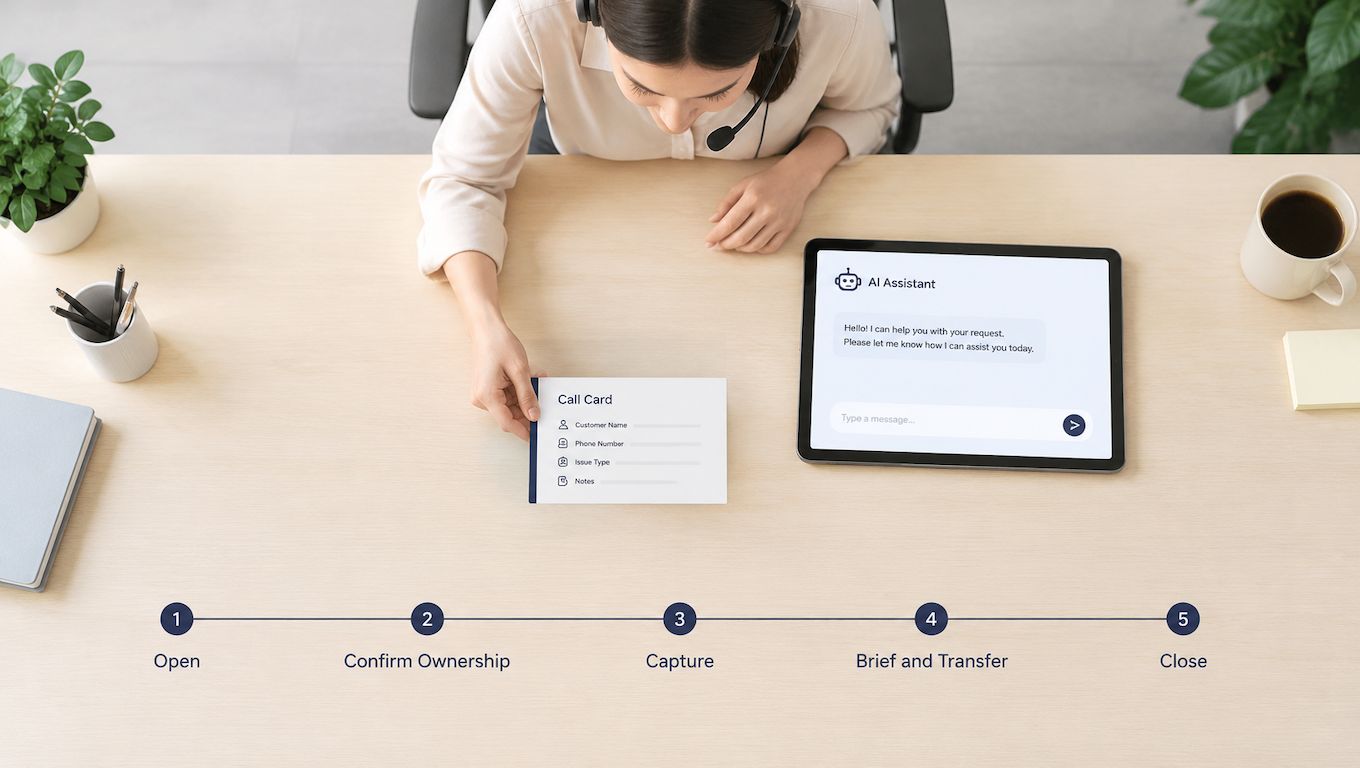
Handoff Script Lines by Stage
| Stage | Human agent line | AI assistant line |
|---|---|---|
| Open | Thanks for holding, this is Sam from the office. | Hello, you have reached the booking assistant. I can help with appointments and urgent issues. |
| Confirm ownership | I will take it from here, so you will not need to repeat yourself. | I am passing this to our engineer now, and they will receive everything you have told me. |
| Capture | Can you confirm your address and what happened in the last hour? | Before I connect you, can I confirm the address and whether there is water or a smell of gas? |
| Brief and transfer | Summary: leak under the sink, tenant, water not yet shut off. Connecting now. | I am connecting you to Sam, who is on call. Your summary is already with them. |
| Close | Sam will call you back within 15 minutes, and you will get a text with the summary. | Sam will call you within 15 minutes. If you do not hear back, reply to the text I have just sent. |
Notice what both columns do. Each line names a person, states what happens next, or confirms what's already been captured. Neither column asks the caller to start again. That's the difference explored in warm transfer vs cold transfer, and it's mostly about briefing, not warmth of tone.
Real phrasing matters more than polished phrasing. An agent might say, "I'm sorry you've had to call twice about the boiler, let me get the engineer who has your file." An AI assistant might say, "I can't book the emergency visit myself, so I'm connecting you to our on-call team now, and I've noted the leak under the kitchen sink and your postcode." Both lines acknowledge the situation and name the next step in one breath.
What to Capture Before You Transfer
Don't transfer until you hold these six items:
- Identity: Name, callback number, and address or account reference.
- Precise request: What the caller wants, in their words where possible.
- Actions already tried: What's been attempted, so nobody repeats it.
- Emotional state: Calm, frustrated, distressed, or vulnerable.
- Record reference: Appointment, job number, or ticket if one exists.
- Desired outcome: What a good result looks like to the caller.
Language follows the same no-repeat rule. If a caller speaks Spanish, the assistant keeps the conversation in Spanish, collects the details in Spanish, and passes an English summary to staff who need one. The caller never has to re-explain in a second language because your internal process prefers it.
When nobody's available, don't improvise. Set a callback time, send a short written summary to the owner of the case, and tell the caller exactly how they'll hear back. Then test every script the blunt way, read it aloud on a real call, and cut any line that runs longer than two sentences.
Measuring Escalation Quality and Spotting Drift
An efficient-looking workflow can still be unsafe. If you only count transfers, you'll miss the urgent call that never reached a person. Measure false negatives, urgent calls that weren't escalated, separately from false positives, routine calls sent to a specialist by mistake.
Telephone triage shows why this split matters. A systematic review found average safety of **97%** across routine out-of-hours calls, but only **89%** among high-urgency patients, with simulated high-risk cases safe just **46%** of the time. Routine accuracy hides high-risk failure.
Escalation Metrics and Their Warning Signs
| Metric | What it shows | Warning sign |
|---|---|---|
| Escalation rate | Share of calls handed to a human | Above 10% for a sustained period, or above 20% at any time |
| Precision | Share of escalations that truly needed a person | Routine calls making up most escalations |
| Recall on urgent calls | Share of genuinely urgent calls routed to a person | Any missed emergency, which triggers a rule review |
| Time to human | Seconds from decision to connected person | Rising week on week, pointing to staffing gaps |
| Transfer abandonment | Callers who hang up during the handoff | Any rise after a rule change |
| Repeat contact rate | Callers who call back about the same issue within a few days | Rising repeats after a fallback change |
| First-contact resolution | Issues closed without a repeat or transfer | Well below the 76% mean benchmark |
Run the same routine every week. Label every call as resolved by AI, transferred to a human, abandoned, or requiring follow-up, then pull a sample of around 20 borderline calls and check each against your tier table. Borderline calls teach you more than clear ones, because they show where your rules are vague.
Use benchmarks as reference points, not targets. A 2025 benchmark of 213 centers reported a mean first-contact resolution rate of **76%** and a mean call-transfer rate of **9.9%**. A sustained escalation rate above 10% deserves investigation, and rates above 20% usually point to over-escalation or weak automation, which is why disciplined call reporting software habits matter more than any single dashboard.
- Review repeat reasons: Check the five most common repeat-escalation reasons every Monday.
- Log every language: Track misunderstanding and transfer rates by language, not just in total.
- Document rule changes: Never change a trigger without writing down why, so you can reverse it.
Set Up Your First Escalation Policy This Week
Keep the first version small and finish it this week:
- Pull 30 days of calls: Group them by your five tiers.
- Write one line per tier: Who answers, the fallback, and the response target.
- Draft five handoff scripts: Write versions for people and the assistant, then test them on a real call.
- Set the weekly review: Track escalation rate, false negatives, and repeat contacts, with 10% as your investigation trigger.
- Review after one month: Move any rule that keeps sending routine calls to a person.
Then cover the hours your team can't staff. rednea is an AI phone assistant for tradespeople, clinics, law firms, and other small businesses. It answers instantly, detects the caller's language among English, Spanish, French, German, and Italian, books appointments, qualifies leads, and escalates only the calls that matter, sending a concise email or SMS summary. It connects to Google Calendar and Microsoft 365, is built around EU and UK GDPR with European servers, and set-up is handled for you in about 30 minutes.
Start simple. Put AI on the Automated tier in the two or three languages your callers use most, keep the Immediate tier with people, and widen the AI role only when your weekly review shows routing holds. AI handles routine calls well enough to free staff for judgment calls. That's a complement to your team, not a replacement for it. The tiers decide which is which.
---
If your Immediate tier depends on whoever happens to hear the phone, put a proper rota behind it and let automation absorb the routine calls that keep interrupting it. Visit rednea to set up an assistant that books, qualifies, and escalates by your tiers in your callers' languages, with a written summary on every handoff.
Try rednea, no strings attached
AI phone assistant for business. Hear a live demo in your browser, book a call with our team, or get started — from £90/month, cancel monthly, no minimum term.
GDPR-compliant · EU & UK GDPR · Multilingual