Small Business Systems and Processes That Actually Scale

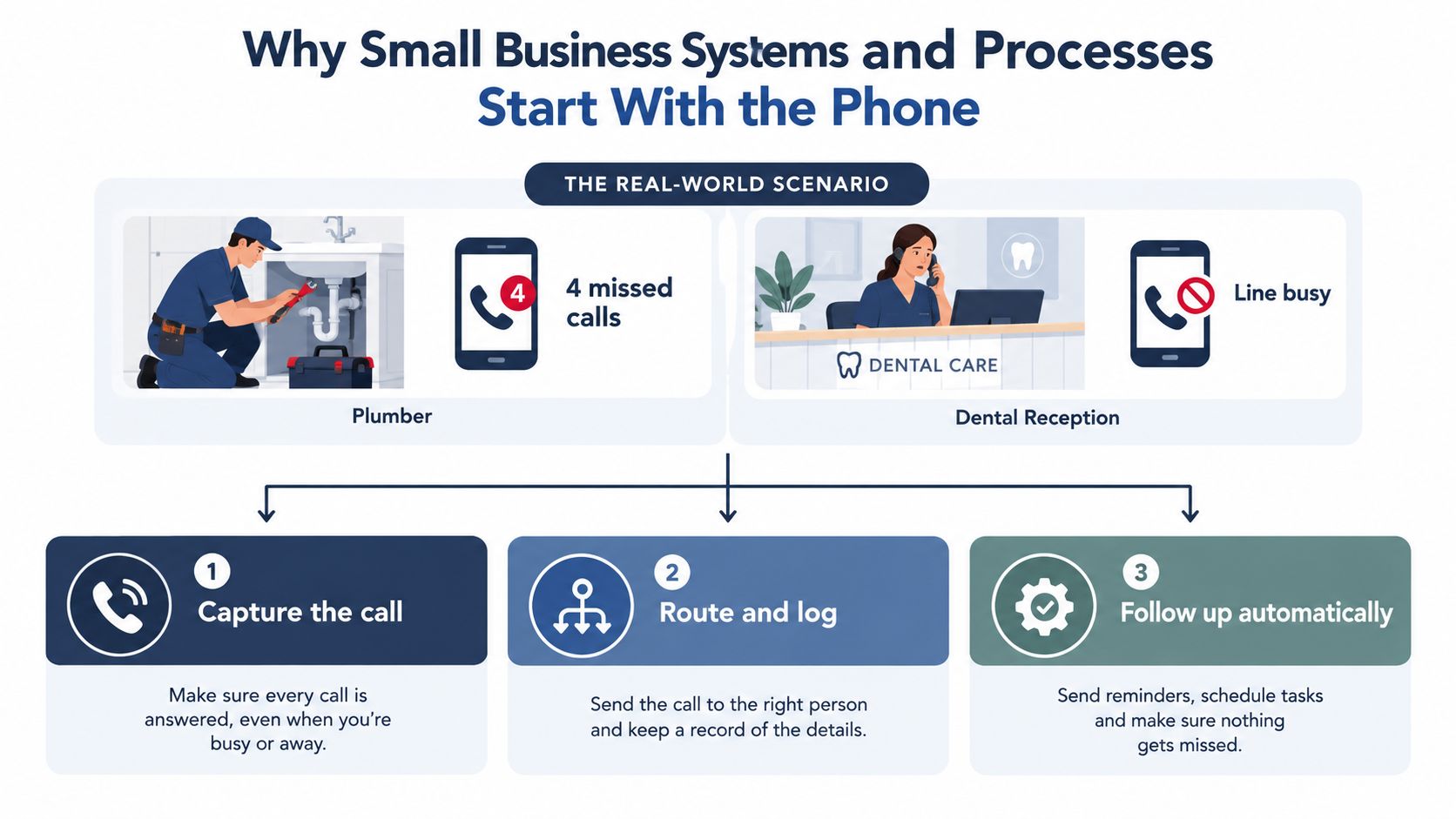
You're halfway through a job when your phone starts vibrating. You miss the first call, then three more. By the time you're free, one caller has hired someone else, another has left no message, and a third needs an answer you could've handled in under a minute. A dental practice has the same problem from the other side of the counter: the receptionist is helping a patient while the line shows “busy,” and appointments disappear.
That's the small-business systems problem. It isn't a lack of ambition or software. It's an owner's calendar becoming the only operating system.
Why Small Business Systems and Processes Start With the Phone
Small business systems and processes are the repeatable way your company handles recurring work. A system is the broader operating flow, such as customer intake or appointment management. A process is the specific sequence inside it, such as answering a call, collecting details, booking a slot, and sending confirmation.
This isn't enterprise bureaucracy. A five-person plumbing firm needs a reliable way to capture inquiries while the team is on site. A dental office needs a consistent way to answer appointment questions during busy periods. A law firm needs to separate routine intake from matters that require a qualified person. The workflow matters because the same customer experience shouldn't depend on whether one individual happens to be free.
Treat the owner's calendar as the constraint
Start with the work that reaches you when you can't respond. That usually means inbound calls, booking requests, quote inquiries, customer updates, and urgent escalations. Redesigning an internal spreadsheet may feel productive, but it won't recover a caller who never got an answer.
A practical phone system has three layers:
- Capture the call: Answer immediately, collect the caller's purpose, name, contact details, and preferred next step.
- Route and log: Send the request to the correct person, calendar, queue, or follow-up list.
- Follow up automatically: Confirm the request, preserve the context, and alert a human when judgment is needed.
A useful guide to phone answering for small business should lead to the same conclusion. The first system to fix is the one closest to lost demand.
OECD research supports the broader principle. Formal management practices, including planning, accounting, marketing, logistics, and quality control, are associated with SME productivity, while documented workflows help convert limited labour into consistent service. The practical lesson isn't to document everything. It's to make the most valuable recurring work dependable. Read the OECD research on SME productivity for the underlying management framework.
The sequence is straightforward. Rank processes by revenue exposure, map the worst one on a single page, automate the inbound call layer where the outcome is clear, secure the customer data involved, and review one useful KPI every week. That approach gives a small operation a working system without turning the owner into a full-time documentation manager.
Ranking Your Processes by Lost Revenue, Not by Urgency
The loudest problem isn't always the expensive one. A messy shared inbox may annoy everyone, while unanswered calls directly remove opportunities from the pipeline. Rank process work by what it costs the business, how often it occurs, and how dependent it is on the owner.
Capture a baseline this week. Don't wait for perfect reporting. Count every inbound call and label it answered, missed, booked, qualified, transferred, or requiring follow-up. For scheduling, record requests, confirmed appointments, cancellations, and no-shows. For invoicing, record the days between completed work and invoice issuance.
Four places where process failure reaches the bottom line
Missed calls deserve attention when customers call during jobs, meetings, treatment, or travel. Track calls by time period and record what happened after each missed call. A missed call that becomes a booked job has a different value from one that never reconnects.
Lead conversion tells you whether inquiries become qualified opportunities or disappear after the first contact. Track the source, service requested, qualification result, and next action. If the owner personally handles every promising lead, that process has high dependency even if its daily volume looks modest.
Scheduling and no-shows create empty capacity. Record appointment requests, booked slots, cancellations, reschedules, and no-shows. The system should confirm the appointment, make the next action clear, and give customers a simple way to request a change.
Follow-up and collections expose delay after the original work is complete. Track the time from quote to decision and from completed work to invoice. A process that relies on one person remembering every callback or payment request should rank high, even when the work feels administrative.
The OECD Digital for SMEs survey found that only about 52% of SMEs in the European Union had implemented at least one digital technology, roughly 8 percentage points below U.S. SMEs. The gap between small and large enterprises reached 34 percentage points for CRM and 23 percentage points for e-commerce, showing that owning software isn't the same as operating a connected process. See the OECD Digital for SMEs findings.
Build the ranking on one page
Use this matrix with your own observations. Keep the ratings simple, such as low, medium, or high. The point is to make trade-offs visible.
| Process | Daily Volume | Revenue Impact | Owner Dependency | Ease of Fix |
|---|---|---|---|---|
| Missed-call recovery | Record calls | High if callers request work | High | High |
| Lead qualification | Record inquiries | High if quotes follow | High | Medium |
| Scheduling and confirmations | Record requests | Medium to high | Medium | High |
| Follow-up and collections | Record open items | High if cash is delayed | High | Medium |
Fix the process with the strongest combination of high volume, high revenue impact, high owner dependency, and reasonable ease of improvement. For many trades and service firms, that will be the phone. For a professional practice, it may be appointment intake or qualification.
If your operation spans multiple locations or regulated services, the discussion of how to optimize clinic and law firm workflows can help you think beyond isolated tasks and identify the handoffs that create the most exposure. Use the resource for structure, but build your ranking from your own call and booking records.
Mapping a Workflow You Can Actually Run on Monday
Don't start by choosing software. Start by describing the work so clearly that another person could run it without asking you what happens next.
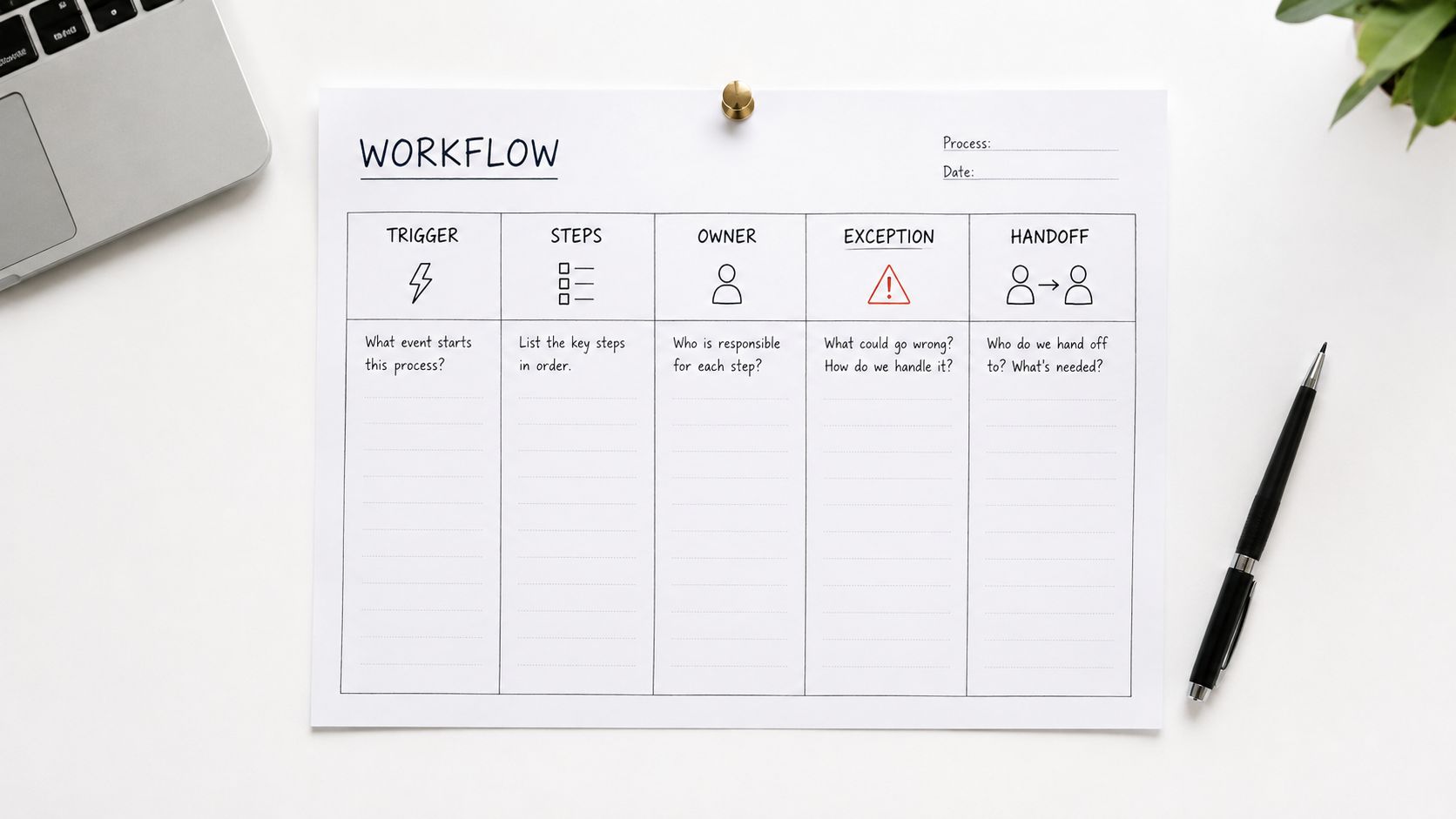
Use five fields. The trigger tells you when the process begins. The steps describe the minimum actions. The owner identifies who is accountable. The exception defines when the normal path stops. The handoff records what information the next person receives.
Workflow template: Trigger → Steps → Owner → Exception → Handoff
Keep the first map to one page. If it takes several pages before you've tested the process, you've probably documented preferences instead of essential actions.
A missed-call recovery example
Trigger: A new caller contacts the business outside operating hours or while the team is unavailable.
Steps: Capture the caller's language, intent, name, contact details, service area, urgency, and preferred appointment time. Answer approved routine questions. Offer an appointment or place the inquiry in a callback queue. Send confirmation with the next step.
Owner: The system handles routine intake and booking. A named staff member owns exceptions and follow-up.
Exception: Escalate when the caller requests a person, asks for medical, legal, financial, or safety advice, gives an unclear request, or falls outside the approved knowledge base.
Handoff: Send the human a concise summary, the caller's details, the requested service, any appointment information, and the reason for escalation.
For a two-person electrical firm, the system might collect a service address, explain the service area, and queue a non-urgent inspection request while both electricians are working. For a four-person dental practice, it might handle opening hours and appointment requests, then transfer clinical questions or requests involving sensitive patient circumstances to the appropriate staff member.
Separate routine actions from judgment
Write “system” beside steps that follow a clear rule. Write “human” beside steps involving diagnosis, interpretation, negotiation, complaints, or risk. This distinction prevents two common mistakes: forcing staff to repeat basic intake and allowing automation to make decisions it shouldn't make.
OECD research identifies formal management practices as important determinants of SME productivity and reports positive correlations between practices such as total quality management, lean production, and business output. The operational takeaway is simple: repeatable workflows are assets, not paperwork. You can review the supporting OECD productivity report before expanding the map beyond your highest-value process.
For a practical workflow perspective, see workflow optimization for small operations. Then test your map manually. If the owner still has to answer the same question at every handoff, the process isn't ready for automation.
Where AI Customer Service Fits Without Replacing Humans
AI belongs first at the inbound call layer because that's where three problems meet: lost revenue, limited owner availability, and routine questions that follow clear rules. You don't need to automate the whole business. You need to absorb the contact load that interrupts paid work.
Start with contacts that have clear and reversible outcomes:
- Appointment requests: Collect the service, preferred time, contact details, and relevant preparation information.
- Opening-hours questions: Provide the approved schedule and holiday exceptions.
- Service-area checks: Confirm whether the address falls within the operating area.
- Basic status updates: Share approved information without improvising.
- Language routing: Let customers speak naturally in the languages your business receives.
Keep these interactions bounded. Complaints, complex quotes, regulated advice, medical or legal questions, safety matters, and anything outside the approved knowledge base should go to a human.
Use disclosure and context as part of the service
A clear opening script is enough:
“You're speaking with an AI phone assistant. I can help with appointments and routine questions, and you can ask for a member of the team at any time.”
The system should pass the conversation forward, not make the customer start again. A useful handoff includes intent, collected details, summary, escalation reason, destination queue, and any appointment already created.
That matters because 83% of consumers reported having to repeat information after an AI-to-human transfer, while trust in AI resolution was 55% when customers had a clear human option, compared with 26% when that option wasn't visible. Those figures support bounded autonomy with fast human takeover, not maximum automation. See the research on AI handoff failures and customer trust.
Make the handoff rule explicit
Escalate when:
- The caller asks for a person: Don't make them argue with the assistant.
- Confidence is low: Route uncertainty instead of guessing.
- Attempts fail repeatedly: Stop looping and transfer the case.
- The caller is distressed or negative: Give a human control quickly.
- The subject is high stakes: Medical, legal, financial, and safety matters require human judgment.
An AI phone assistant can answer in the caller's language, book into a connected calendar, and send an email or optional SMS summary so staff continue from the correct context. rednea provides this type of inbound assistance, including call answering, language detection, routine questions, appointment booking, routing, and summaries through its AI answering service.
For broader planning around automation and service operations, the Microsoft customer service roadmap offers useful context. Keep your own implementation narrower. Automate one or two call types, review outcomes by intent, and expand only when the quality remains stable.
Securing Customer Data Without Creating a Compliance Project
Security should be attached to the workflow you just mapped. It shouldn't become a separate binder that nobody opens.
NIST describes a small-business security approach that is voluntary, risk-based, prioritised, flexible, repeatable, and cost-effective. One compilation cites 77% of SMBs reporting inadequate cybersecurity personnel and 76% attempting to manage cybersecurity without external resources, which is why a five-person firm needs a lean control loop rather than an oversized compliance exercise. See the NIST guidance on small-business cybersecurity resources.
Apply six controls to one live workflow
Govern: Assign one person as the data owner. Define what the AI assistant may handle and what must reach staff.
Identify: List the customer data involved, including call records, contact details, calendars, CRMs, shared inboxes, integrations, and transcripts. Remove fields that the workflow doesn't need.
Protect: Use least-privilege access, strong authentication, backups, vendor controls, and clear staff procedures. A receptionist doesn't need the same access as an administrator.
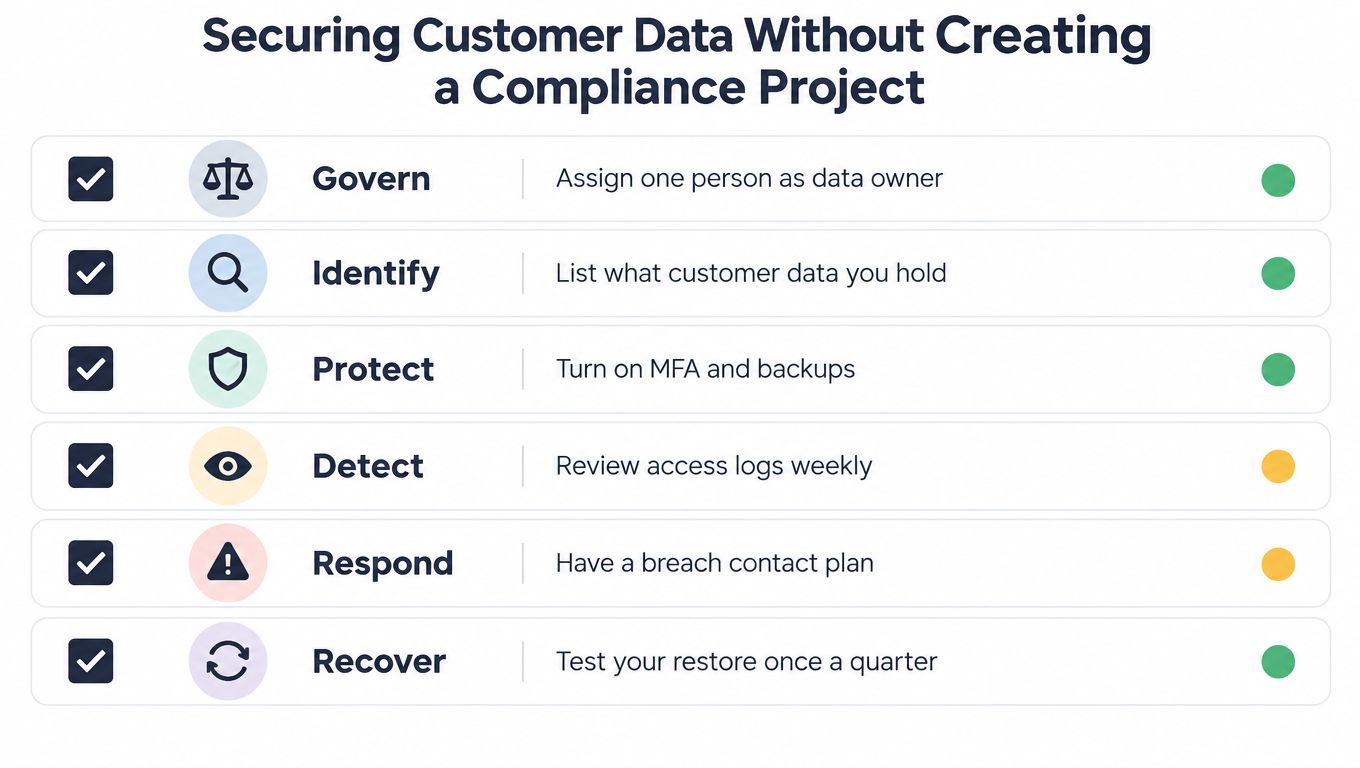
Detect: Review unusual logins, failed calls, unexpected data access, and integration failures. A weekly review is more useful than an annual promise to “check security.”
Respond: Keep an escalation contact plan. Define who contains the issue, who assesses customer notification, and where evidence is preserved.
Recover: Restore the service, check data integrity, and update the workflow after an incident. A backup that has never been restored is an assumption, not a recovery plan.
Keep the data footprint small
For EU and UK-facing businesses, adopt data minimisation as the default posture. Tell callers when they're speaking with an AI assistant, collect only what the process needs, define retention, and delete information when a valid request requires it. Don't keep sensitive details just because a system makes storage easy.
Tie each control to the map. If the phone workflow collects an address, specify who can view it and when it is removed. If an appointment enters a calendar, confirm which staff can access it. If a summary goes by email or SMS, decide what information is appropriate for that channel.
Use this customer data protection guidance as a practical checklist, then review the controls quarterly. Security becomes manageable when it follows the work instead of competing with it.
The Weekly Measurement Loop and Your First 30 Days
A process isn't improved because it looks tidy. It improves when a business outcome changes without creating more defects or customer escalations.
Choose one outcome first: missed-call recovery, booking conversion, no-show rate, or days to invoice. Establish a baseline by counting every relevant transaction and recording handling time, rework, exceptions, and peak-period demand. Then change one part of the workflow, review it weekly, and standardise it only if the KPI improves.
A small-business process-improvement study reported a 46.8% improvement in process-cycle efficiency, a 27.9% reduction in lead time, a 59.3% increase in value-added time, and a 71.9% reduction in non-value-added time after Lean Six Sigma adoption. Those are study results, not promises. The useful lesson is disciplined measurement, not copying percentages. See the benchmarking analysis guidance.
Review three KPIs every week
Contact outcome: Classify every inbound interaction as answered, missed, booked, qualified, escalated, or requiring follow-up. This shows whether the call layer is capturing demand.
Speed to next action: Record how long it takes to respond, book, transfer, quote, or invoice. Faster isn't automatically better if errors increase, so pair speed with rework or escalation review.
Quality of completion: Check repeat contacts, no-shows, failed handoffs, customer complaints, and unresolved follow-up. A process that closes tasks but creates customer confusion isn't working.
Use a basic weekly review with three questions: What changed? Which outcome moved? What went wrong? Don't add another automation until the team can answer those questions from actual records.
Start on Monday
Week one, baseline: Count calls and inquiries. Label outcomes. Record booking, follow-up, and escalation results. Don't redesign the process yet.
Week two, map: Put the top-ranked process on one page using trigger, steps, owner, exception, and handoff. Mark every point where the owner currently becomes the bottleneck.
Week three, pilot: Let AI handle a narrow set of approved call types. Disclose the AI interaction, provide a visible human option, preserve the transcript or summary, and keep a human fallback available.
Week four, review: Compare the chosen KPI with the baseline. Check defects, repeated contacts, customer escalations, and staff workload. Standardise the change only if it saves time or improves revenue without harming service.
Set an exit criterion before the pilot starts. If the system doesn't reduce owner interruption, improve a selected outcome, or maintain acceptable handoffs, pause it and fix the workflow instead of adding features.
The contrarian rule: Bounded autonomy with fast human takeover beats maximum automation.
Small business systems and processes are operating assets. Build the one that protects your calendar, measure whether it earns its place, and leave the rest alone until the evidence says otherwise.
---
rednea provides an AI phone assistant that answers routine customer calls, detects supported languages, books appointments, captures inquiries, routes important requests, and sends concise summaries for human follow-up. Start by fixing your highest-loss contact process and visit rednea to see how a small business can add a reachable first line without removing human judgment.
Try rednea, no strings attached
AI phone assistant for business. Hear a live demo in your browser, book a call with our team, or get started — from £90/month, cancel monthly, no minimum term.
GDPR-compliant · EU & UK GDPR · Multilingual