Lead Qualification Checklist: 8 AI Steps for Phone Calls

It's just after nine on a Tuesday night. Your phone rings, the problem is a burst pipe under a kitchen sink, and the caller is panicking in Spanish. Nobody picks up. She leaves thirty seconds of voicemail, then calls the next plumber on the list, who answers and books the job.
That's a qualification problem, not a marketing problem. A 411 Locals study of missed business calls found that in 2024 only 37.8% of incoming calls to 85 businesses across 58 industries were answered by a live person, while 37.8% went to voicemail and 24.3% got no response at all.
A lead qualification checklist fixes this only when it's built for the phone instead of the form. Most published versions assume a sales rep reading a web enquiry the next morning. Your reality is a ringing handset, a caller who needs an answer now, and a decision that has to happen in ninety seconds.
The eight steps below run in order, from the first ring to the follow-up. Each one has a job an AI assistant can do and a clear point where a person takes over. Start with the first three and you'll catch calls you're losing this week.
1. Define Your Ideal Customer and Qualifying Criteria
Before any assistant answers your phone, you need one page that says what a good job looks like. Not a strategy deck. The services you want, the postcodes you'll drive to, the smallest job worth loading the van for, and the work you turn down.

Most small teams skip this page and pay for it later. Belkins' sales pipeline benchmarks report that 46% of surveyed B2B sales teams used no formal deal-qualification framework. Among teams that did, 29% built their own, 14% used BANT and 9% used MEDDIC, and adoption rose with company size from 47% of small and midsize teams to 86% of large teams.
Read that as permission to keep this small. Your own six lines, applied on every call, beat a methodology nobody follows.
Three to five criteria is the right starting size
Write each line as a yes/no or a simple range, because an assistant can apply those without guessing. "Budget around five thousand" is answerable. "Good fit" isn't.
- Electrician: callers within 25 km, jobs above a set minimum, free quotes reserved for rewiring and consumer unit work. Everything else goes to a callback slot or a referral.
- Dental practice: treatment type, insurance status, and whether the patient can take an appointment within two weeks.
- Solo consultant: a decision-maker on the call, a defined project, and a start date inside the current quarter.
Rule of thumb: pull your last 20 to 30 jobs and mark which ones were worth the time. Those patterns are your criteria, and they're more honest than anything you'd write from memory.
Review the page monthly for the first quarter after launch. Criteria drift as you hire, buy equipment, and change the area you cover.
2. Answer Every Call Instantly, in Any Language
A caller with a leaking pipe at 9 p.m. needs a clear next step, not a voicemail prompt. If nobody answers, the business may never hear what the caller needed.
A 2011 Harvard Business Review study sent test inquiries to 2,241 U.S. companies and timed their replies, as this speed-to-lead analysis documents. Only 37% replied within an hour, 16% within one to 24 hours, 24% took more than a day, and 23% never replied. Among companies that responded within 30 days, the average response time was 42 hours.
The same body of work found that firms contacting prospects within an hour were nearly seven times more likely to qualify the lead than firms waiting a second hour, and more than 60 times more likely than firms that waited a day or more.
What an assistant does with the first ten seconds
rednea answers on the first ring, introduces the business by name, then determines whether the call is an emergency or a routine request. It can handle calls in English, Spanish, French, German and Italian, using the language configured for the assistant.
For an emergency on the business's list, the assistant first captures the caller's address and callback number, then transfers the call to the technician on call. Routine requests can be booked or logged. If the right person is unavailable, the assistant takes a callback request unless it can handle the inquiry itself.
- The 9 p.m. leak: The assistant confirms the address and callback number, then transfers the caller to the on-call technician if the issue matches the business's emergency rules.
- The bilingual estate agency: French and English enquiries can be handled in the caller's language, with viewing requests captured for follow-up.
During setup, write the business name, hours, service area, emergency criteria and everyday caller questions in English. That information carries into every language the assistant speaks. Test the greeting and common caller phrasing in each configured language, including local terms for the same fixture or room. Set clear rules for when a caller asking for a person should be transferred or get a callback.
3. Write a Short, Scripted Set of Qualifying Questions
For a roofing call, start with the job and the property postcode. Then ask about urgency, budget range and whether the caller owns the home. Keep the script to four to six questions, ordered around the criteria that determine whether you can help and what should happen next.
The BANT qualification framework organizes questions around budget, authority, need and timeline. On the phone, use those categories to confirm the basics and decide where the call goes. Ask for useful details rather than yes-or-no answers: an approximate budget range is more actionable than “flexible,” and the name of the person approving the work is clearer than “I decide.”
Fewer questions, sharper ones
Callers often research their options before making contact. The 2025 Buyer Experience Report, cited in Martal's guide to qualifying sales leads, found that 94% of buying groups rank their shortlist before contacting sellers and purchase from the pre-contact favourite roughly 77% of the time. Keep questions focused on the caller's need, fit and next step.
A helpful receptionist can ask five clear questions. A long sequence can make the same call feel like a form.
Ask the question that rules out a poor fit early. If the job is outside your service area, explain that promptly and politely. If it fits, capture the details needed to route the call or arrange the next step.
- Roofing contractor: Ask what work is needed, the property postcode, whether it is urgent or planned, the approximate budget range and whether the caller owns the home.
- Law firm: Ask the type of matter, jurisdiction and whether a deadline applies, then direct the enquiry to the right practice area.
Review which questions callers skip or answer unclearly. Tighten the wording when the question causes confusion, and keep the script short enough for a real phone conversation.
4. Score and Tag Each Lead Automatically
Three tags are enough to start: hot, warm, cold. A hot lead meets every must-have criterion and has urgent timing. A warm lead meets most of them and is planning ahead. A cold lead sits outside your criteria or has no clear need.
Timing deserves the heaviest weight, and the numbers back that up. The MIT and InsideSales.com lead response study found leads contacted within five minutes were 21 times more likely to qualify than leads contacted after 30 minutes, as reported in a 2026 benchmark summary.
Rules, not models
Use plain rules at this size. If the job is in the service area, the system is dead, and the caller wants someone this week, that's hot. A points model with weighted coefficients looks impressive and gets second-guessed by everyone on the team.
- HVAC company: hot means in-area, no cooling, wants a visit this week. The booking drops straight into the technician's calendar.
- Solo consultant: warm means a clear need with a start date next quarter, so the caller gets a follow-up email with pricing and a call booked for next month.
Compare the assistant's tags with what your team would have decided for the first 50 calls, and correct the mismatches while you still remember the calls. Automated lead scoring only earns trust when the team can see why a lead was labelled.
Keep the tag visible in the CRM next to the call summary. A tag nobody sees is a tag nobody uses.
5. Set Clear Escalation Rules for Human Handover
Automation that swallows a complaint costs more than it saves. Customers want the option of a person: Gartner research cited in this guide to AI customer service for small business found 87% of customers believe companies using generative AI for service should still provide access to a human agent.
The upside of getting the split right is time. Salesforce's service report for growing businesses reports that 65% of representatives at organisations using AI have more time for relationship-building, against 50% at organisations without it.
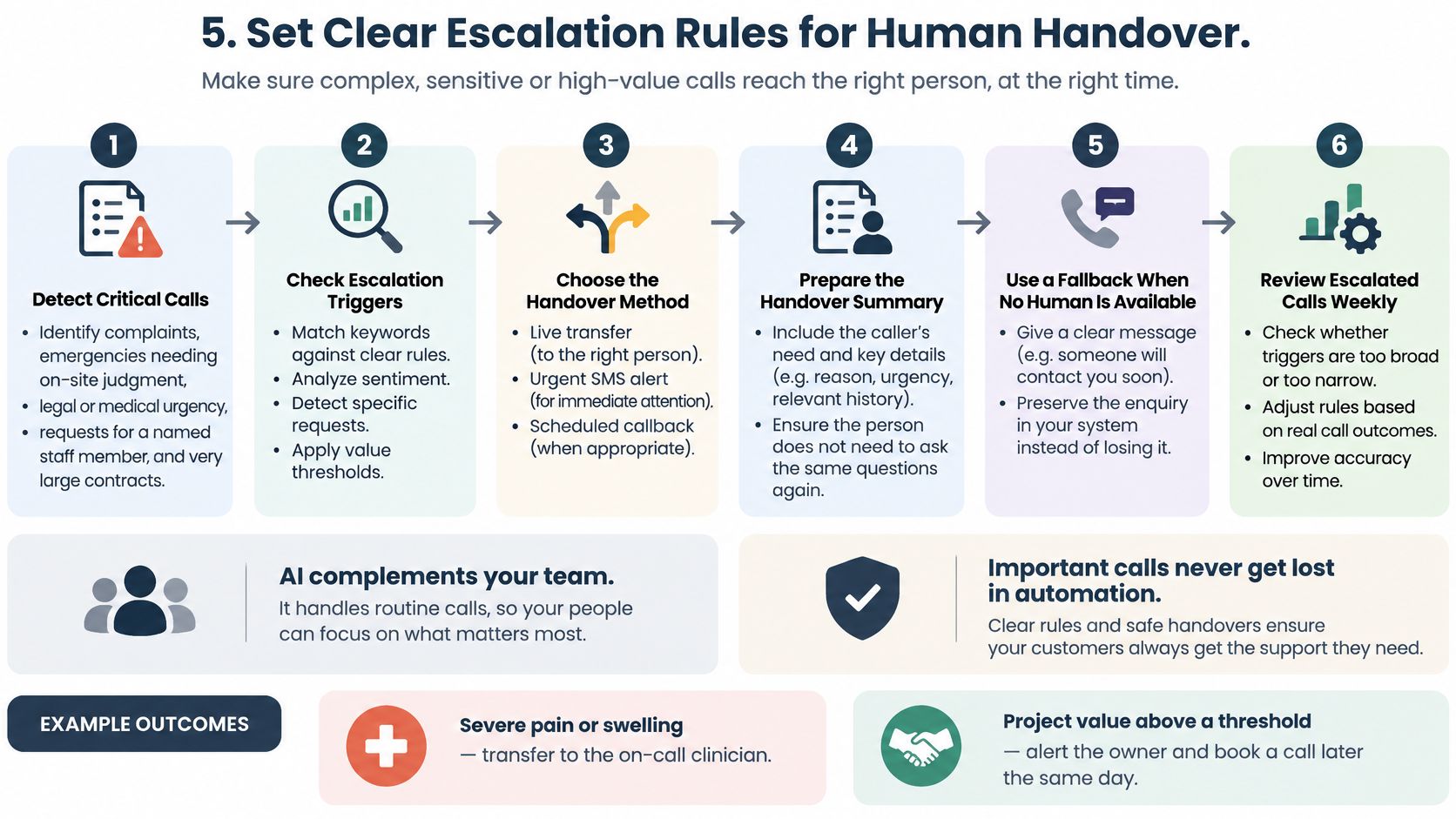
That extra time only appears when the escalations are defined in advance rather than improvised mid-call. Write the five triggers first.
- Complaints and anger: any caller who is already unhappy goes to a person, with no "let me finish qualifying you first".
- Emergencies that need judgement: active leaks, no power, a patient describing severe pain or swelling.
- Legal or medical urgency: a court date, a filing deadline, a safeguarding concern.
- Named staff: "I want to speak to Sarah" means Sarah, or a callback time Sarah has agreed to.
- High value: anything above a contract threshold you set in advance.
Test the transfers at different times of day, including the hours when nobody is in the office. Then read last week's escalated calls and ask whether each trigger fired too early or too late. Escalation call handling is a routing decision, not a failure of the assistant.
6. Connect Qualified Leads to Your Calendar and CRM
A qualified lead is worth nothing if it stays in a transcript. The booking has to land in the calendar your team opens every morning: Google Calendar, Microsoft 365, or the scheduling tool your industry runs on.
Small firms adopt this in stages, and the pattern is consistent. A 2025 Talkdesk survey of 400 U.S. small-business owners found that 51% had integrated AI into customer-service operations, with chatbots the most common application at 74%, while 65% reported faster resolution times and 60% reported round-the-clock support.
The settings that prevent a mess
Hot leads book directly into an open slot. Warm leads become tasks with a due date. Both need the same three settings.
- Buffer times: leave 15 to 30 minutes between appointments so travel and paperwork aren't squeezed to zero.
- Appointment lengths: set a duration per job type, because a 30-minute quote visit and a 90-minute callout don't belong in the same slot length.
- One contact record: check that each booking creates one record and not a duplicate, or your pipeline doubles in a week.
Test the CRM phone integration against the exact calendar account your team uses, not a personal one. A physiotherapy clinic needs each practitioner's diary with the correct appointment length. A freelance designer needs a discovery call booked and the enquiry logged as a lead in a simple pipeline. Both fail the same way when the account is wrong.
7. Send Fast, Concise Follow-Up Summaries
A useful call summary lets the next person act without replaying the call. Keep it to six lines: caller name and number, address, reason for calling, lead status, what was booked or promised, and the next step. For a practical guide to the format, see what to include in a telephone call summary.
What belongs in the summary
Plumbing call
- Caller: Maya Chen, 555-0100
- Address: 18 Pine Street
- Request: Water coming up through the floor in the back room
- Status: Emergency, transferred to the on-call technician
- Outcome: Address and callback number provided before transfer
- Next step: Technician to call the customer
Use the caller's own description where possible. “Water coming up through the floor in the back room” gives the plumber a clearer starting point than “internal leak.”
For a legal enquiry, keep the same structure: caller and callback number, matter type, brief description, consultation booking or callback request, and who should handle the next step. Send routine summaries by email. Follow the business's rules for urgent calls, including which calls should be transferred to the right person. Email works well for a record; urgent matters need a clear route to a person who can act.
8. Measure, Review, and Improve with Privacy in Mind
Five metrics, reviewed on the same day each week: calls answered, percentage of calls qualified, bookings made, hot leads contacted inside your target time, and conversion to paying customers. That's enough to see where the flow leaks.
Response time needs cohorts rather than an average, because a good mean hides a bad tail. Benchmark guidance on lead response recommends segmenting results into under five minutes, five to 30 minutes, 30 minutes to an hour, and over an hour, and capturing timestamps, first-contact latency, contact outcome, qualification outcome and booking completion alongside them.
The privacy settings to decide before launch
Callers describe leaks in their homes, symptoms, and legal disputes. Collect what the job needs and nothing else.
- Disclosure: say at the start of the call that an assistant is handling it and that the call is recorded or transcribed, in plain language and not in a legal paragraph nobody follows.
- Retention: set a period, document it, and test the deletion process with a sample request rather than assuming it works.
- Scope: skip the date of birth, the policy number, or the medical detail the booking doesn't require.
Privacy rules in the EU and UK ask four things of a call flow: collect only what you need, explain the recording, limit retention, and delete on request. None of that is exotic, and all of it is easier to build before launch than to retrofit.
Review a sample of summaries each week. A contractor who finds half the callers abandoning the budget question should switch it to a range selection and watch the completion rate move.
What each qualification step produces and where it can go wrong
| Step | Main Output | Best For | Key Risk |
|---|---|---|---|
| 1. Define ideal customers and qualifying criteria | Written criteria and disqualifiers | Consistent lead qualification | Criteria may be too strict |
| 2. Answer every call instantly, in any language | 24/7 multilingual call answering | Capturing after-hours and multilingual enquiries | Accents or noise may require clarification |
| 3. Write qualifying questions | Short, structured question script | Consistent, efficient information gathering | Too many questions may frustrate callers |
| 4. Score and tag each lead | Lead status and searchable tags | Prioritising follow-up and tracking lead quality | Simple rules may misclassify unusual leads |
| 5. Set human handover rules | Escalation triggers and fallback process | Complex, urgent, or high-value calls | Poor triggers may overload staff |
| 6. Connect leads to calendar and CRM | Bookings and updated lead records | Reducing manual entry and missed follow-ups | Poor setup may create duplicate records |
| 7. Send follow-up summaries | Concise call details and alerts | Fast team response to qualified leads | Too many alerts can cause fatigue |
| 8. Measure, review, and protect privacy | Performance metrics and data practices | Improving qualification and building trust | Privacy requirements vary by jurisdiction |
Start Small, Check Your Results, and Let AI Carry the Routine Calls
Qualification improves through careful review. Start with a small set of criteria and questions, then check how the process handles real calls in the languages your customers use. Use what you learn to refine the wording and rules.
What to look at after the first week
- Answered rate: How many calls became conversations?
- Completion: Which question do callers skip most often? Unclear wording may be the cause.
- Tag accuracy: Review calls where the assistant's hot or warm tag differs from your assessment.
- Booking rate: How many qualified calls led to an appointment?
- Callback follow-through: Check whether high-priority callers received a response within your target time.
Change one thing at a time. Reword questions callers often skip, adjust criteria that exclude suitable work, and refine escalation triggers that send too many routine calls to staff. This makes it easier to see which changes help.
Keep people responsible for decisions that carry risk, such as handling complaints, applying clinical judgement, or responding to legal deadlines. Set clear rules for when the assistant should route a call, take a callback request, or handle the inquiry itself.
rednea can support this phone-based workflow with around-the-clock call answering, appointment booking, routine answers and call summaries by email. You can call a live demo number before paying to hear how the assistant sounds and behaves.
Start with clear criteria, questions, escalation rules and follow-up. Then review the results and adjust the process as your calls show where it needs attention.
---
Keep your line open while you're on a ladder, under a floorboard, or in a consultation. Visit rednea to hear the assistant handle a call the way your business would.
Try rednea, no strings attached
AI phone assistant for business. Hear a live demo in your browser, book a call with our team, or get started — from £90/month, cancel monthly, no minimum term.
GDPR-compliant · EU & UK GDPR · Multilingual