How Do AI Assistants Work for Small Businesses

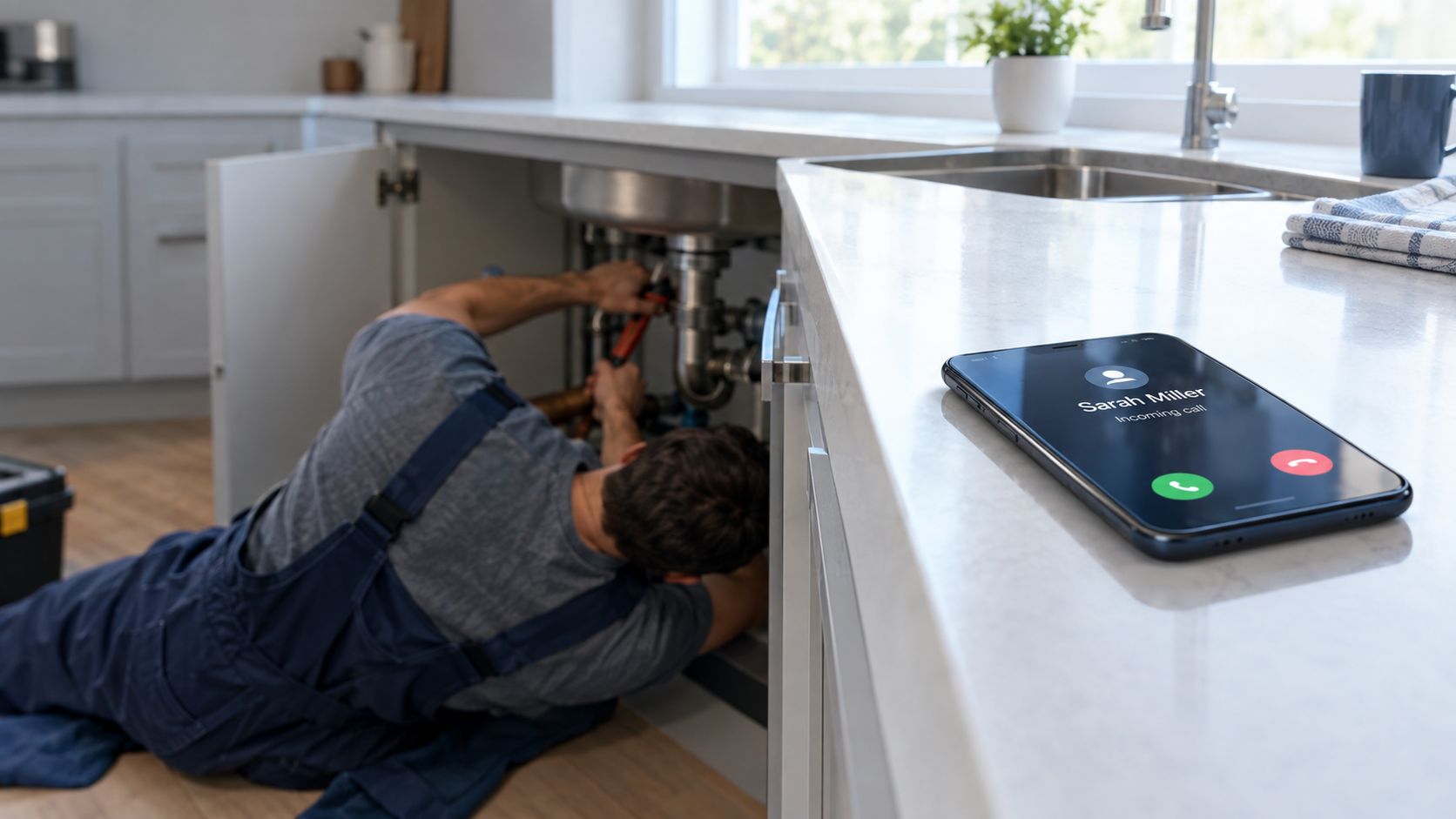
You're halfway under a customer's kitchen sink when your phone rings. You can't reach it without standing up, drying your hands, and leaving the job. By the time you call back, the caller has already found someone else, and the urgent leak may have turned into a much larger repair.
An AI assistant can prevent that missed opportunity without pretending to be a replacement for you. It can answer the phone, understand what the caller needs, check your availability, book a suitable slot, and contact you when the situation needs judgment. That's the practical answer to how AI assistants work for a small business: they handle the predictable first contact, then bring a person into the conversation at the right moment.
The Moment a Call Comes In Without You
You are under a sink fitting a new valve when an unfamiliar number calls. Your AI assistant answers before the caller reaches voicemail: “Thanks for calling your local plumbing team. How can I help today?” The caller gets a response while you keep working safely.
The assistant identifies the business, listens for the job, and asks only for details that affect the next step. Is water still running? What is the postcode? Does the caller need emergency help, a quote, or a routine appointment? It can offer a suitable visit, record the request, or alert you when the description suggests immediate danger.
The result is closer to a reliable receptionist than a website chatbot. It keeps the caller engaged while you finish the job, then passes information to the right place. For a solo operator, **immediate availability** can protect leads that would otherwise disappear.
What the caller experiences
A typical call follows a practical sequence:
1. A greeting: The assistant names the business and confirms that the caller has reached the right team. 2. Short qualification: It captures the job type, location, urgency, and preferred timing. 3. A useful action: It answers a routine question, offers an appointment, sends a message, or creates a callback request. 4. A safe decision: It transfers the call when the issue is urgent, sensitive, uncertain, or too valuable to handle automatically.
The caller does not need to know what happens behind the scenes. They receive a useful response instead of voicemail.
The full pipeline
Several parts work together: speech capture, speech recognition, intent understanding, dialogue management, and voice generation. An integration layer connects those parts to calendars, customer records, notifications, and human handoff rules.
The assistant may also apply business instructions during the call. A burst pipe can trigger an urgent alert, while a routine quote request can become a scheduled callback. The system records the relevant details so you do not have to reconstruct the conversation later.
A language model handles only part of this process. The surrounding systems determine whether the assistant can complete a real task, such as checking availability, saving caller details, or handing the conversation to a person when automation is unsafe.
The Five Building Blocks Behind Every AI Assistant
Think of the assistant as a well-run restaurant kitchen. The caller places an order, different stations prepare the right parts, and the front-of-house worker delivers the finished response. The caller hears one smooth conversation, even though several operations happen underneath.
1. Speech capture
The phone network or device first captures the caller's audio. A wake mechanism may activate the assistant when someone says a chosen phrase on a device, while a phone assistant usually starts when the call connects.
The system has to deal with ordinary conditions, not studio audio. Callers speak from vans, busy roads, kitchens, or reception areas. The audio is passed to the recognition stage in small pieces so the assistant can begin processing before the caller has finished every sentence.
2. Automatic speech recognition
Automatic speech recognition, often called ASR, converts audio into text. It separates words from background noise and tries to handle accents, interruptions, hesitations, and incomplete phrases.
If a caller says, “The boiler's gone and there's water coming through the ceiling,” the assistant needs more than a transcript. It must preserve the meaning and identify the details that affect the next action. A poor transcript can lead to a poor decision, so audio quality and language coverage matter during testing.
3. Intent and details
The system next identifies the caller's intent. “Can someone come out tomorrow?” may mean a booking request. “How much do you charge for a blocked drain?” may be a pricing enquiry. The assistant also extracts details, such as the postcode, preferred day, property type, or existing customer name.
A foundation model, particularly a large language model, helps interpret natural language and generate next-step actions. The Transformer architecture introduced in the 2017 paper *Attention Is All You Need* became an important foundation for this type of language processing because attention mechanisms made sequence processing more parallelizable. The published translation results included 28.4 BLEU for English to German and 41.0 BLEU for English to French, with the English-to-French model trained for 3.5 days on eight GPUs, as described in this overview of the attention mechanism and Transformer architecture.
4. Dialogue management
Dialogue management keeps the conversation on track. It remembers what the caller has already said, identifies missing information, and decides which question should come next.
If the caller has already provided a postcode, the assistant shouldn't ask for it again. If the caller says the situation is dangerous, the normal booking flow should pause and follow the emergency rule. Slot-filling helps the system collect the fields required for a specific task without turning the call into a rigid form.
5. Natural language and voice
Finally, natural language generation creates the reply, and text-to-speech turns it into spoken audio. The assistant might say, “I can offer Tuesday morning, or I can send your details to the on-call plumber now.”
A practical AI voice agent explanation covers the user-facing experience, but the important operational point is that the reply must connect to the next action. A natural voice that cannot check a calendar is less useful than a plain voice that can complete the booking.
How Assistants Connect to Calendars, CRMs, and Tools
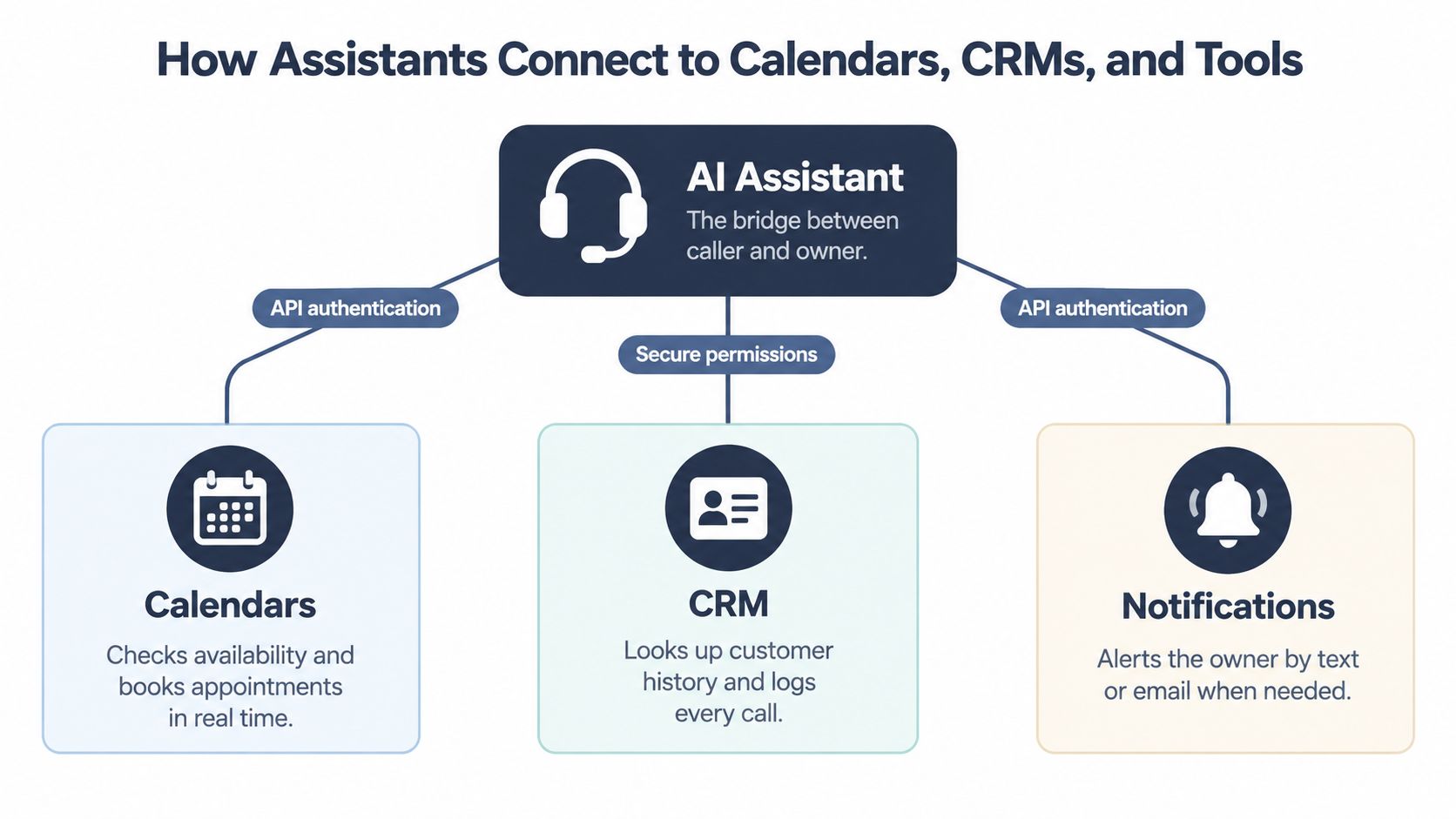
An assistant becomes useful to a business when it can do more than talk. It needs controlled access to the systems you already use for appointments, customer history, jobs, payments, and alerts.
The connection usually works through an orchestration layer. The language model decides that it needs a specific action, such as “find the next available appointment,” and sends a structured function call. The orchestration layer checks permissions, runs the action through the relevant system, and returns the result for the assistant to explain to the caller.
A booking example
Suppose someone calls a dental practice and asks for a cleaning. The assistant can:
1. Read the requested service and preferred timing. 2. Ask for the caller's name and contact details. 3. Query the practice calendar. 4. Check that the chosen slot isn't already occupied. 5. Offer an available appointment. 6. Confirm the booking aloud. 7. Update the customer record and send a notification to the practice.
The assistant doesn't need unrestricted access to every record. It should receive narrowly defined permissions for the actions it has to perform. That principle applies whether the system connects to a calendar, a CRM, a job-management system, or a payment-link service.
Why integrations need safeguards
Reliable integrations use controls such as API authentication, structured permissions, webhook events, idempotency keys, and retry handling. If a network connection fails after a booking request, an idempotency key helps the system recognise that the same request shouldn't create a second appointment when it retries.
You don't need to build these mechanisms yourself, but you should ask a provider how they prevent duplicate bookings and how failed actions appear in your dashboard. A CRM phone integration guide can help you think through the information that should move from the call into your customer workflow.
The same bridge supports escalation
The integration layer can also trigger an alert when a call needs your attention. It might send a concise email summary, notify an on-call person, or transfer the caller directly. That means escalation isn't a separate manual process. It uses the same caller details, calendar context, and business rules that power routine bookings.
When the Assistant Should Hand the Call to a Human
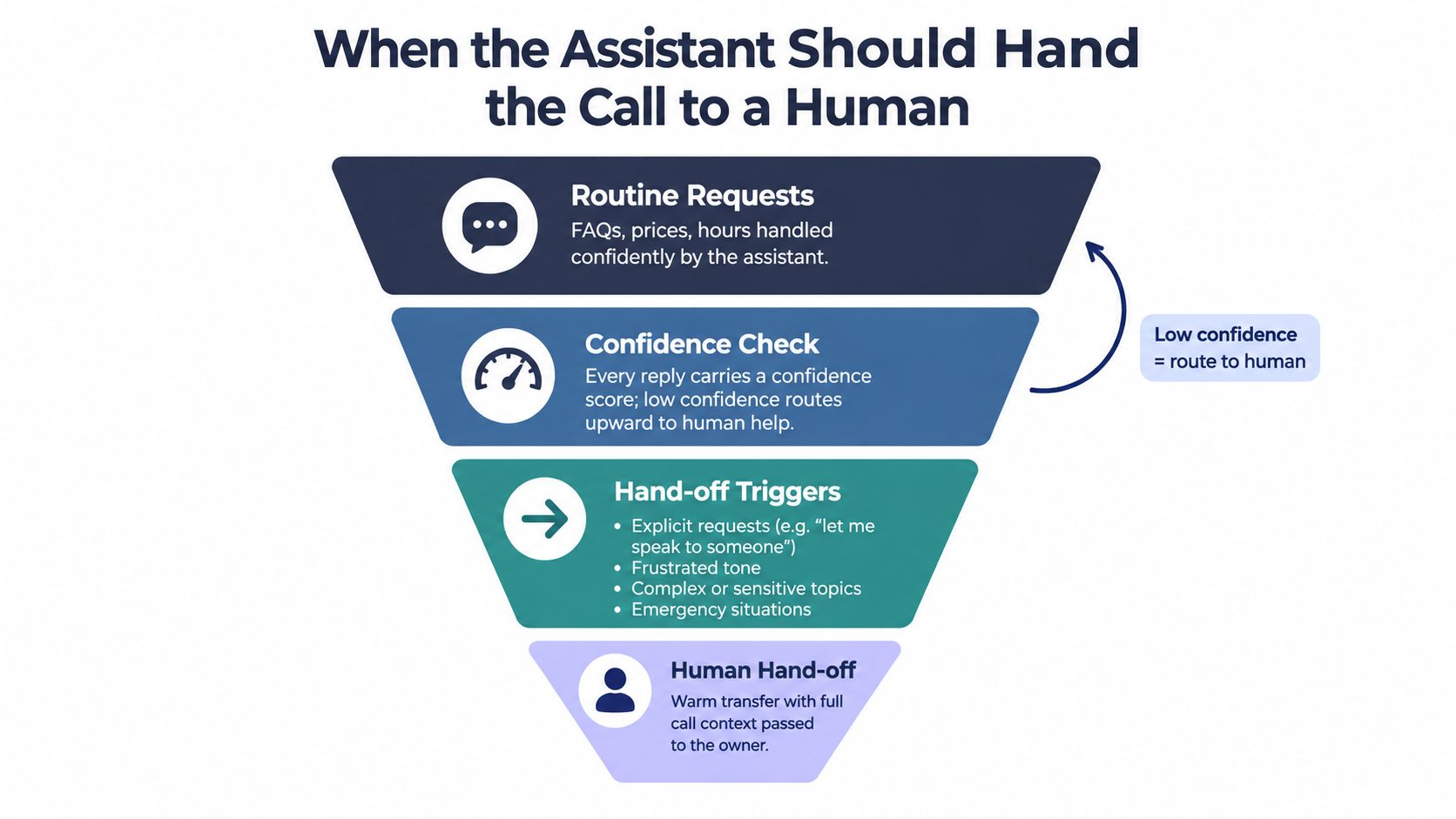
The safest assistant knows when to stop. It doesn't need to solve every call. It needs to recognise which calls are routine and which ones require authority, empathy, technical judgment, or immediate action.
Every response can be evaluated against a confidence threshold. If the system isn't confident that it understood the caller or selected the correct intent, it should ask a clarifying question once, then offer a human route rather than guessing repeatedly.
Four practical handoff triggers
An explicit request is the clearest signal. If the caller says, “Let me speak to someone,” the assistant should respect that request and transfer or arrange a callback.
An unsupported intent needs the same treatment. If you trained the assistant for bookings, opening hours, and basic quotes, it shouldn't improvise advice about a service it wasn't configured to handle.
Repeated misunderstanding is another warning. After two failed attempts to rephrase the question, a warm transfer protects the caller from repeating themselves and protects your business from a bad answer.
A sensitive situation should usually reach a person. Complaints, refunds, distressed callers, medical information, legal concerns, safety risks, and disputes over expensive work all require careful handling.
Gartner-cited market analysis estimates that 14% of customer interactions will be fully handled by AI by 2027, leaving 86% involving humans directly or with AI assistance. The figures appear in this analysis of whether AI will replace call centre agents. The practical lesson isn't that automation has failed. It's that most businesses need a triage layer, not a promise of complete replacement.
Practical rule: If a call could affect a five-hundred-pound invoice, a medical appointment, or an angry complaint, configure a human handoff.
Signals your provider should expose
Ask for configurable rules based on:
- Keyword hits: Terms such as “emergency,” “refund,” “lawyer,” or “speak to a person” can trigger a route.
- Sentiment changes: A sudden drop in tone or signs of frustration can move the call to a person.
- Confidence breaches: The system should transfer when recognition or intent confidence falls below your chosen threshold.
Human support remains important because 79% of Americans strongly prefer interacting with a human over an AI agent, 84% believe human agents are more accurate than AI, and 89% think companies should always offer a human option, according to this research on human and AI customer service preferences. A guide to sensitive calls and human versus AI reception can help you turn those preferences into transfer rules.
Real Examples of Small Businesses Using AI Assistants
A dental practice and an electrical contractor may both use an AI assistant, but they need different conversation flows. The practice cares about appointment type, language, patient context, and staff availability. The electrician cares about urgency, location, safety, and whether the job can be assessed remotely.
A multilingual dental reception flow
Consider a two-dentist practice in Bristol. Its assistant handles requests to book cleanings, confirms hygiene appointments, and manages rescheduling in English, Polish, and Portuguese between 8am and 7pm. The front-desk nurse can concentrate on patients in the practice instead of answering every routine call.
The assistant doesn't need to make clinical decisions. It can collect the reason for the call, identify the appointment category, offer approved slots, and pass clinical questions to the dental team. If a caller describes pain, bleeding, or another concern outside the booking flow, the assistant can flag the call for human attention.
Multilingual support is especially useful for small teams serving diverse communities. Research on AI tools for multilingual customer service describes how language coverage can support consistent service and customer trust. In practice, the assistant can keep the first conversation moving even when the available staff don't speak every caller's language fluently.
An after-hours electrician flow
Now consider a sole-trader electrician in Manchester. During the day, the owner is moving between jobs. After hours, the assistant asks whether the issue is urgent, captures the caller's postcode, records the symptoms, and identifies any immediate safety concern.
The system can then send a concise summary for review and prepare a text quote or diagnostic-booking message for the morning. It doesn't promise a repair it cannot assess. Instead, it turns an unanswered call into a structured lead with the details needed for a quick follow-up.
Choose the closest first use case
Start with the call type that repeats most often and carries the least risk. Good starting points include:
- Appointment booking and rescheduling.
- Opening hours, service areas, and basic pricing guidance.
- Lead qualification and postcode collection.
- Callback requests when you're driving or working on-site.
- Language detection and first-line support.
Write down what a successful first week would look like for your business. You might want every caller to receive an answer, every booking to include the right job details, or every urgent enquiry to reach the on-call person. That definition will guide the assistant's script and your review process.
Privacy, GDPR, and What Happens to Caller Data
A phone conversation can contain personal data even when the caller isn't your customer. A dentist calling about a patient, for example, may reveal information about another person. That third party still matters under privacy rules.
Start by tracing the data. The caller's voice enters through the phone system, becomes audio and possibly a transcript, passes through the assistant's processing service, and may then appear in a booking record, CRM note, email, SMS, or analytics report. Each step should have a clear purpose.
Four questions before you buy
Where is data stored? Ask whether recordings, transcripts, logs, and backups stay in EU or UK regions, or whether they are transferred elsewhere. A region choice isn't the entire GDPR assessment, but it helps you understand the processing arrangement.
Can you control retention? Find out how long recordings and transcripts remain available, whether you can set separate retention periods, and whether deletion removes copies from backups and analytics systems.
Can a caller opt out? Test a phrase such as, "Don't record this call," and check what the assistant does. The system should follow your configured privacy process rather than continuing without acknowledgment.
What does the agreement say? Read the data processing agreement. Look for the processor's role, subprocessors, security duties, international transfers, deletion terms, breach responsibilities, and support for access or erasure requests.
A vendor scorecard to copy
| Check | Record the answer |
|---|---|
| Storage regions | EU, UK, other, or mixed |
| Audio retention | Period and deletion method |
| Transcript retention | Period and deletion method |
| Real-time deletion | Available, unavailable, or conditional |
| Caller opt-out | Trigger phrase and system behaviour |
| Human access | Who can review calls |
| Subprocessors | Listed and updated |
| Data processing agreement | Signed, pending, or unavailable |
| Automated decisions | Explanation and human review route |
The ICO's guidance on automated decision-making should be read in plain English as a warning against letting a system make consequential decisions without appropriate safeguards. For a small business, that means documenting what the assistant can decide, keeping a human review path for significant outcomes, explaining the process where required, and avoiding unnecessary personal data in prompts and notes.
Use data minimisation as your default. If the assistant only needs a postcode and preferred appointment time, don't give it an entire customer history. If you don't need a recording after quality review, configure deletion rather than storing it indefinitely.
Common Problems and How to Fix Them
Most difficult rollouts don't fail because the language model can't form a sentence. They fail because the business rules, integrations, or handoff settings don't match the way the business operates.
Missed or incorrect bookings
A missed booking often points to a stale calendar connection, a timezone mismatch, or opening hours that weren't configured correctly. Check the live sync, confirm appointment duration and buffer time, then replay a complete booking call from greeting to confirmation.
Use a test calendar before connecting the assistant to real appointments. Ask it to book, reschedule, cancel, and handle an unavailable slot. Review what the caller heard and what the calendar recorded.
Wrong transfers
Wrong transfers usually mean two intents overlap. A caller asking about price might be routed to general support when you want a sales callback. An urgent safety issue might follow the ordinary booking path.
Set a clear priority order:
- Safety and emergencies: Send to the on-call person or emergency instructions.
- Pricing and purchase intent: Route to sales or lead follow-up.
- Routine service requests: Let the assistant answer or book.
- Unclear requests: Ask one clarifying question, then offer a callback.
Slow responses
Voice conversations need quick turn-taking. Measured live voice-agent testing found time to first audio rising from 649 milliseconds on the opening turn to 1242 milliseconds by the seventh turn, while a sliding context window reduced the increase from 726 milliseconds to 1037 milliseconds. The findings are reported in this voice-agent turn-taking analysis.
If replies feel slow, test the CRM round trip, calendar connector, network route, and size of the conversation context. A local audio cache may help with repeated prompts, while pruning or summarising old context can keep the call responsive.
Start with one channel, either phone or chat. Log the first fifty interactions, label every missed intent and transfer, and fix the most common issue before adding another channel. This gives a non-technical owner a manageable feedback loop instead of several unconnected systems changing at once.
---
rednea provides an AI phone assistant for answering business calls, detecting the caller's language, booking appointments, qualifying enquiries, and escalating important conversations to a person. If you want to start with one phone line and expand into calendar, CRM, notifications, and multilingual support, visit rednea to see how the setup works.
Try rednea, no strings attached
AI phone assistant for business. Hear a live demo in your browser, book a call with our team, or get started — from £90/month, cancel monthly, no minimum term.
GDPR-compliant · EU & UK GDPR · Multilingual