How to Answer a Call: A Practical Guide for Businesses

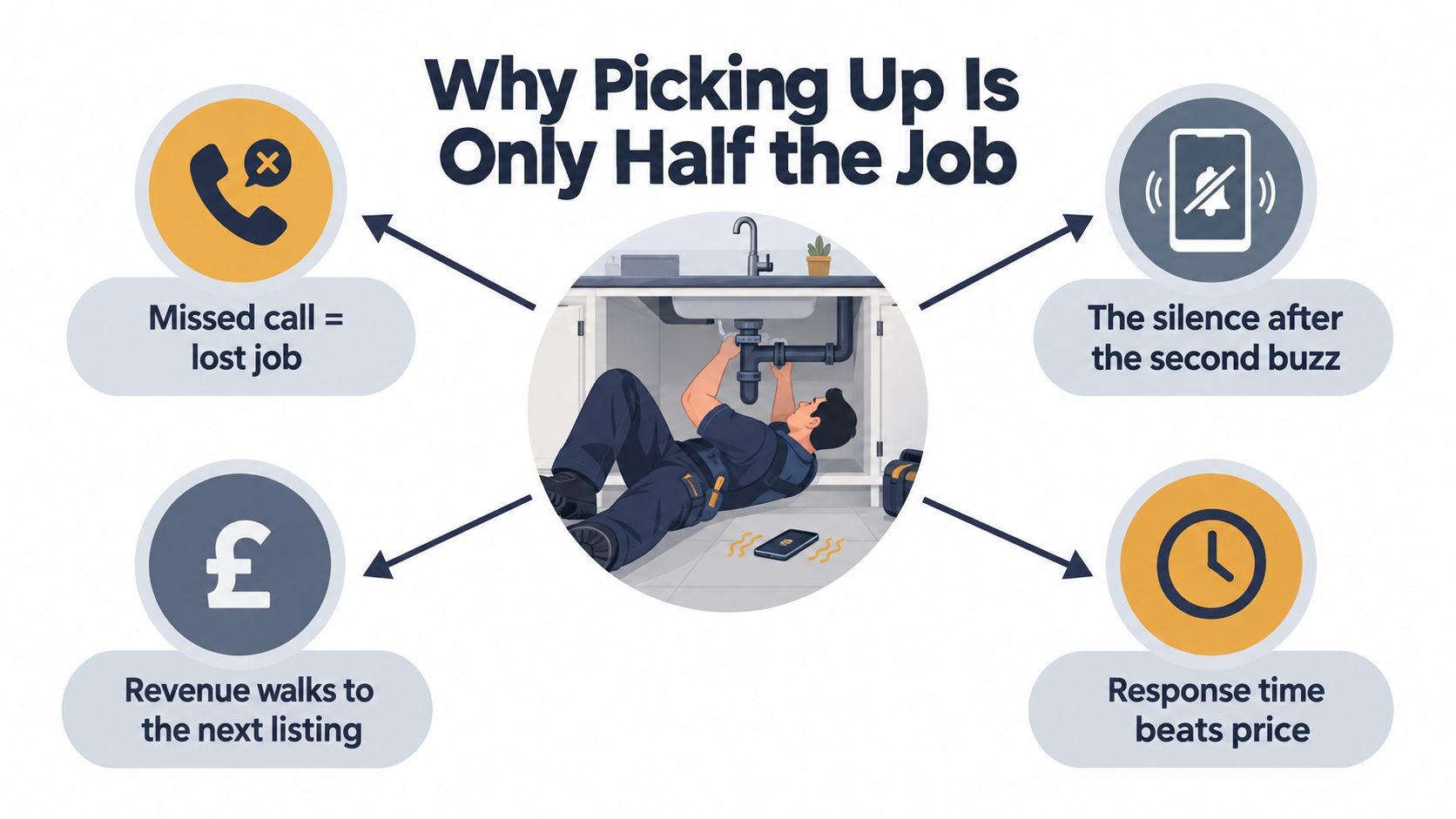
A plumber is under a kitchen unit with both hands around a waste pipe when his mobile vibrates on the floor. It rings twice, stops, and the caller moves on to the next tradesperson in the search results. The missed opportunity isn't the ringtone. It's the silence after it.
That scene repeats in clinics, law offices, estate agencies, repair businesses, and solo consultancies. A call arrives while the person who matters is already serving someone else. Good call handling must therefore answer a harder question than “What should I say when I pick up?” It must decide who should respond, what information to collect, how urgent the request is, and what happens next.
A structured process also matters because callers don't always wait. Ofcom reported that 7% of calls were abandoned before the caller reached a customer-service adviser in 2024, while average waits for broadband and landline providers increased to 2 minutes 1 second, from 1 minute 48 seconds in 2023. The figures concern telecom providers, not every small business, but they show why waiting and abandonment are operational problems, not minor etiquette issues. Ofcom's customer service report provides useful context for designing a faster response.
Why Picking Up Is Only Half the Job
The plumber eventually calls back from under the sink. The caller answers, but they've already explained the leak to another company and booked a visit. The plumber's greeting might have been perfectly polite. It still failed commercially because the business had no way to respond while the owner was occupied.
Call handling breaks down in three predictable ways:
- Nobody is available: The owner is driving, treating a patient, visiting a property, or working with both hands occupied.
- The live answer is inconsistent: Whoever picks up asks different questions, forgets to record the callback number, or gives an uncertain answer.
- The hand-off disappears: A receptionist takes a message, but nobody owns the callback, the promised time isn't recorded, or the context gets lost.
A useful answer identifies the caller, surfaces the reason for the call, and assigns ownership before the conversation ends. “Hello, how can I help?” sounds friendly, but it leaves the employee to improvise the intake and the caller unsure whether anyone will act.
Treat the phone as a queue
A business phone is a queue with different priorities. An active leak, a distressed patient, and a request for opening hours shouldn't enter the same workflow. The person answering needs a fast triage method, not a longer greeting.
For a field-service company, that might mean routing an urgent repair to an on-call person while collecting details for a routine quote. For a clinic, it may mean separating a same-day concern from a routine appointment. For an estate agency, it can mean sending a qualified buyer to the agent with the relevant property information already captured. Features such as call routing, appointment handling, and caller context are described in this overview of real estate telephony features, and the same operational principles apply well beyond property businesses.
What callers need before they hang up
Every completed call should produce one of three outcomes:
1. The caller reaches the right person. 2. The caller gets a confirmed appointment or next action. 3. The business records enough information to respond within a credible window.
If none of those happens, the call is still unresolved, even if somebody answered it. Businesses that need to manage availability while staff are occupied can also review this practical approach to immediate availability.
Operational rule: Don't measure success by whether someone said hello. Measure whether the caller left with a clear owner and a specific next step.
The Four Building Blocks of a Strong Greeting
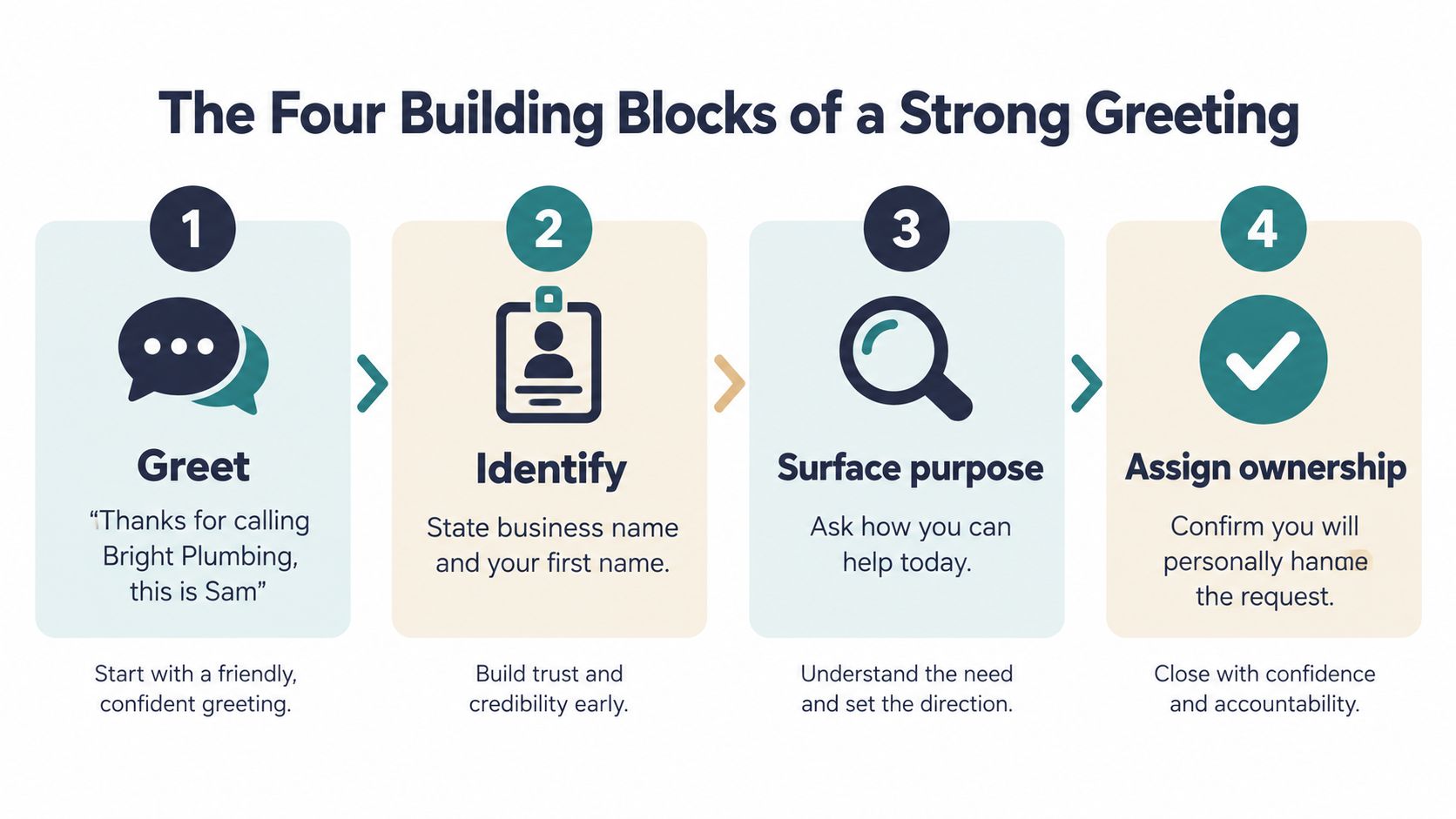
A strong live answer has four parts, in sequence: greet, identify, surface purpose, and assign ownership. The order reduces friction because the caller first knows they've reached the right business, then knows who they're speaking with, and only then gets asked for useful detail.
Start with a complete opener
Greet with the business name and your first name:
“Thanks for calling Bright Plumbing, this is Sam.”
That line is short, identifiable, and easy to hear over background noise. Use a calm pace, speak slightly slower than you would with a colleague, and smile before you speak. A smile won't fix a broken process, but it can make the opening sound less abrupt.
Identify the caller next. Asking for a name immediately, before confirming the business, can feel like a form or a sales call and may increase hang-ups. Once the caller knows they've reached the intended company, ask naturally:
- “May I take your name so I can address you properly?”
- “Who am I speaking with today?”
- “Could I get your name for the job notes?”
Trade customers usually respond well to a direct service prompt. Professional-service callers may prefer a slightly more formal version. Match the wording to the setting, not to a rigid script.
Surface the real purpose
“How can I help?” is acceptable, but broad questions often produce broad answers. Prompts that invite context work better:
- “What would you like us to help with today?”
- “Is this about a new job, an existing appointment, or something else?”
- “What happened, and what outcome are you looking for?”
Listen to the first sentence for urgency. If the caller says “water is coming through the ceiling,” “I can't breathe properly,” “the hearing is tomorrow,” or “the server is down,” stop routine qualification and escalate. If they say “I'd like a quote,” “I need to arrange a visit,” or “what areas do you cover?”, continue with the standard intake.
Assign ownership before ending
The fourth block tells the caller what happens next:
- Booking: “I can book that for Tuesday morning, and I'll send the appointment details by SMS.”
- Callback: “I'll pass this to Jordan, who handles these repairs, and you'll hear from us during our stated opening hours.”
- Transfer: “I'm putting you through to Sarah, who handles our commercial quotes. She'll have the calendar open.”
- Message: “I'll record these details and assign the callback to our duty manager.”
Avoid a cold handoff such as “You'll need to speak to someone else.” It makes the caller repeat themselves and signals that nobody owns the request. For more examples, see this guide to a phone greeting for business.
Qualifying Callers, Booking Appointments and Taking Messages
Use one intake template for every inbound call. The outcome may be a qualified lead, a booked appointment, or a clean message, but the fields should stay consistent so staff don't rely on memory.
Capture information in this order:
1. Caller name. 2. Callback number. 3. Location. 4. Service needed. 5. Urgency. 6. Property access constraints. 7. Preferred contact window. 8. How the caller found the business.
The first sentence usually reveals the correct path. “There is water pouring through the light fitting” needs safety-led escalation. “I want a quote for a bathroom renovation” needs qualification. “Can I move my appointment?” needs access to the existing booking, not a fresh sales conversation.
Use the same fields for every outcome
| Field | Script Prompt | Collect When |
|---|---|---|
| Caller name | “May I take your name?” | At the start of every call |
| Callback number | “What's the best number if we're disconnected?” | Before discussing detailed requirements |
| Location | “What's the property or service address?” | For visits, deliveries, or location-based availability |
| Service needed | “What do you need help with?” | After the caller explains the reason |
| Urgency | “Is anything unsafe, active, or getting worse right now?” | Immediately for repairs, health matters, or outages |
| Property access constraints | “Are there access, parking, entry, or occupancy details we should know?” | Before booking a visit |
| Preferred contact window | “When are you easiest to reach?” | Before assigning a callback |
| How they found the business | “How did you find us?” | During qualification, once the urgent details are secure |
For a direct booking, read the critical details back aloud: name, address, service, date, arrival window, and contact number. Then say, “I have you booked for [day and time window]. I'll send confirmation to [preferred channel].” The written confirmation should repeat the appointment details and explain how to contact the business if circumstances change.
For a message, promise only what the team can deliver. Tie the callback window to stated hours: “A member of the team will review this during our opening hours and contact you within the agreed window.” Don't say “someone will call you shortly” if nobody has accepted ownership. That vague promise creates avoidable complaints and can create liability when the caller reasonably interprets it as an urgent commitment.
Audit your form in five minutes. Can a new employee see the caller's number, urgency, location, requested service, preferred callback period, assigned owner, and promised action without opening several systems? If not, the form is recording a conversation, not managing a job.
Smart Transfers When You Cannot Answer Live
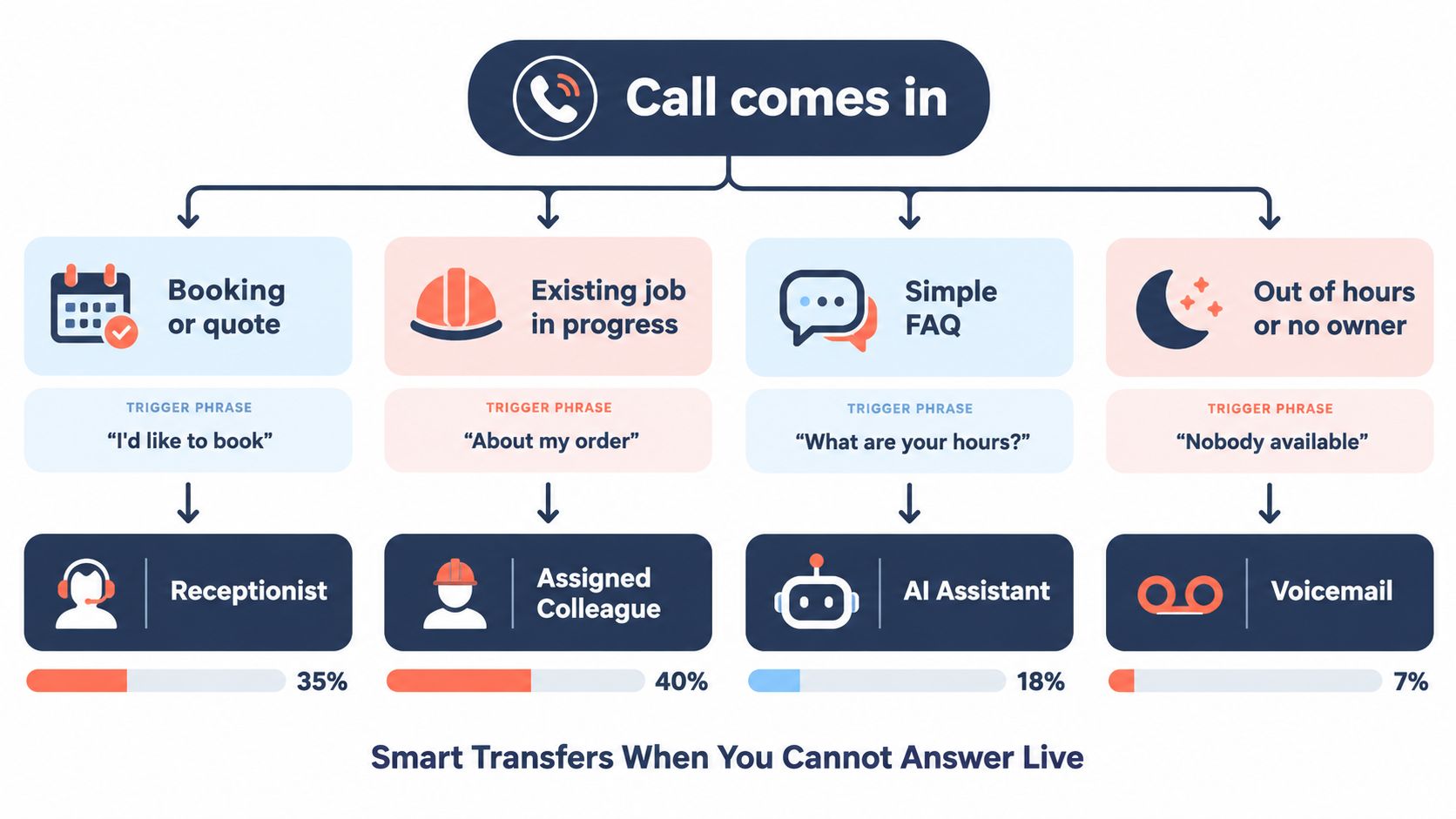
When the owner can't pick up, the first available person or system should classify the call before transferring it. Use four categories:
- Urgent: “There's an active leak,” “I can smell gas,” “the patient is distressed,” or “the server is down.” Route to the on-call person or responsible professional immediately, using a warm transfer where possible.
- Qualified lead: “I'd like a quote,” “I have a budget,” or “I need this completed by a deadline.” Route to the sales or service owner with the captured details and a scheduled follow-up.
- Routine: Opening hours, service areas, basic availability, and general process questions can go to a receptionist, documented FAQ, or AI assistant.
- Junk: Sales pitches, wrong numbers, and robocalls should be filtered without consuming the team's callback queue.
Make the transfer informative
A warm transfer gives the recipient enough context to answer intelligently:
“I'm putting you through to Sarah, who handles our commercial quotes. She'll have the calendar open.”
Before connecting, tell Sarah the caller's name, reason, urgency, and any relevant job reference. If Sarah doesn't answer, the system should return the caller to a message path rather than leave them in silence.
Avoid saying, “I'll put you through,” without explaining to whom or why. A blind transfer may be quick for staff, but it forces the caller to restart and makes the business appear disorganised. Guidance on the difference between these approaches is available in this explanation of warm transfer versus cold transfer.
Build an after-hours branch
After hours, route an urgent issue to an on-call mobile only if someone has explicitly accepted that responsibility. Route routine requests to a callback slot in the next business hour, and send an SMS confirming the missed call with a self-serve booking link when the caller can complete the process without assistance.
Train a cover person in under ten minutes by showing them:
1. The four urgency triggers. 2. The intake fields. 3. The on-call destination. 4. The exact callback promise. 5. Where to record ownership.
The system should make the safe action the easy action. If staff have to search for an emergency number, calendar, and message form while a caller is waiting, they will improvise.
Multilingual, Accessible and AI-Assisted Answering
A multilingual call process doesn't need to begin with every employee speaking every language. Start with the languages your callers use most often, then create a fallback for everything more complex.
A practical afternoon setup looks like this:
- Language detection: Ask, “Which language would you prefer for this call?”
- Basic phrasebook: Prepare greetings, names, addresses, appointment questions, urgency checks, and confirmation phrases.
- Human coverage: Assign trained bilingual staff to routine conversations in the highest-demand languages.
- Complex-call support: Use an interpreter or fluent human for sensitive, technical, legal, or health-related matters.
- AI intake: Let a phone assistant handle first-line identification, routine questions, qualification, and routing across supported languages.
Research summarized by CSA found that roughly three in four online shoppers preferred to buy in their own language, while 40% would never buy from a website offered only in another language. The same available research reports that 86% of contact centres had non-English-speaking customers, but only 65.5% formally offered support in another language, and 76% said native-language support improves customer experience. These findings come from research on multilingual business communication, and the practical lesson is simple: language access affects whether callers can complete basic actions such as booking, giving an address, or explaining a problem.
Slow down when communication requires it
Accessibility is more than speaking clearly. Offer relay or text alternatives where appropriate, avoid rushing callers with speech conditions, spell back names and addresses, and confirm safety-critical information using closed-loop communication:
“I heard 14 King Street, apartment 3B. Is that correct?”
Ask whether the caller prefers SMS or email for confirmation. Don't treat unusual speech as evidence that the caller is confused or unreliable. A slightly slower verified interaction is safer than a fast misunderstanding about a gas smell, dental appointment, legal deadline, or medical concern.
Use AI within clear boundaries
AI works well for opening hours, service areas, appointment availability, basic qualification, and message capture. It should transfer complaints, payment disputes, emotionally charged calls, professional judgment, ambiguous consent, and sensitive health matters to a human.
A 2024 Salesforce study of 15,015 consumers found that 45% were more likely to use an AI agent when a clear human escalation path existed. The source also cites a benchmark in which 23% of AI-assisted customer-service contacts still required human override or supplementation. Salesforce-related AI customer service findings support a complement, not replacement, model.
| Scenario | AI Phone Assistant | Human Receptionist | Voicemail |
|---|---|---|---|
| Opening hours or service area | Answer immediately | Useful if the answer needs context | Too slow for a simple question |
| Appointment request | Collect details and offer available slots | Handle exceptions and special requirements | Acceptable only with a clear callback process |
| Urgent or safety-related issue | Detect urgency and escalate | Take ownership and apply judgment | Unsafe unless the message route is actively monitored |
| Complaint or payment dispute | Capture context and transfer | Lead the conversation | Poor choice because emotion and detail can be lost |
| After-hours routine enquiry | Provide intake and confirmation | Available if staffing permits | Use only when the caller gets a credible next step |
Privacy needs to sit inside the workflow. GDPR's data-minimisation principle means collecting only what's necessary for the stated purpose. Tell callers at the beginning if a call is recorded, explain the purpose, define retention and access rules, and offer a suitable non-recorded route where applicable. AI disclosure isn't the same as recording consent. Practical safeguards are outlined in this GDPR call-handling guide.
Your One-Page Playbook and the Metrics to Measure
Print one page and keep it beside the desk phone. It should contain the exact greeting, the intake fields, the four routing categories, and the callback promise. Staff shouldn't have to remember the process during a noisy afternoon.
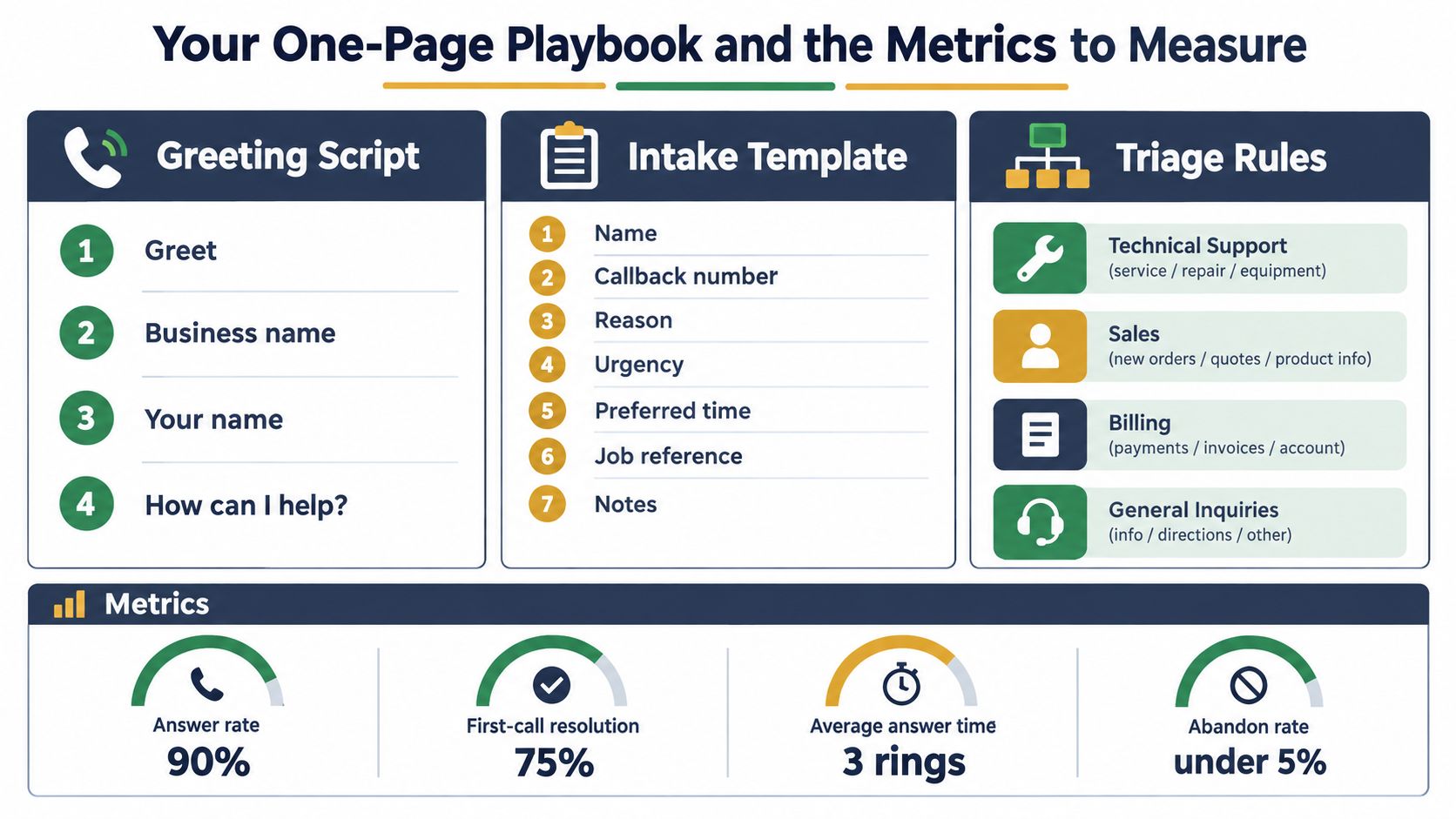
The printable call playbook
Greeting
“Thanks for calling [business name], this is [first name]. May I take your name? What would you like help with today? I'll make sure the right person handles it.”
Intake: Record the caller name, callback number, location, service needed, urgency, property access constraints, preferred contact window, and discovery source.
Triage: Send urgent calls to the on-call owner, qualified leads to the booking or sales owner, routine questions to the trained receptionist or AI assistant, and junk calls out of the callback queue.
Callback promise: During business hours, promise a callback within 15 minutes only when the team can reliably meet it. After hours, promise contact by 10:00 the next morning only if that matches the business's actual operating commitment. If the business can't meet either promise, state the actual window instead of borrowing a faster one.
Track outcomes, not activity
Pull four metrics from the phone system or AI dashboard:
1. Pickup rate within four rings during business hours: Use 90% as an internal operating target. If it falls short, ask whether calls are reaching the right person or whether staffing gaps are predictable. 2. Average speed to the first human or qualified AI response: Use three rings as a practical target. If response is slower, inspect routing, simultaneous calls, and after-hours settings. 3. Lead-to-appointment conversion for booking requests: Use 75% as a working target, not a universal benchmark. If it misses, check whether staff ask for a date, capture the number, and offer a concrete slot. 4. After-hours callback SLA hit rate: Use an under 5% abandon-rate threshold alongside your internal callback promise. If callers abandon or callbacks slip, improve confirmation, ownership, and escalation.
These are operating targets to test against your own baseline, not claims about every small business. Customer experience measurement can also be connected to satisfaction metrics for revenue forecasting once your call records are consistent. For reporting workflows, see this guide to call reporting software.
Roll it out over one week
- Day 1: Record and test the four-line greeting.
- Day 2: Set up after-hours AI intake and escalation.
- Day 3: Print the playbook and place it beside every answering point.
- Days 4 and 5: Train staff and cover people with live examples.
- Day 6: Run a shadowing session and review how calls are classified.
- Day 7: Review the four metrics and choose the single biggest leak to fix next week.
---
rednea provides a 24/7 AI phone assistant that greets callers, detects their language, answers routine questions, books appointments, captures messages, and escalates important calls to a person. If your team misses calls while working on jobs, treating patients, or serving customers, visit rednea to set up a practical intake and callback workflow.
Try rednea, no strings attached
AI phone assistant for business. Hear a live demo in your browser, book a call with our team, or get started — from £90/month, cancel monthly, no minimum term.
GDPR-compliant · EU & UK GDPR · Multilingual