Best Scheduling App for Small Business: 8 Picks for 2026

You're under a sink with a wrench in your hand when the phone rings. A stylist is mid-colour with gloves on. A clinic receptionist is already on the other line. In each case the caller reaches voicemail, hangs up, and books the next business that answers.
That's the flaw in most roundups. They compare booking pages as if every customer starts online. A March 2025 survey of 320 SMB owners and managers found that 55% received between 10 and 100 or more customer calls per day, while 42% estimated losing at least $500 per month because of missed calls, according to the PRNewswire release on SMB voice agents. In 2024, only 37.8% of calls to small businesses were answered by a live person in a study of 85 businesses across 58 industries conducted by 411 Locals, as reported in this 411 Locals call study summary.
So the best scheduling app for small business use isn't just the prettiest calendar. It's the one that captures demand however it arrives, by link, by message, or by phone, and turns it into a confirmed appointment without adding admin. The eight picks below are ranked with that in mind, with fit notes for trades, salons, clinics, and professional services.
1. Calendly Simple Self-Service Booking With Multilingual Invitee Pages
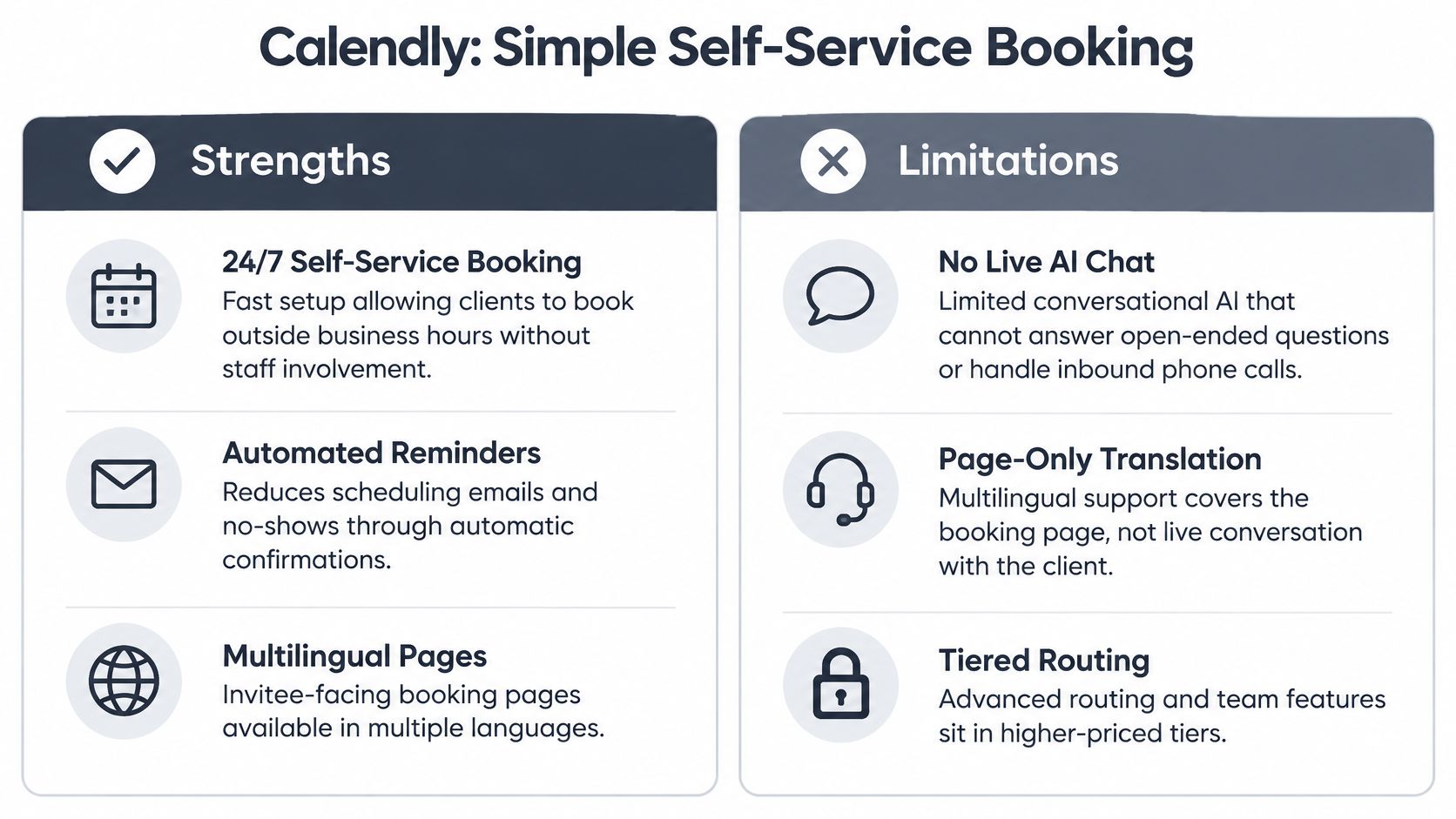
A booking link lets a client choose an available time without an email chain. It works well for consultants, coaches, and solo professionals whose appointments follow a predictable format.
A 2025 Cint survey commissioned by Zoho Bookings, covering 1,733 working respondents, found that 41% struggled with back-and-forth scheduling. A self-service link can reduce that back-and-forth, but it does not help a caller who needs guidance before choosing an appointment.
Where It Works and Where It Stops
A client opens the booking page, selects a time, and receives a confirmation. For a professional serving clients in different countries, language and time-zone settings can make that process easier to follow. For a law firm, a booking link can handle routine consultations, while staff still need to review requests that require judgment.
The limit is phone coverage. A booking page cannot answer a call, clarify which service a caller needs, or book for someone who will not use a link. Pair self-service booking with a way to handle calls, and review how Google Calendar appointment booking works when choosing where appointments should appear.
- Start with one event type: Put a clear booking link on your website or in your email signature.
- Ask one pre-booking question: Confirm the service needed or the client's language preference.
- Check the plan details: Confirm that your chosen language and automation options are included.
2. Acuity Scheduling Client Intake and Localized Booking for Service Businesses
A physiotherapy clinic can collect medical history and insurance details before a first visit, giving the clinician useful context ahead of the appointment. For clinics and studios, intake forms, payments, and session packages can sit alongside the calendar, reducing the details staff need to chase by phone.
A coaching practice might sell a package of sessions and send booking confirmations in the client's chosen language. Check the actual wording in each language: a confirmation that says “Your session is confirmed” should not be translated in a way that sounds like the client merely requested a time. Ask staff to check that the message clearly confirms the appointment and its time.
The No-Show Question Needs Honesty
A 2025 survey of 500 US appointment and class-based businesses reported that 75% of respondents experienced fewer no-shows with automated scheduling, though the findings were self-reported and limited to the product's customers, as the Acuity Scheduling customer outcomes survey describes. Results can depend on reminder timing, cancellation policy, and clientele. Test by segment rather than assuming.
Practical rule: Keep intake forms under five questions. Every extra field adds effort before a client can book.
An automated appointment booking system can handle routine appointment requests, while intake forms gather details staff may need to assess. Route urgent or complex responses to a staff member for follow-up. Online intake only helps people who reach the booking page; callers who need to explain a problem still need a way to reach someone by phone.
3. Square Appointments Booking and Payments for Retail and Service Sites
A salon that takes deposits can set the cancellation terms before a client books. Put the policy on the booking page, then make the deposit amount clear at checkout. This reduces disputes over fees clients did not expect.
A barbershop can also ask clients to keep a card on file. For a personal trainer, automated reminders and client-requested same-day rescheduling can reduce front-desk calls, though neither replaces a staff member handling a sensitive request.
Making the Payment Link Work for You
- Display your cancellation policy on the booking page: State the fee and deadline before clients confirm.
- Record preferred language in client notes: Staff can use it for greetings and follow-ups without asking twice.
- Review no-show data monthly: Adjust deposits based on the patterns you see, not on gut feel.
For any business taking appointments, client history helps staff prepare for a useful conversation. A salon receptionist can check a client's past services before discussing a reschedule. But booking and payment tools do not answer incoming calls, so a busy front desk still needs a plan for missed calls and messages.
4. Jobber Scheduling Dispatch and Quoting for Field Service Teams
Jobber brings quotes, scheduling, dispatch, invoicing, and payments into a field-service workflow for plumbing, HVAC, landscaping, and cleaning companies. A dispatcher can assign a job, share its details with a crew, and carry the approved work through to billing.

A Day on the Board
A four-van plumbing company can use a shared schedule to assign jobs, send customers arrival updates, and give technicians job notes on their phones. A landscaping firm can send a quote for approval, then add the accepted work to a crew calendar without re-entering the details.
Set up job templates for common services to speed up quoting, and use reminders to confirm the next day's jobs. Have a person review higher-value quotes before they go out. The scheduling and dispatch workflow organizes jobs already in the pipeline; calls that come in while crews are on site still need a clear path to someone who can answer, record details, or arrange a callback.
5. Housecall Pro Field Service Scheduling With AI-Assisted Customer Communication
For a heating contractor, a missed call can mean a customer books elsewhere while the crew is on a job. Field-service platforms such as Housecall Pro combine scheduling, dispatch, invoicing, and marketing. Automated customer communication can also confirm appointments and answer routine questions, reducing the amount of follow-up staff need to handle.
A useful setup routes predictable requests through automation and sends emergencies, complaints, and unusual job details to a person. For example, an HVAC company can confirm arrival windows by text, while an electrical contractor can collect estimate requests online and pass a job summary to the technician. For more on handling HVAC calls, see this guide to an AI receptionist for HVAC.
Putting Guardrails on the Automation
- Test replies before launch: Try five realistic customer messages in each language you serve, then check every response for accuracy and tone.
- Set hard escalation rules: Send emergencies and complaints directly to a person.
- Review logs weekly: Check call and message transcripts to find unanswered questions, incorrect replies, and cases that should have been escalated.
6. Fresha Free-to-Start Booking for Beauty Wellness and Personal Services
A nail technician can take online bookings and send reminders while working with a client. A spa can list treatments in a marketplace, giving potential new clients another way to find its services. Fresha offers a free-to-start booking option, but check which features and costs apply to your setup before relying on it.
Where Fresha Earns Its Place
Grand View Research estimates the worldwide scheduling-apps market was worth approximately USD 663.1 million in 2025 and projects it to reach about USD 1.81 billion by 2033. For a beauty business, the practical question is whether online booking and marketplace exposure justify the terms and any costs attached to the features you need.
Write treatment descriptions in the languages your clients use, and ask a fluent speaker to check them. Machine-translated menus can leave staff explaining unclear service names at the desk. Store each client's language preference in their profile so reminders are relevant.
Fresha handles booking, but it does not answer calls when staff are busy. A salon answering service can cover that gap for callers who prefer to speak with someone. Fresha is designed for beauty and wellness; it is not a tool for dispatching field crews or managing clinical intake.
7. Microsoft Bookings Scheduling Built Into Microsoft 365
An accounting practice can offer separate booking slots for tax reviews at the office and calls through Teams. Microsoft Bookings can publish those services on a booking page and add appointments to Outlook calendars. If your business already uses Microsoft 365, check whether Bookings is included before paying for another scheduling service.
Scheduling Still Takes Time Without a Process
A 2024 Calendly survey reported that 43% of respondents spent at least three hours per week scheduling, according to SchedulingKit's small business scheduling statistics. A booking page can reduce the back-and-forth, but staff still need a clear process for handling appointments.
Set up separate services for in-person and virtual meetings, with the location or Teams link stated clearly in each confirmation. For a clinic, that distinction helps patients know whether to arrive or join online. A trades business can use the same setup for office consultations and remote estimates.
Decide who follows up on new-client bookings and what they need to confirm. Bookings does not take payments, manage detailed intake, or answer phone calls. It suits straightforward appointments in a Microsoft-based office, but businesses that need those functions will need additional tools.
8. rednea AI Phone Assistant That Books Appointments in Five Languages
A missed call can mean a lost job for an electrician or a patient who books elsewhere. rednea answers calls instantly, detects the caller's language, and speaks English, Spanish, French, German, or Italian.
It books appointments, answers routine questions, qualifies leads, and passes important calls to a person. Each call generates a concise email summary, with optional SMS, for staff follow-up. It connects with Google Calendar, Microsoft 365, industry scheduling tools, and leading CRMs. Set-up is handled for you and takes about 30 minutes.
What This Looks Like in Practice
An electrician can have the assistant book the next available visit for a routine service call and escalate an urgent fault. At a dental practice, it can take new-patient bookings in Spanish or French while the receptionist is with a patient. The receptionist then reviews the summary and confirms any details that need human judgment.
Keep the first setup narrow. Use one line and one service, then expand the call types once the outcomes are reliable.
- Set escalation rules: Send complaints, emergencies, and quotes above a chosen amount to a person.
- Review summaries daily for two weeks: Use recurring questions to refine the assistant's answers.
- Offer callers a person: Make it clear they can request human help rather than forcing them through an automated conversation.
How the 8 Best Scheduling Apps for Small Business Compare
A calendar tool and a phone-answering service solve different parts of booking. Compare them by the handoff: how customers request a time, what happens when they call, and how booking details reach the team.
| Buying criterion | What to check |
|---|---|
| Booking channel | Can clients book online, or do they need to call or message? |
| Phone handling | Can routine calls be answered and appointments booked when staff are busy or away? |
| Languages | Does the service support the languages your callers use? |
| Scheduling connections | Can it work with your calendar, industry scheduling tool, or CRM? |
| Escalation and follow-up | Can it pass urgent or complex requests to staff and provide a useful summary? |
A self-service booking page can reduce back-and-forth, but it does not answer a caller who needs help choosing a service. Phone handling matters most when staff are serving customers, driving between jobs, or working with patients. A salon may need to answer questions about appointment types; a trades business may need to capture the job details before arranging a visit.
Check what happens after a call, too. A booking is only useful if it reaches the right calendar and the team can see what the caller requested. For sensitive or unusual questions, staff should retain the judgment call rather than relying on an automated response.
Match the Tool to Your Calls Clients and Trade
Start with the way customers book. If clients choose a time from a link, a simple booking page may be enough. If your work requires intake forms or packages, choose a tool that collects those details before confirming. For salons and other service businesses, booking and payment in one flow can reduce handoffs. Trades teams need scheduling that also supports dispatch, quotes, and invoices.
Then consider who answers when your calendar is full, your team is on site, or the phone rings after hours. A 2025 report from BT and Small Business Britain found that 62% of UK small businesses used AI in some form, while only 8% used it for customer service, according to the BT and Small Business Britain AI report. For a small business, routine customer contact is a practical place to test AI: calls about opening hours, service areas, or standard appointment requests can take staff away from work that needs their attention.
A Two-Week Test You Can Actually Run
Choose one booking flow and one call type for an AI assistant to handle. Run the test for two weeks, keeping the scope narrow enough that staff can review what happens.
Track missed calls, completed bookings, no-shows, and follow-up time. Compare the results with the previous two weeks. If calls are answered but bookings do not increase, check whether the assistant is collecting the right details and handing exceptions to staff promptly.
The division that works: AI handles routine questions and appointment requests in the caller's language. Your team handles quotes, complaints, emergencies, and conversations that require judgment.
Keep a person responsible for exceptions, and review call summaries until the answers reflect your business. Staff can then focus on decisions while routine inquiries receive a timely response. The best setup is the one that keeps bookings moving whether a customer uses a link at midnight or calls while a tradesperson is under a sink.
If missed calls are costing you bookings while you're on a job, in treatment, or closed for the night, rednea answers every call instantly in five languages, books appointments straight into your calendar, and escalates only the calls that need you. Visit the site to see how it pairs with the scheduling app you already use and start with a single line.
Try rednea, no strings attached
AI phone assistant for business. Hear a live demo in your browser, book a call with our team, or get started — from £90/month, cancel monthly, no minimum term.
GDPR-compliant · EU & UK GDPR · Multilingual