Call Personalization Guide: How SMBs Can Start Simple

Your phone is ringing while you're on a ladder, under a sink, with a client in the chair, or halfway through a paid session. You glance at the screen, can't answer, and tell yourself you'll call back in ten minutes. By then, the caller has moved on.
That's the reason call personalization matters for small businesses. It isn't a branding exercise. It's a bottom-of-funnel system for catching buyers when they're ready to act, speaking to them in the right language, and moving them to the right next step without friction.
The missed-call problem is bigger than most owners admit. A 2024 observational study of 85 businesses across 58 industries found that only 37.8% of incoming calls were answered live, while 37.8% went to voicemail and 24.3% received no response at all. That means 62.2% of calls were effectively missed. Independent summaries of the same research also note that 70% of the businesses studied answered fewer than half of their calls, which tells you this is normal in the SMB market, not an edge case (missed-call statistics from the 2024 observational study).
And callers don't wait around. A 2025 survey of 1,000 U.S. consumers reported that 78% had abandoned a business after an unanswered call, and 21% immediately called another business instead (consumer behavior after unanswered business calls). If you're in trades, healthcare, property, legal, or any service business where calls come from people close to booking, that should change how you think about your phone setup today.
What Call Personalization Actually Means for a Small Business
A plumber is under a kitchen sink when a homeowner calls about a full bathroom refit. The plumber misses it. The caller gets voicemail, hangs up, and rings the next company.
That's the failure point. Not the quote. Not the workmanship. The first ten seconds.
Call personalization means the caller feels recognized from the moment the line connects. For a small business, that usually means four simple things happen fast: the call gets answered, the caller hears the right language, the business uses any relevant context it already has, and the call moves toward a useful outcome instead of a dead end.
What it looks like in practice
A returning customer shouldn't have to explain who they are from scratch. A patient shouldn't have to fight through a rigid menu just to move an appointment. A new lead calling after hours shouldn't hit a generic mailbox and hope someone checks it.
Personalization done right sounds more like this:
- Known caller handling: A repeat customer is recognized by number, and the assistant can reference an existing booking or past job.
- Language-aware intake: The caller starts in Spanish, German, or English, and the system follows their lead instead of forcing a menu choice first.
- Clean routing: A repair emergency gets escalated. A routine question gets answered. A booking request gets pushed into the calendar flow.
If you want a simple example of what that layer looks like operationally, an AI receptionist for small businesses is the closest model. It answers immediately, collects intent, and stops your inbound line from acting like a voicemail box.
Practical rule: If the caller has to repeat basic information before your business gives them value, your phone flow isn't personalized yet.
What it is not
Most owners confuse personalization with sounding polite. That's too shallow.
It is not:
- A generic IVR menu: “Press 1, press 2, press 3” is routing, not personalization.
- A robotic script: Saying the caller's name once and then reading a fixed script doesn't count.
- A late callback: If the person was ready to book now, calling later is recovery, not personalization.
Small businesses don't need enterprise theatre. They need relevance at the exact moment the call arrives. That's the whole game.
The Building Blocks Behind a Personalized Call
Call personalization isn't one feature. It's a stack. Add the layers one at a time and the phone line gets smarter without becoming a mess.
Here's the basic flow visually.
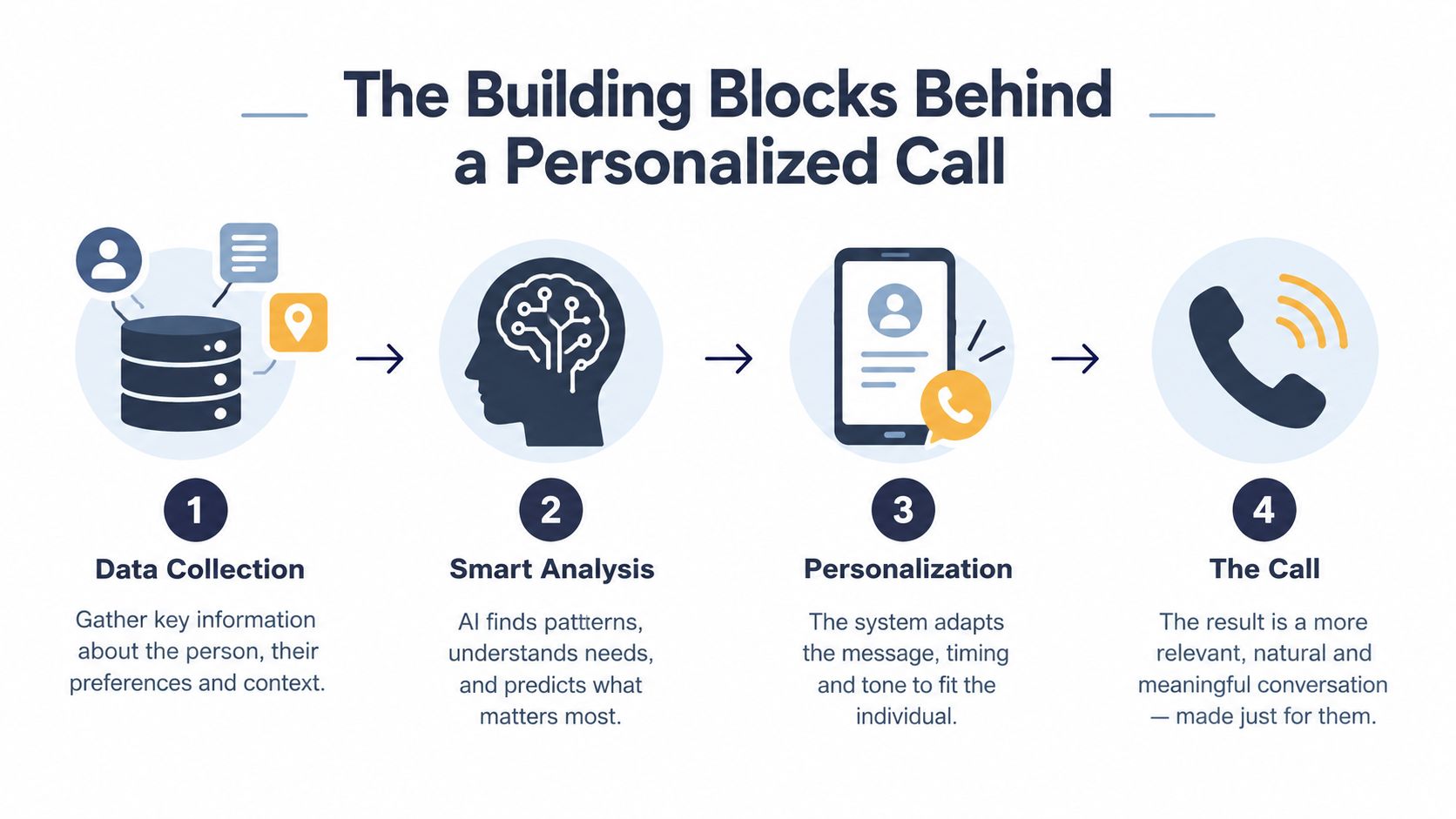
The five layers that matter
The first layer is caller context. If the number matches an existing contact, booking, case, or prior inquiry, the system should use that. In one technical architecture for AI call personalization, the context is assembled at call start from CRM, order, support-ticket, and interaction-history systems so the agent can greet by name, see account tier and tenure, and tailor the conversation around open issues and recent purchases rather than defaulting to a generic script. The same architecture ties context at initiation to stronger operational outcomes such as higher call completion and better first-contact resolution (real-time context assembly for AI call personalization).
Second is dynamic greeting logic. Your greeting should change based on time, language, and business state. After-hours callers need a different path than midday callers. Existing patients need a different opening than first-time prospects.
Third is language detection. Small businesses can punch above their weight here. One 2026 industry summary reports that AI-powered multilingual support covers an average of 50+ languages, compared with 3-5 languages for traditional multilingual support teams, and says 75% of global customers prefer support in their native language (multilingual AI support statistics). You don't need a staffed multilingual reception team to give callers a usable experience anymore.
If you're evaluating the routing side of that stack, this is the operational idea behind call routing software for SMB phone flows.
Why the speech layer matters more than owners think
Most owners focus on the greeting and forget the recognition layer. That's a mistake.
Personalized speech and language handling can improve recognition quality because the system can adapt to the caller's pronunciations, contacts, device vocabulary, and interaction history. Related work on personalized speech recognition and natural language understanding shows these systems can stay low-latency while improving live understanding, which matters because lag kills trust on phone calls (personalized speech and language handling in AI call centers).
If the assistant understands the caller cleanly, routing gets better, notes get better, and handoff gets better.
Add analytics last, not first
The final layer is analytics. Transcripts, outcomes, dropped-call patterns, language distribution, and handoff reasons all matter. But don't start there. Start with answer coverage and booking flow, then add reporting once the basics are stable.
A simple order works best:
- Answer every call
- Detect language and intent
- Route or book
- Pull in customer context
- Review analytics and tune
That sequence keeps cost and complexity under control.
Real SMB Use Cases Across Trades, Freelancers, and Clinics
The same phone logic solves very different problems depending on the business. That's why call personalization works so well for SMBs. You're not building a giant contact center. You're fixing a specific leak in your sales or service flow.
Tradespeople who can't answer mid-job
A heating engineer is inside a plant room. A returning customer calls after hours about a boiler issue. The old setup sends them to voicemail. The new setup recognizes the caller, picks up instantly, asks whether the issue is urgent, and either slots the request into tomorrow's route or escalates based on the handoff rule.
The owner doesn't lose the lead, and the customer doesn't repeat everything.
For field teams, this is exactly why answering services for contractors are shifting from simple message-taking to qualification and scheduling. The useful version doesn't just capture a name. It moves the job forward.
Freelancers who need lead filtering
Freelancers have a different problem. They often can answer calls, just not at the wrong moment.
A photographer or designer in a client meeting can let the assistant answer, greet the prospect in their language, ask two qualifying questions, and offer the next step. That might be a booking link, a callback window, or a short intake form sent by text.
That matters because not every caller deserves the same interruption cost. Some want a quote. Some want availability. Some are price shopping. A personalized call flow sorts that in real time and protects the freelancer's focus.
The best small-business phone system isn't the one that answers everything with a human. It's the one that filters low-value interruption without dropping high-intent buyers.
Clinics that need fewer morning surprises
Clinics live and die by schedule integrity. Generic reminders don't solve enough.
A better setup confirms appointments in the patient's preferred language, lets the patient reschedule through the call flow, and updates the front desk with what changed before the team starts the day. That reduces morning chaos and cuts back on manual call-backs.
The win here isn't novelty. It's cleaner operations. Patients get a more usable call. Staff start the day with fewer loose ends. The chair schedule is more reliable.
One pattern across all three
These businesses look different, but the pattern is the same:
| Business type | Before | After |
|---|---|---|
| Trades | Missed urgent or high-value calls | Priority captured and routed correctly |
| Freelancer | Random interruptions and weak qualification | Lead screened before human time is used |
| Clinic | Repetitive admin and messy confirmations | Appointment flow handled before staff jump in |
That's why I push owners to treat call personalization as a bottom-of-funnel control point. It catches demand that already exists.
Metrics and KPIs That Prove Personalization Is Working
If you don't measure the phone line, you'll fool yourself fast. Owners love saying, “We're getting more of the right calls now.” Fine. Show it.
Track a baseline first. Then compare after the new flow has run long enough to expose the rough edges.
The KPIs worth tracking
Ignore vanity metrics. Start with these:
- Answer coverage: Did the business or AI pick up the call promptly, or did it still fall through?
- Booking conversion: Did the call end in an appointment, deposit, site visit, consultation, or other real next step?
- First-contact resolution: Did the caller get what they needed without requiring another call?
- Qualified handle time: On good calls, did the conversation become more efficient because the basics were already gathered?
One reason first-contact resolution matters so much is that recent contact-center research notes under 2 in 3 issues are resolved on the first call, which pushes businesses toward better context-sharing and smarter automation. That same discussion also raises the privacy tradeoff that comes with richer personalization (privacy and context tradeoffs in voice AI).
If you need a practical way to review this weekly, call reporting software for small teams should make it easy to see outcomes by caller type, not just total volume.
Segment your numbers or they won't tell you much
Don't lump every call together. A returning customer and a brand-new lead behave differently.
Use at least two buckets:
| Segment | What to watch |
|---|---|
| Repeat callers | Resolution speed, routing accuracy, repeat questions |
| New leads | Qualification rate, booking rate, missed opportunities |
That split matters because personalization should improve each group in a different way. Repeat callers should get less friction. New callers should get faster conversion.
Operator test: If your reporting can't tell you which calls became jobs, appointments, or qualified opportunities, your KPI setup is still too shallow.
What to skip
Don't obsess over call duration by itself. Longer isn't always better. Shorter isn't always better. A short call that books is useful. A long call that goes nowhere is waste.
Measure outcomes first. Everything else supports that.
A Simple 30-Minute Implementation Path With rednea
Most small businesses don't need a six-week project. They need a working phone layer by the end of the day.
The fastest path is simple. Keep the existing number, forward calls into the AI layer, connect the systems you already use, and define handoff rules before going live.
Step 1 setup the number and forwarding
Start with a local business number and forward your current line to it. That keeps customer behavior stable. You don't want to retrain people to call a new number if the old one already appears on vans, invoices, and listings.
Set business hours, after-hours behavior, and fallback actions early. If no human is available, decide whether the assistant should book, message, escalate, or collect a callback request.
Step 2 connect calendar and basic customer data
Next, connect your calendar and one customer record source. For many SMBs, that's enough. It might be a shared spreadsheet, a lightweight CRM, or a booking list.
The point isn't to build a giant data warehouse. The point is to let the assistant recognize returning callers and know the last interaction. That alone makes the call feel much more competent.
One option in this category is rednea, which can connect with calendars and CRM-style systems so the assistant can identify callers, handle bookings, and pass only the important calls through to a person.
Step 3 write the three prompts that control everything
Most owners overcomplicate the script. You need three prompts, not thirty.
- Greeting prompt
Define how the business answers. Keep it natural, short, and language-aware.
- Qualification prompt
Decide which few questions matter. For trades, that may be urgency, postcode, and job type. For clinics, it may be appointment type and preferred slot.
- Handoff prompt
Set exact transfer rules. This is the big one. Spell out when the AI should escalate to a mobile, a colleague, voicemail, or a follow-up task.
The handoff rule is where most setups fail
The assistant doesn't need to do everything. It needs to know when to stop.
A clean handoff rule should cover:
- Urgency: Burst pipe, medical concern, legal deadline, or other time-sensitive issues
- Customer status: Existing client, VIP account, or ongoing case
- Confidence: If the assistant isn't understanding the caller cleanly, move the call
- Sensitivity: Billing disputes, complaints, or emotionally charged situations
Test the full flow with a handful of real calls before sending customer traffic through it. Check language switching, routing, booking behavior, and fallback handling. That half hour of testing saves a week of avoidable annoyance later.
Accessibility and Inclusion as Part of Real Personalization
A lot of call personalization advice is shallow. It treats the caller like a record in a database. Name, account, language, done.
That isn't enough.
Real personalization has to adapt to the person on the line, not just the file attached to their number. If your system struggles with accents, speech differences, filler words, emotional stress, or hearing needs, then the experience isn't personal. It's selective.
Most “personalized” phone systems still create barriers
A 2025 accessibility report found that only 35% of sampled calls were fully positive, while 65% included barriers such as interruption, hanging up, or getting stuck in IVR (phone accessibility barriers in the 2025 report). That should embarrass anyone claiming their call flow is modern.
The problem isn't just bad scripts. It's bad listening.
A useful setup should handle:
- Regional accents and speech differences: The recognition model needs room to adapt rather than forcing a narrow pronunciation pattern.
- Stress-heavy calls: A parent calling about a sick child or a homeowner dealing with flooding won't tolerate a slow script.
- Repeat and slow-down options: Some callers need slower phrasing, a repeat path, or a simpler next step.
- Alternate channels: Some callers will need a text follow-up, written confirmation, or caption-friendly callback options.
If a caller is under pressure, the qualification flow should shrink, not expand.
Inclusion is operational, not cosmetic
Businesses often stop at “we support multiple languages.” Good start. Not the full job.
Inclusion also means the system can recover from interruptions, understand natural filler speech, and avoid trapping someone in a loop because they didn't answer in the expected pattern. It means using predictable phrasing for callers who need clarity more than charm.
This is also where AI can help smaller teams more than old menu systems ever did. It can answer instantly, keep a calmer cadence, and switch language without making the caller handle a maze first. But only if you design for usability, not just speed.
GDPR, Privacy, and Where AI Complements Humans
Most phone systems collect too much data because nobody decides what the minimum is. Then they bolt on policy language later and call it compliance.
Do it the other way around. Build the call flow so it only uses the data needed to answer, route, or book.
Four privacy decisions to make upfront
A practical GDPR-first setup starts with clear limits:
- Collect only what the routing decision needs: If postcode, appointment type, and caller status are enough, stop there.
- Tell callers what's happening: If the call is being processed or recorded, say so early and plainly.
- Set a retention rule: Keep transcripts and summaries for a defined period, then delete them.
- Support deletion fast: If someone asks for removal, the team should be able to act without digging through multiple systems.
That matters more as personalization gets richer. The tradeoff is obvious. More context can improve handling, but beyond a point it can also feel invasive and create compliance overhead. That's especially true in sectors dealing with sensitive information.
AI should carry the front end, not the whole relationship
I think many businesses get it wrong. They either avoid AI entirely or try to replace people with it.
Neither approach is smart.
A blended model is better supported by the available evidence. A 2025 Harvard Business School summary of a field study reported that agents using AI-based suggestions responded about 20% faster, with less-experienced agents improving even more as response times fell by 70%. The same summary says customer sentiment rose by 0.45 points on a five-point scale, while AI-assisted agents also became more empathetic and thorough (AI-assisted agent performance summary). Separate 2026 comparative research found AI support averaged 5 seconds versus 45 seconds for human support, while humans still scored higher on satisfaction at 8.6 out of 10 versus 7.8 and achieved a higher resolution rate at 92% versus 85%. The authors concluded AI should supplement, not replace, human support. And a major customer-experience report from Capgemini found 55% of consumers prefer interactions enabled by a mix of AI and humans (consumer preference for blended AI and human interactions).
That's the practical model for SMBs. Let AI handle intake, after-hours coverage, routine questions, language switching, notes, and triage. Let humans handle judgment, exceptions, reassurance, and sensitive conversations.
That isn't a compromise. It's the right division of labor.
---
If you want that model without building a phone workflow from scratch, rednea gives small businesses an AI phone assistant that answers instantly, detects the caller's language, books appointments, qualifies leads, and escalates the calls that need a person. It fits this exact call personalization approach: start simple, cover missed calls first, then add context, routing, and privacy controls as your business grows.
Try rednea, no strings attached
AI phone assistant for business. Hear a live demo in your browser, book a call with our team, or get started — from £90/month, cancel monthly, no minimum term.
GDPR-compliant · EU & UK GDPR · Multilingual