AI Receptionist for Law Firms: A Requirements Guide

Prospective clients don't sit on hold while a lawyer finishes a hearing. An AI receptionist for law firms can cover that first ring for a solo practice or a mid-size office, in the caller's language, while people still make every legal decision. You can start with a short script and widen it only after the tests stay clean.
Why Law Firms Lose First Calls and How AI Answers Them
A secret-shopper study reported by the American Bar Association in March 2025 found that only 40% of law firms answered incoming phone calls, down from 56% in 2019. 60% of firms failed to answer the caller, compared with 44% six years earlier, a 16-percentage-point decline. The share of unanswered calls was roughly 36% higher than in 2019.
That gap opens while lawyers are in court, with a client, or off the clock. Someone who hears voicemail often dials the next firm, and the cost of missed calls shows up as consultations that never start. The study doesn't claim every unanswered call is a lost matter, and it doesn't measure automated reception itself.
An AI receptionist is software that answers instantly, holds a spoken conversation, books consultations, captures structured details, and hands exceptions to a person.

A careful receptionist takes a name, a number, and the reason for calling, then routes the person. The AI does that job when the desk is empty. Solos and small firms lose the most calls because no second person is free to pick up.
Practical rule: Legal judgment, conflict decisions, and relationship work stay with attorneys. The software only covers first contact.
Decide, call by call, what it may finish, what it must refuse to collect, and what a person must own before you trust the line.
Which Calls an AI Receptionist Handles and Which Go to a Lawyer
Read the table as a set of permissions, not a menu of clever features. Find the caller's situation in the left column. The middle column is the only work the AI may do alone. The right column is the moment a person takes over. If a row says none, there is no handoff. If a row names a person, the AI stops and moves the call.
| Call type | AI action | Human handoff |
|---|---|---|
| Office hours, directions, accepted practice areas | Answers from approved FAQ | None |
| Consultation request for an accepted practice area | Books into attorney calendar | Staff only if slot conflicts |
| New matter inquiry | Collects contact details, practice category, party names for conflict screen | Intake staff callback the same day |
| Existing client calling about a matter | Takes a message and flags the caller as a client | Attorney or paralegal the same day |
| Deadline or limitation concern | Captures date and flags as urgent | On-call attorney, live transfer |
| Emergency such as arrest, violence or threat | Gives emergency-services guidance and transfers | Immediate live transfer |
| Caller starts describing facts in detail | Stops narrative intake, logs a minimal note | Conflict check before any further detail |
| Request for legal advice or outcome prediction | Declines and offers a consultation | Attorney consultation booking |
| Distressed or vulnerable caller | Slows down, offers transfer | Live human |
| Unsupported language | Offers callback in a supported language | Bilingual staff or interpreter |
Apply the rows in priority order
Safety comes first. An emergency transfers before any intake question. A limitation date is captured and flagged before scheduling. Conflicts come next. Party names are for screening, not for a story. Scheduling is last, and only for practice areas the firm has already accepted.
Existing clients get a message and a same-day follow-up, not a status update. The AI can't change matter status, and it shouldn't try. When it can't classify a call with confidence, it escalates rather than guesses, and it says plainly that a person will follow up. Sensitive situations belong with people, which is why human handling versus an AI receptionist is a design choice, not a failure of the script.
Review the escalation log weekly. Calls sent to a person for no real reason show where the script is loose, not where the AI "failed." A firm that treats each row as a permission can hand over FAQ answers and accepted-area bookings on day one, and keep deadlines, distress, and advice requests with lawyers.
Confidentiality and Privilege Rules for Intake Calls
Picture a caller who starts describing the dispute before anyone has run a conflict check. Once those facts are spoken, they sit in a recording or a transcript and become a firm record. The design goal is to stop that detail from being requested in the first place.
ABA Formal Opinion 512 states that lawyers must protect information relating to current, former, and prospective clients and make reasonable efforts to prevent unauthorized disclosure or access. The same opinion's setting, read alongside NIST's AI Risk Management Framework, treats confidentiality, integrity, availability, privacy enhancement, and data minimization as trust requirements, not slogans.
The minimum-data rule
The approved script may ask only for fields the firm needs for contact, conflict screening, urgency, and scheduling.
- Name, phone, and email: enough to call back.
- Practice category: enough to route.
- Names of other parties: enough for a conflict screen, not a narrative.
- Preferred time: enough to offer a slot.
- Urgency flag: a date or a yes/no on emergency, nothing more.
It must not ask for a factual story. If the caller starts one, the AI thanks them, stops, logs a minimal note, and moves to conflict screening.
The AI should work like a receptionist with a clipboard for names and numbers, not a stenographer recording the whole story.
Controls that match the script
Technical settings have to enforce that narrow list. Redact or pseudonymise sensitive text before any analytics. Require encryption in transit and at rest, tenant isolation, role-based access, and immutable audit logs. Set a configurable retention period, for example 30 days for unmatched calls, plus a deletion workflow someone can run in practice.
Get the vendor's confirmation in writing that transcripts aren't used for model training without authorization, and that retention, sharing, subprocessors, and self-learning policies are disclosed. The voice agent announces that it is automated, states whether the call is recorded or transcribed, and offers a person.
Tool permissions stay on an allowlist. The assistant may create an appointment or send an intake summary. It may not alter matter status, send legal advice, or disclose information across matters.
What you test on purpose
Run adversarial calls for hallucinated answers, wrong names, language-switching errors, prompt injection, and attempts to pull another client's information. A system that can't pass those calls isn't ready for a prospective client's facts, however polite it sounds.
Privacy Laws and Recording Consent by Jurisdiction
| Regime | What it requires | Setup that meets it |
|---|---|---|
| EU GDPR | Lawful basis, purpose limitation, data minimisation, right to erasure | EU hosting, processor agreement, deletion workflow |
| UK GDPR and Data Protection Act 2018 | Same core principles, UK regulator oversight | UK or adequately protected hosting, retention schedule |
| California (all-party consent) | Every party must consent before a confidential call is recorded | Disclosure and affirmative consent at call start |
| Florida, Illinois, Pennsylvania, Washington (all-party consent) | Same all-party rule for recording | Same consent prompt, verified with counsel |
| New York, Texas (one-party consent) | One party may consent to recording | Disclose recording as firm policy anyway |
| US state bar confidentiality rules | Reasonable efforts to prevent unauthorized disclosure | Vendor due diligence, access controls, audit logs |
| Other countries | Local recording and data protection law | Written sign-off from local counsel before any recording starts |
Two rules change most setups. Everything else in the table is a checklist you score before launch.
Data protection for EU and UK callers
GDPR and UK GDPR both demand a lawful basis, purpose limitation, data minimisation, and a real right to erasure. Transfers outside the EU or the UK need a lawful route, not a shrug. Practical settings are EU or UK hosting, a data processing agreement with the vendor, a written retention schedule, and deletion inside a stated window when someone asks. If you can't name where the audio sits, you don't have a setup yet.
Recording consent, then the bar rules
All-party consent states, including California, Florida, Illinois, Pennsylvania, and Washington, require every party to agree before a confidential call is recorded. The AI asks at the start and stores the answer. A workable line is: "You're speaking with an automated receptionist. This call may be recorded and transcribed. Do you agree to continue?" If the caller says no, continue without recording or offer a person, and don't argue.
One-party consent states such as New York and Texas allow one party to consent. Disclose recording as firm policy anyway. Callers who weren't told tend to dispute the file later, even when the statute would have allowed it.
US lawyers also answer to confidentiality duties under Model Rule 1.6 and state equivalents. Those duties apply whatever the software is called. For mixed callers, apply the strictest rule that touches any person on the line. UK recording questions are spelled out in more detail in this guide to recording a phone call in the UK. Treat the table as a planning map, not legal advice, and confirm local rules with counsel before you go live.
How to Run an Intake Call From First Ring to Follow-Up
Each step has one job. Skip a step and the summary that lands in someone's inbox is either late or too full of facts.
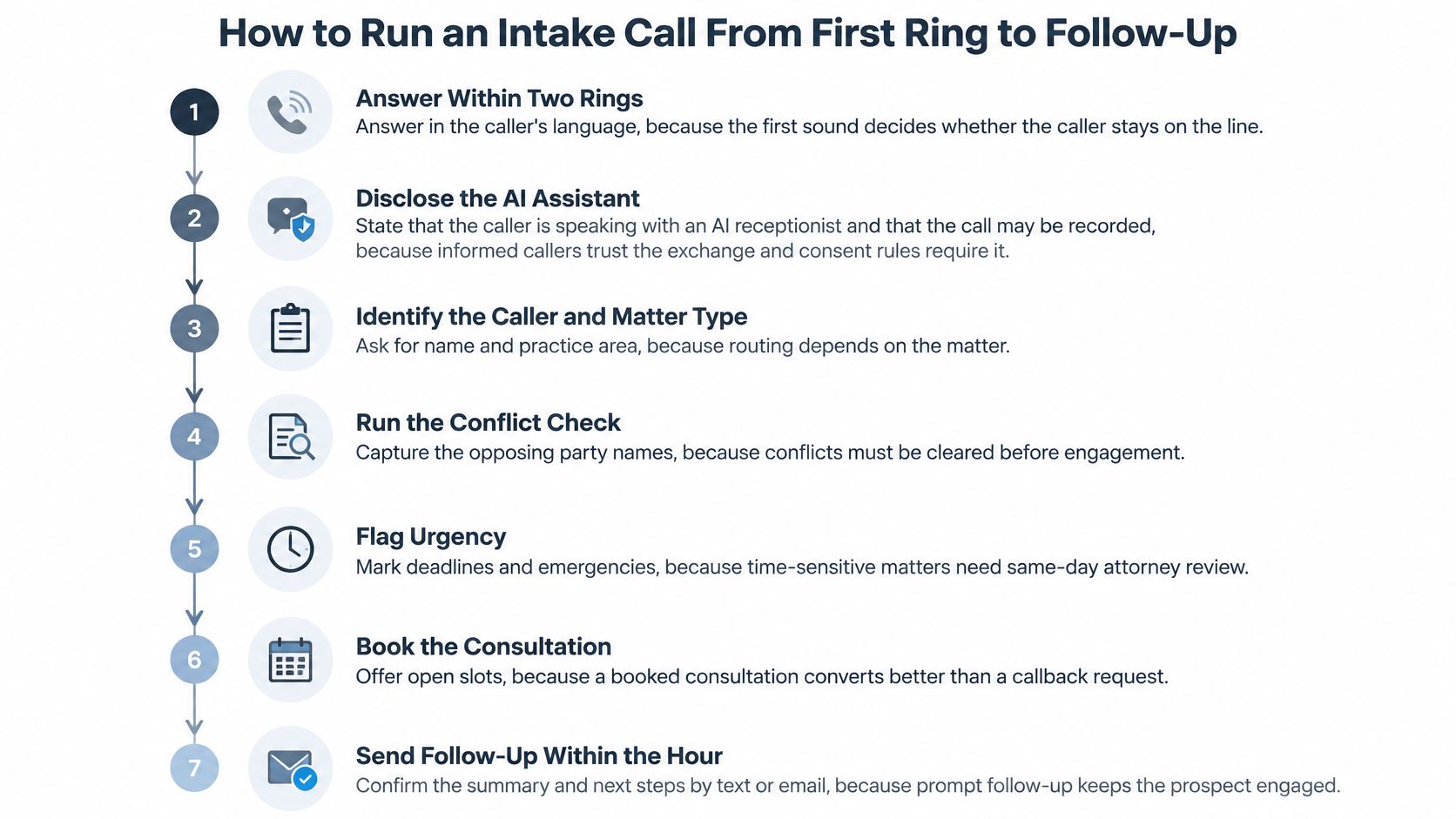
- Answer within two rings, in the caller's language. The first sound decides whether they stay. A long ring, then English-only, loses callers who were ready to talk.
- Disclose the automation and the recording, then take consent where the jurisdiction requires it. Informed callers trust the exchange, and consent rules aren't optional once you press record.
- Identify the call type from the permission table. Office-hours questions can finish on the AI. Anything that isn't on an approved path doesn't get improvised.
- Run the urgency screen for deadlines, emergencies, threats, and existing clients. Those calls skip the remaining steps and go to a live person. A limitation date flagged late is the failure that costs the most.
- Collect only the minimum-data fields, and stop at any factual narrative. This is the step that keeps a transcript from becoming a privileged story. Thank the caller, log a short note, and move on.
- Book the consultation into the attorney calendar, or create a callback task if no slot fits. A booking that isn't on a real calendar isn't a booking.
- Send a concise summary by email, and optional SMS, within minutes. Structured fields only, to the assigned attorney or intake staff. A summary that pastes narrative detail is the slip this sequence exists to prevent.
- Create a follow-up task with a 24-hour deadline. Clio research cited by legal-intake reporting found that 79% of legal consumers expected a response within 24 hours of contacting a firm. The AI can handle office hours, consultation availability, accepted matter categories, locations, and required documents. It escalates conflicts, emergencies, strategy requests, and anything that needs professional judgment.
Track the percentage of new inquiries that receive a same-day human follow-up. Automation isn't a substitute for that call back. If the rate slips, fix the task owner before you widen what the AI is allowed to say.
Feature Checklist and Integrations to Require
Score every vendor on the same sheet. Mark each item must-have or nice-to-have, and treat a marketing claim as unverified until the answer is in writing.
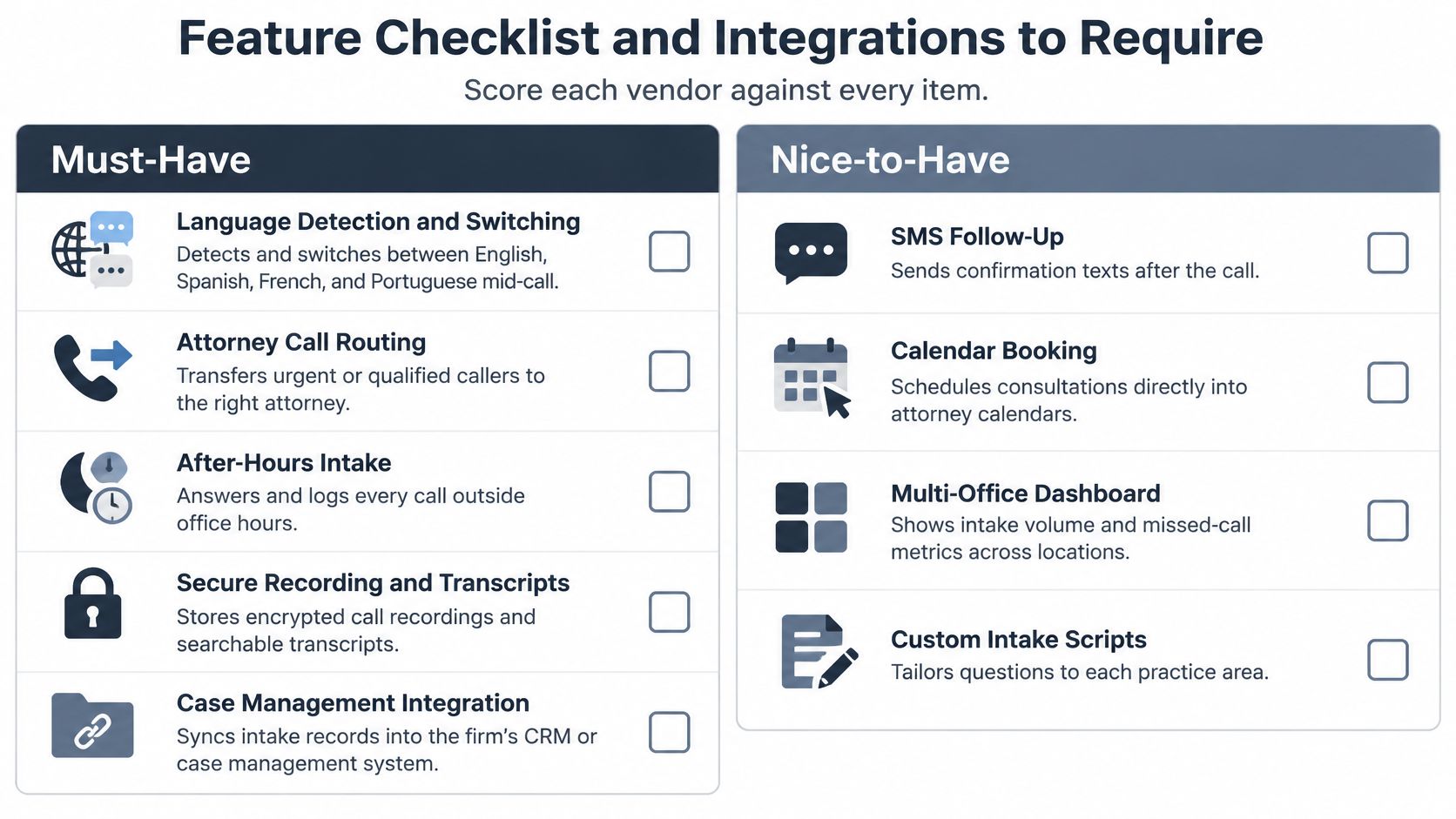
Must-haves
- Language detection and switching: English, Spanish, French, German, and Italian are a practical minimum for many EU and UK firms. Every other language needs a stated fallback, a callback in a supported language or a bilingual staff member.
- A script the firm approves line by line: if you can't edit a question, you can't enforce minimum data.
- Disclosure and recording notice before the first question.
- Routing rules with live transfer, including a named on-call path after hours.
- Two-way booking with Google Calendar or Microsoft 365.
- Sync of contact and call summary into the CRM or case-management system. A booking that fails to sync is a booking that never happens, which is why CRM and phone integration belongs in the contract, not the demo.
- Email and optional SMS summaries that carry fields, not a transcript dump.
- Retention you can configure, and deletion on request.
- Audit logs and role-based access.
- Stated data location and a named subprocessor list.
- Analytics for answer rate, qualified-call rate, and escalation time.
Nice-to-have items, such as custom voices or outbound reminders, wait until the must-haves are proven on your own calls.
rednea is one vendor to score against that sheet. Its site states EU and UK GDPR alignment, European server infrastructure, deletion on request, and Google Calendar and Microsoft 365 integrations, with conversations in English, Spanish, French, German, or Italian. Confirm each item in writing before you rely on it. Ask every other vendor the same questions. A demo that sounds fluent and can't show a deletion workflow is a no.
Run These Tests Before You Switch the Line On
| Metric | What it reveals | Baseline to set |
|---|---|---|
| Answer rate by language and hour | Coverage gaps by time and caller language | Current answered share from call log |
| Qualified-call rate | Share of calls that become usable intakes | Week-one sample from the live call log |
| Abandoned-call recovery rate | Callers who hang up and then call back or book | Current callback rate |
| Escalation latency | Seconds from urgent flag to live transfer | Target set by firm policy |
| False reassurance rate | Answers that promised something the firm cannot deliver | Zero tolerance in test log |
| Incorrect matter classification | Calls routed to the wrong practice area | Sampled weekly |
| Booking sync failures | Appointments missing from calendar or CRM | Count per 100 bookings |
| Same-day human follow-up rate | Share of new inquiries reached by a person the same day | Current rate from intake log |
Set the baseline in week one from the firm's current call log, before the AI is live. Otherwise you can't tell a gain from a new hole.
Adversarial calls, then a small pilot
Place these test calls yourself.
- A caller who switches language mid-call.
- A name spelled three ways.
- A request for legal advice or a likely outcome.
- A caller fishing for another client's status.
- A caller who pastes instructions into the conversation.
- A deadline call near a court date.
A system that transfers high-risk calls in seconds can be safer than one that "handles" more calls alone. False reassurance is a zero-tolerance item. One promise the firm can't keep fails the pilot.
Run a two-week pilot on after-hours calls only. Compare it with the baseline. Expand to daytime only if urgent calls transfer within seconds and the test log shows no false reassurance. A solo or small firm should start with FAQ answers and consultation booking, then add intake capture once that false-reassurance count stays at zero. That's enough for the software to complement the humans, without asking it to be one.
---
rednea answers law-firm calls around the clock, runs a structured intake in the caller's language, books consultations, and routes urgent matters to a person without giving legal advice. It keeps the captured fields narrow, syncs with common calendars and CRMs, and deletes data on request under an EU and UK GDPR setup. If you want that first ring covered without handing legal judgment to software, visit rednea.
Try rednea, no strings attached
AI phone assistant for business. Hear a live demo in your browser, book a call with our team, or get started — from £90/month, cancel monthly, no minimum term.
GDPR-compliant · EU & UK GDPR · Multilingual