Interactive Voice Responses: A Small Business Guide

You're halfway through a job when the phone starts vibrating on the van dashboard. Your hands are dirty, the customer is waiting, and answering means stopping work. By the time you call back, the caller has already found another electrician, plumber, contractor, or service firm that picked up first.
That pattern affects more than tradespeople. A solo professional misses calls while in a meeting, a dental practice loses appointment enquiries during the lunch rush, and a small office sends every unanswered caller to voicemail. Interactive voice responses can prevent that leakage without pretending that a machine should replace the people customers trust.
When Calls Go Unanswered
A missed call rarely feels like a major operational failure. One customer leaves no message. Another calls again later. A third sends an email instead. The problem appears manageable until the same thing happens every day while you're working, driving, serving customers, or handling paperwork.
Voicemail only records the problem. It doesn't answer a question, qualify an enquiry, offer an appointment, or tell a caller what happens next. Some callers leave a message, but many move to the next business in their search results. That's especially costly when the caller needs urgent help and several local providers appear interchangeable.

Why availability matters
You don't need a receptionist sitting beside the phone all day. You need a dependable first response that can establish why the person is calling and move the enquiry into your existing workflow.
A useful phone assistant can:
- Answer immediately: Greet the caller while you're on site, with another customer, or outside normal hours.
- Handle routine questions: Explain service areas, opening hours, appointment types, and basic policies.
- Capture useful context: Record the caller's name, reason for calling, preferred time, and urgency.
- Book or route the next step: Use your calendar or send the important calls to a human with the relevant context.
That's different from forcing every caller through a long menu. The practical objective is simple: make sure a genuine enquiry reaches a useful next step, even when nobody can pick up manually. Guidance on the operational value of immediate phone availability is also covered in this overview of immediate availability.
Practical rule: If a caller can't get a clear answer or a clear next step within the first interaction, your phone system is still creating work rather than removing it.
The best setup complements your work. It doesn't promise that every conversation can be automated, and it shouldn't. A burst pipe, a distressed patient, a legal problem, or a complicated project may require a person. The assistant's job is to identify those cases early, preserve the details, and get them to the right human without making the caller repeat everything.
How Interactive Voice Response Systems Work
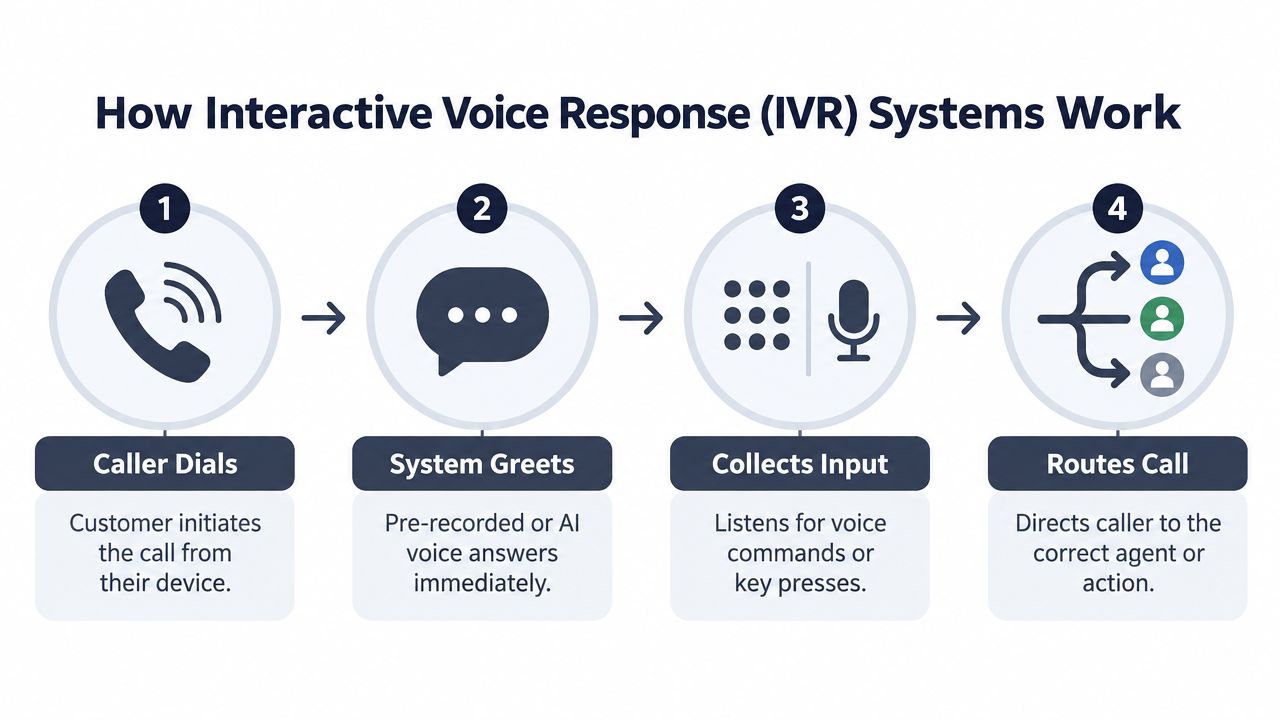
An IVR system sits between your business phone line and the person calling. It answers, provides a greeting, accepts input through keypad presses or speech, checks relevant information, and then either completes a task or routes the call.
The basic flow is straightforward:
1. The caller dials your business number. 2. The system identifies the call and plays a greeting. 3. The caller speaks or presses keys to explain what they need. 4. The system applies rules, retrieves information, and chooses the next action. 5. The caller receives an answer, books a service, leaves details, or reaches a person.
The technology behind the call
Traditional systems commonly use DTMF, the tones created by keypad presses, and recorded prompts. Modern implementations can also use speech recognition, text-to-speech, VoiceXML applications, and connections to databases or web applications. The underlying telephony stack may include PSTN or VoIP connectivity, a database, and an application server that manages the conversation.
That technical detail matters because a phone system disconnected from your business data can only give generic answers. An IVR connected to your CRM, scheduling system, or account database can make a more useful decision. It may recognise a returning caller, retrieve appointment information, identify a service request, or apply time-based routing rules.
This explanation of what an IVR is is useful when you need to distinguish a basic menu from a connected call-handling workflow.
Treat the system as an orchestration layer
A menu asks, “Press one for sales.” An orchestration layer asks, “What does this caller need, what information is available, and what should happen next?”
For a plumbing company, the flow might look like this:
- The caller says they need emergency help.
- The system asks for the address and a short description.
- It checks whether the request falls inside the service area.
- It alerts the on-call person or routes the call according to the agreed rule.
- It sends a concise summary so the tradesperson can respond without starting from zero.
For a professional practice, the flow might handle appointment requests, cancellations, basic directions, or document requirements, while sending sensitive or complex matters to staff.
The design principle is integration before sophistication. A natural-sounding assistant with no access to your calendar can still create double bookings and follow-up work. A simpler system connected to accurate business information can deliver a better customer experience.
Measuring What Actually Matters
Call volume tells you how busy the phone is. Average handle time tells you how long conversations last. Neither metric answers the most important operational question: did the caller get what they needed without unnecessary human effort?
That's why containment rate deserves priority. It measures the share of calls resolved entirely inside the IVR without transfer to an agent. A high containment rate can mean the system answered routine questions, completed a booking, collected information, or finished another defined task successfully.
A review by the U.S. Postal Service Office of Inspector General recorded containment rising from 62% in FY2018 to 78% during the first eight months of FY2021. The lesson isn't that every business should copy that result. It's that prompt design, routing logic, and self-service coverage can change how much demand reaches human staff.
IVR performance metrics that matter
| Metric | What it measures | Target range |
|---|---|---|
| Containment rate | Calls resolved without transfer | Set a baseline, then improve it without blocking human access |
| Speech recognition rate | Spoken inputs correctly understood | High enough to avoid repeated prompts and fallback transfers |
| Abandonment rate | Callers who leave before resolution | As low as practical for your audience and call type |
| Transfer rate | Calls passed to a human or another queue | Appropriate for complexity, not automatically low |
| Task completion | Bookings, updates, payments, or enquiries completed | Increasing completion for clearly automatable tasks |
APQC tracks IVR speech recognition rate as a formal benchmark metric. That makes operational sense. Recognition isn't just a technical quality measure. If the system misunderstands “no heat upstairs” as something unrelated, the caller gets a poor route, the agent receives incomplete context, and containment falls.
A system that answers every call but transfers nearly all of them may be adding a greeting, not providing automation.
Review metrics by intent rather than only by total calls. Separate appointment requests from emergencies, billing questions from sales enquiries, and simple status checks from complex complaints. A containment rate that looks healthy overall can hide one broken path that frustrates your most valuable callers.
Use real-time analytics for call handling to find where people repeat themselves, abandon the call, request a human, or trigger fallback prompts. Then change one part of the flow, test it with real calls, and watch the relevant measure rather than redesigning the entire system at once.
Legacy Menus vs. AI Phone Assistants
A two-person plumbing firm with three predictable enquiry types may work perfectly well with a keypad menu. A dental practice handling reschedules, insurance questions, cancellations, and urgent symptoms needs callers to describe what they need. The right choice depends on call variety, risk, and how much information staff must collect before taking action.
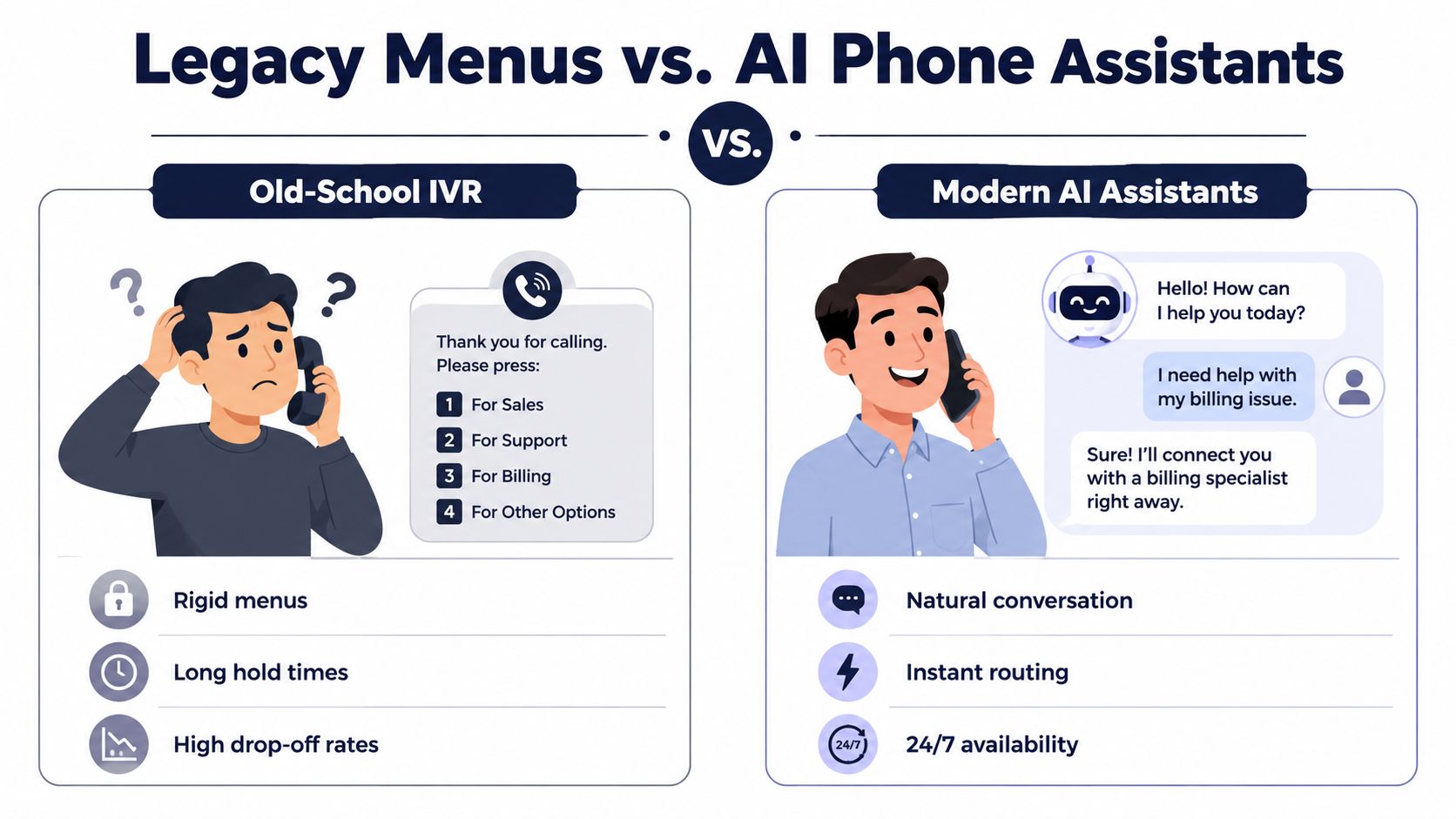
A traditional IVR starts with fixed options, such as sales, support, or accounts. That structure works when the menu is short and callers' needs fit its categories. It becomes frustrating when someone has two issues, uses unfamiliar wording, or cannot tell which department owns the problem. Deep menus expose the internal organisation instead of guiding the caller's actual request.
An AI phone assistant lets the caller explain the situation naturally. It identifies intent, asks relevant follow-up questions, and selects an answer, workflow, or transfer. Keypad fallback still matters in noisy environments, for callers with speech difficulties, and whenever speech recognition is unreliable.
Where fixed menus still work
A legacy menu remains practical when:
- The request is narrow: Callers need a known option, such as opening hours or a payment route.
- Reliability matters more than flexibility: Touch-tone input avoids recognition problems.
- The audience expects keypad navigation: Familiar paths reduce training and setup effort.
- A fallback is required: Callers can continue when language, noise, or accents affect recognition.
Keep the first choices focused on customer intent, not internal team names. A caller should not need to understand the company's structure to reach the right outcome.
Where AI adds practical value
AI suits calls where the situation needs explanation rather than category selection. It can collect a job description, ask follow-up questions, identify urgency or language, and pass a concise summary to the staff member receiving the call. That reduces repeated explanations without pretending that every decision should be automated.
A customer service analysis reports higher satisfaction and lower contact costs among organisations using conversational AI, including reported improvements in customer satisfaction and human-agent satisfaction, alongside a reported reduction in cost per contact. Those results support a hybrid operating model, not the removal of human judgement.
For a small business, the practical test is whether the assistant fits the existing workflow and protects caller information. Limit access to the personal data needed for the task, define retention rules, and configure consent and escalation processes to support GDPR obligations. A suitable system handles routine intake while staff keep control of decisions that require context, approval, or discretion.
Getting Started with AI Call Handling
You don't need a large IT department to start. The first deployment should solve one visible operational problem, such as missed appointment enquiries, after-hours calls, or repetitive questions that interrupt field work.
A practical setup usually follows three decisions.
Choose the first job to automate
Start with a task that is frequent, low-risk, and easy to judge. Appointment booking is often suitable if your availability is accurate. Basic service questions can work if the answers rarely change. Lead qualification is useful when callers need to provide a few details before someone calls back.
Don't begin with every possible workflow. A narrow first release gives you cleaner feedback and makes it easier to correct mistakes.
Connect the information source
The assistant needs current information. Connect the calendar used for appointments, the customer records used for follow-up, or the scheduling system used by your team. Define what the system may read, what it may change, and which actions require human approval.
Before launch, write down:
- Services offered: Include the names customers use, not only internal terminology.
- Coverage area: State where you work and how the system should handle out-of-area requests.
- Opening hours: Include holidays, emergency arrangements, and after-hours escalation.
- Human handoff rules: Identify calls that must reach a person.
- Message format: Decide what the staff member receives after each relevant call.
A concise summary is usually more useful than a full transcript. It can include the caller's contact details, intent, urgency, location, requested service, and agreed next step.
Test before you trust it
Call from different phones and speak naturally. Try background noise, short answers, unusual wording, interruptions, and callers who change their minds. Test every route that matters, including a direct path to a human and a safe response when the system doesn't understand.
The setup itself can be handled quickly, but operational readiness depends on testing and accurate business information, not just switching the phone line on. Start with inbound answering and booking, then add outbound reminders, advanced routing, or additional locations once the first workflow is stable.
For businesses wanting a managed option, rednea answers calls, detects the caller's language, handles routine questions, books appointments, and escalates important calls with summaries. It connects with calendars, scheduling tools, and CRMs, and its setup is designed for small businesses and tradespeople.
Language, Privacy, and Scaling Your System
A phone system can be technically efficient and still lose customers if it can't communicate clearly. Language support should be treated as part of service design, not as a decorative feature added after launch.
CSA Research surveyed 8,709 consumers across 29 countries and found that 75% were more likely to repurchase when customer care was delivered in their native language. The same research found that 60% preferred support in their own language even when they were confident in English. The CSA Research findings on multilingual customer service make the commercial implication clear: language detection can influence whether a caller continues with your business.
Build language handling into the first interaction
Ask callers to speak naturally, detect the language where possible, and provide a clear fallback if confidence is low. Keep translated service information aligned across languages. A wrong answer delivered fluently is still a wrong answer, so review pricing, coverage, appointment rules, and escalation wording for each supported language.
Multilingual support also needs practical testing. Use real terminology from your trade or profession, including local expressions, product names, addresses, and names that speech recognition may misread. Keep keypad input available when speech is unreliable.
Protect voice and customer data
AI call handling can involve recordings, transcripts, contact details, appointment information, CRM records, and potentially sensitive conversations. Privacy decisions must happen before deployment, especially in healthcare, legal, financial, and other regulated work.
Choose a provider that supports EU and UK GDPR requirements, explains where data is processed, limits retention, and provides a clear deletion process. The customer data protection guidance offers a useful framework for checking consent, access, storage, and deletion controls.
Use data minimisation as the operating rule:
- Collect only what the task needs: Don't ask for sensitive details to answer a basic question.
- Separate routine and sensitive routes: Send complex or confidential matters to trained staff.
- Control system access: Limit which records the assistant can retrieve or change.
- Document escalation: Make it clear when a human must take over.
- Test deletion and access requests: A policy isn't enough if the process can't be executed.
Voice biometrics is gaining adoption in banking and healthcare, but more personalisation creates more responsibility. Scaling from one phone line to several locations should preserve the same consent, retention, access, and audit rules rather than multiplying unmanaged data stores.
Start with one language, one workflow, and one clear privacy policy if that's what your team can manage well. Then expand only after the system handles real callers reliably and your staff know exactly when to trust automation and when to step in.
---
rednea gives small businesses and tradespeople a 24/7 AI phone assistant that answers callers, detects languages, handles routine questions, books appointments, and escalates important calls to humans with concise summaries. Visit rednea to see how you can start with one reliable call workflow and expand it as your business grows.
Try rednea, no strings attached
AI phone assistant for business. Hear a live demo in your browser, book a call with our team, or get started — from £90/month, cancel monthly, no minimum term.
GDPR-compliant · EU & UK GDPR · Multilingual